
AWS: Athena Configuration
How-to configure Athena for OpenTelemetry instrumentation collection
This guide contains instructions on how to configure Glue and Athena to ingest AI agent traces from a S3 bucket into a table that can be monitored by Monte Carlo.
This guide assumes you already have an Athena integration added to your Monte Carlo account. If not, please refer to this documentation on how to add an Athena integration to Monte Carlo.
Deploy Athena AWS Resources
Using CloudFormation
Monte Carlo offers a CloudFormation template to stand up the required Athena and Glue resources for Agent Observability. Click the link below to deploy this CloudFormation stack into your AWS account.
If you need to share with a colleague or first review the template you can download a copy here.
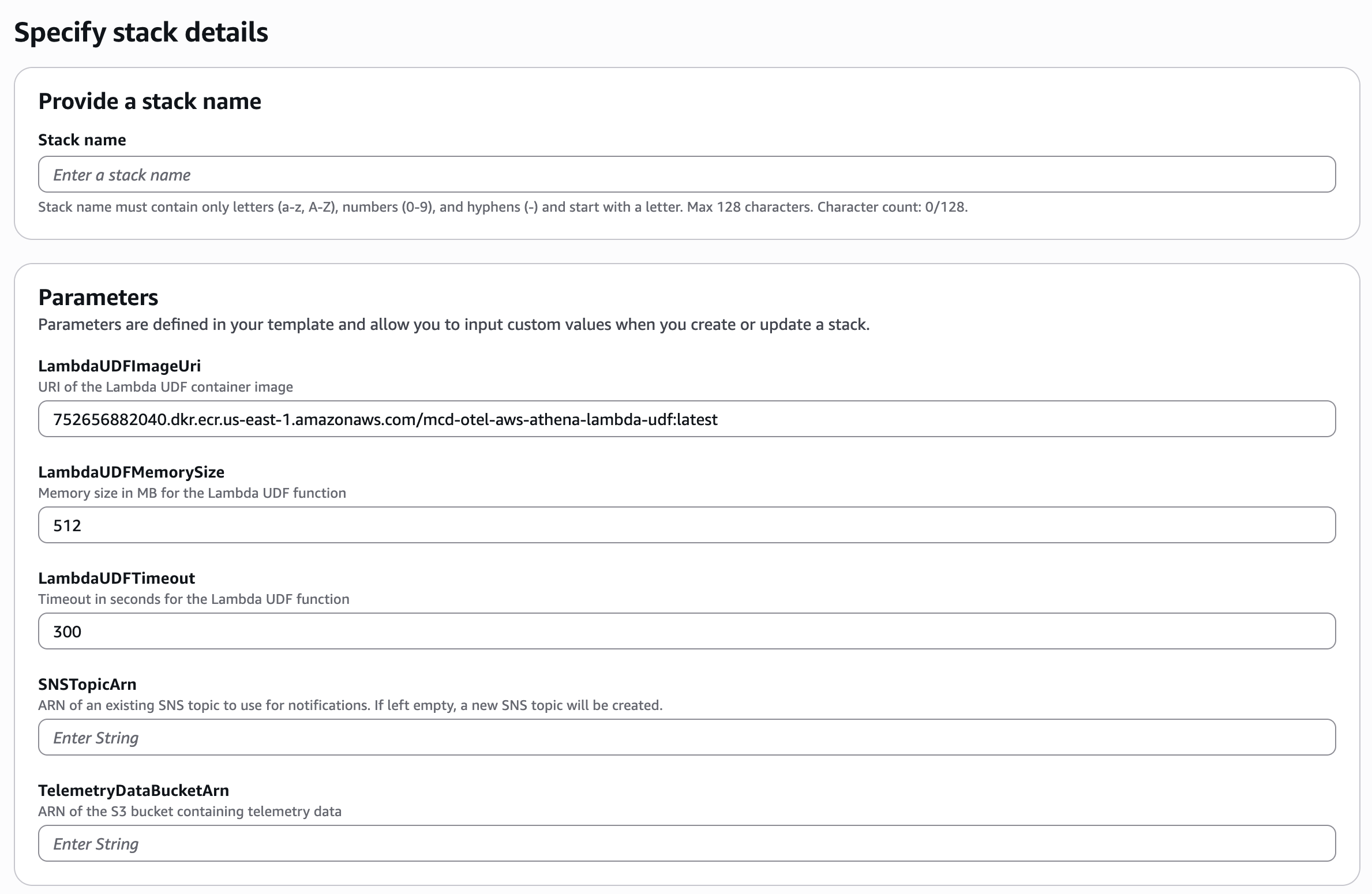
The only required parameters for this deployment is the TelemetryDataBucketArn parameter which is the ARN of a S3 bucket where the OpenTelemetry Collector will be writing your trace data. If you wish to use an existing SNS Topic you can optionally provide the ARN in the SNSTopicArn parameter. Otherwise, a new SNS Topic will be created if this field is left blank.
Using Terraform
As mentioned in the AWS: Terraform Deployment documentation, the Monte Carlo Otel Collector Terraform module provides a flag deploy_athena_resources which can be used to deploy the additional AWS resources required for Monte Carlo to monitor a Glue table via Athena. Make sure your Terraform deployment sets this flag to true. If not, update the value and refer to the deployment documentation for further instructions.
Refer to the FAQ below for more information on the additional resources required for Athena.
Monte Carlo provides a full example of this Terraform deployment here.
# Monte Carlo Agent Module
module "agent" {
  source  = "monte-carlo-data/mcd-agent/aws"
  version = "1.0.3"

  cloud_account_id  = var.cloud_account_id
  private_subnets   = var.existing_subnet_ids
  image             = var.agent_image_uri
  region            = var.region
  remote_upgradable = var.remote_upgradable
}

# OpenTelemetry Collector Module
module "opentelemetry_collector" {
  source  = "monte-carlo-data/otel-collector/aws"
  version = "0.4.3"

  deployment_name                                  = "Provide any name for the deployment"
  existing_vpc_id                                  = "Proivde a VPC ID from your AWS account"
  existing_subnet_ids                              = ["Provide at least two private subnet IDs from your AWS account"]
  existing_security_group_id                       = "(Optional, but recommended) Provide a Security Group ID allowing your AI agents to communicate with the OpenTelemetry Collector"
  telemetry_data_bucket_arn                        = module.agent.mcd_agent_storage_bucket_arn

  telemetry_data_bucket_notification_sns_topic_arn = "(Optional) Provide an existing SNS Topic producing S3 Bucket notifications. If not provided, one will be created."

  # set this flag to 'true' to deploy the neccesary AWS resources if you're using Glue & Athena as your warehous
  deploy_athena_resources                          = true
}
Update Athena Monte Carlo IAM role
The IAM role you created for the Monte Carlo Athena integration (see this documentation) needs to be expanded to include additional permissions for Athena to access the S3 bucket used to store OpenTelemetry traces and for Athena to have access to invoke the Lambda Bedrock UDF function.
Athena S3 Access IAM Policy
{
    "Version": "2012-10-17",
    "Statement": [
        {
            "Effect": "Allow",
            "Action": [
                "s3:ListBucket",
                "s3:GetBucketLocation"
            ],
            "Resource": [
                "arn:aws:s3:::<bucket_name>"
            ]
        },
        {
            "Effect": "Allow",
            "Action": "s3:GetObject",
            "Resource": [
                "arn:aws:s3:::<bucket_name>/*"
            ]
        }
    ]
}
Athena Lambda InvokeFunction IAM Policy
The Lambda mcd-agent-observability-bedrock-udf is deployed to your AWS account using via the Terraform module mentioned above. The Lambda's name cannot be changed.
{
    "Version": "2012-10-17",
    "Statement": [
        {
            "Effect": "Allow",
            "Action": "lambda:InvokeFunction",
            "Resource": "arn:aws:lambda:*:*:function:mcd-agent-observability-bedrock-udf"
        }
    ]
}
Congrats! You've now fully deployed the required AWS resources to ingest OpenTelemetry traces into your Athena warehouse. You can now follow these instructions to configure your AI Agents to send instrumentation to the newly deployed OpenTelemetry Collector.
FAQs
What additional AWS resources are deployed for Athena warehouse ingestion?
Monte Carlo supports monitoring a Glue table containing your AI Agent traces via an Athena integration. In order to write traces to a Glue table that is queryable from Athena, additional AWS resources must be deployed. If you're using Terraform, these additional resources can be deployed by setting variable deploy_athena_resources = true on the monte-carlo-data/otel-collector/aws Terraform module. If you're using CloudFormation you can deploy these same resources by using the additional CloudFormation stack template provided here.
Additional resources:
- S3 Resources:
- SQS Queue: Subscribes to the SNS topic to receive notifications when new data arrives
- SNS Topic: (Optional) Created automatically if not provided. Receives S3 event notifications
- S3 Bucket Notifications: (Optional) Created automatically if SNS topic is not provided. Configures S3 to publish events to the SNS topic
- Glue Resources:
- Glue Classifier: A grok classifier for parsing telemetry data
- IAM Role for Glue Crawler: Grants permissions to access S3, read from SQS, and use AWS Glue services
- AWS Glue Crawler: Automatically processes new telemetry data in S3 and creates/updates tables in the Glue Data Catalog
- Lambda Resources:
- Lambda UDF function: A lambda invokable from Athena to access Bedrock models for LLM evaluations
- IAM Role for Lambda UDF: Providing the lambda with access to Bedrock
To review the details of the additional Athena AWS resources, please review these resources:
- Terraform Athena Submodule
- Terraform Athena Example
- Lambda UDF source code
- CloudFormation Athena stack template
Why is the Lambda UDF function needed?
Unlike other warehouses, Athena does not natively provide access to LLMs in its query language. Monte Carlo uses LLMs for some validation functionality of our Agent Monitors. See the Agent Monitor documentation for more information. In order to access Bedrock LLMs, AWS requires a Lambda UDF be used to interface between Athena and Bedrock. When a Monte Carlo Agent Monitor executes, it will query your Glue table containing agent traces and will invoke this Lambda UDF as an External Function if it is necessary to perform validation. This Lambda UDF processes incoming requests, forwarding them to Bedrock, and returns the results to Athena. Monte Carlo specifically needs access to Claude Bedrock models as defined in the IAM policy here. The source code for this lambda can be found here.
How can I route traces from one agent to a different table in Glue?
If you have multiple agents send traces to the OpenTelemetry Collector and wish for one or more of these agents' traces to be written to a different Glue table, you can achieve this by creating additional Glue Crawlers in your AWS account.
First, you must set the service.name attribute in your OpenTelemetry traces to the name of your agent. In the montecarlo-opentelemetry Python lib, this is accomplished by providing the agent_name property to the mc.setup(...) method. The OpenTelemetry Collector will include the value of this attribute in the S3 file path of your trace data.
Next, you can configure your Glue Crawler to route files from this S3 bucket to different tables depending on their file path.
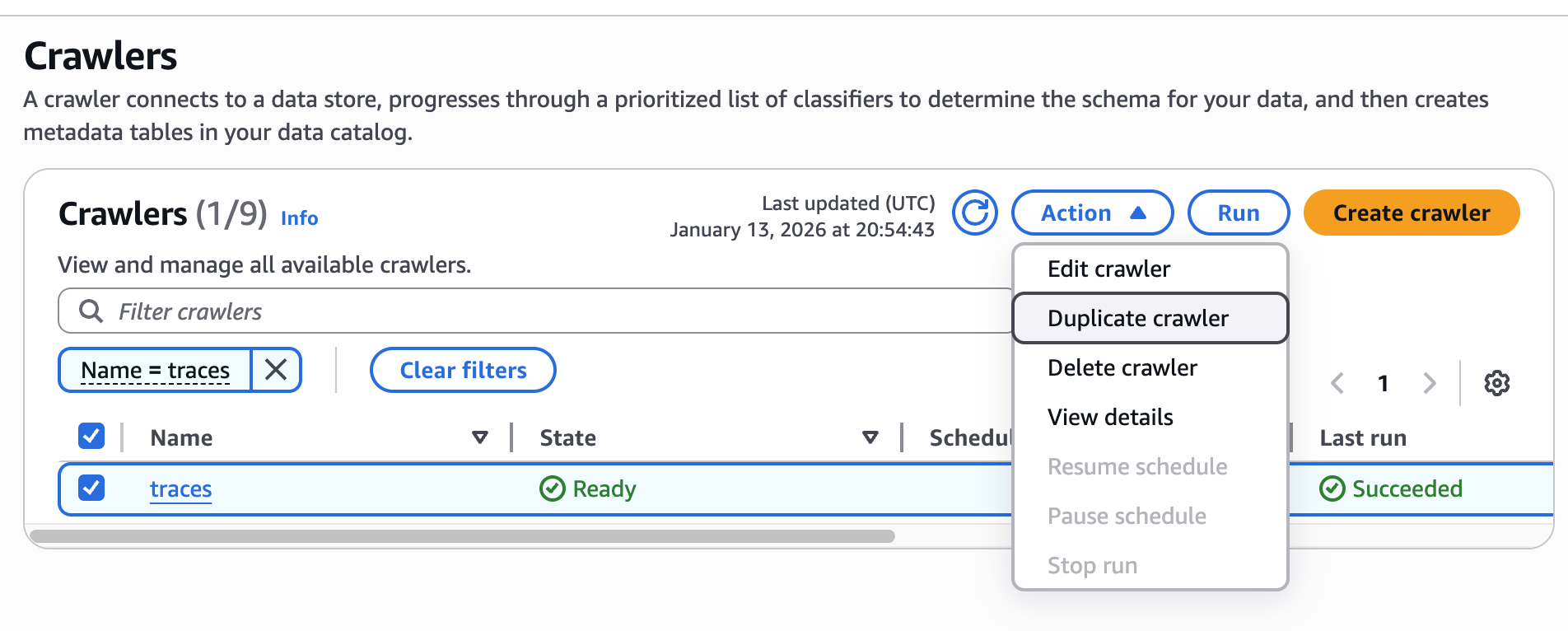
- Start by visiting the AWS Console Glue Crawler page and duplicating the Crawler created by the Monte Carlo Terraform deployment.
- Modify the newly created Crawler by giving it a name you'll recognize and by modifying the 'data source'. In the example below, the Crawler has been modified to only crawl sub-directories of the
my-agentdirectory.
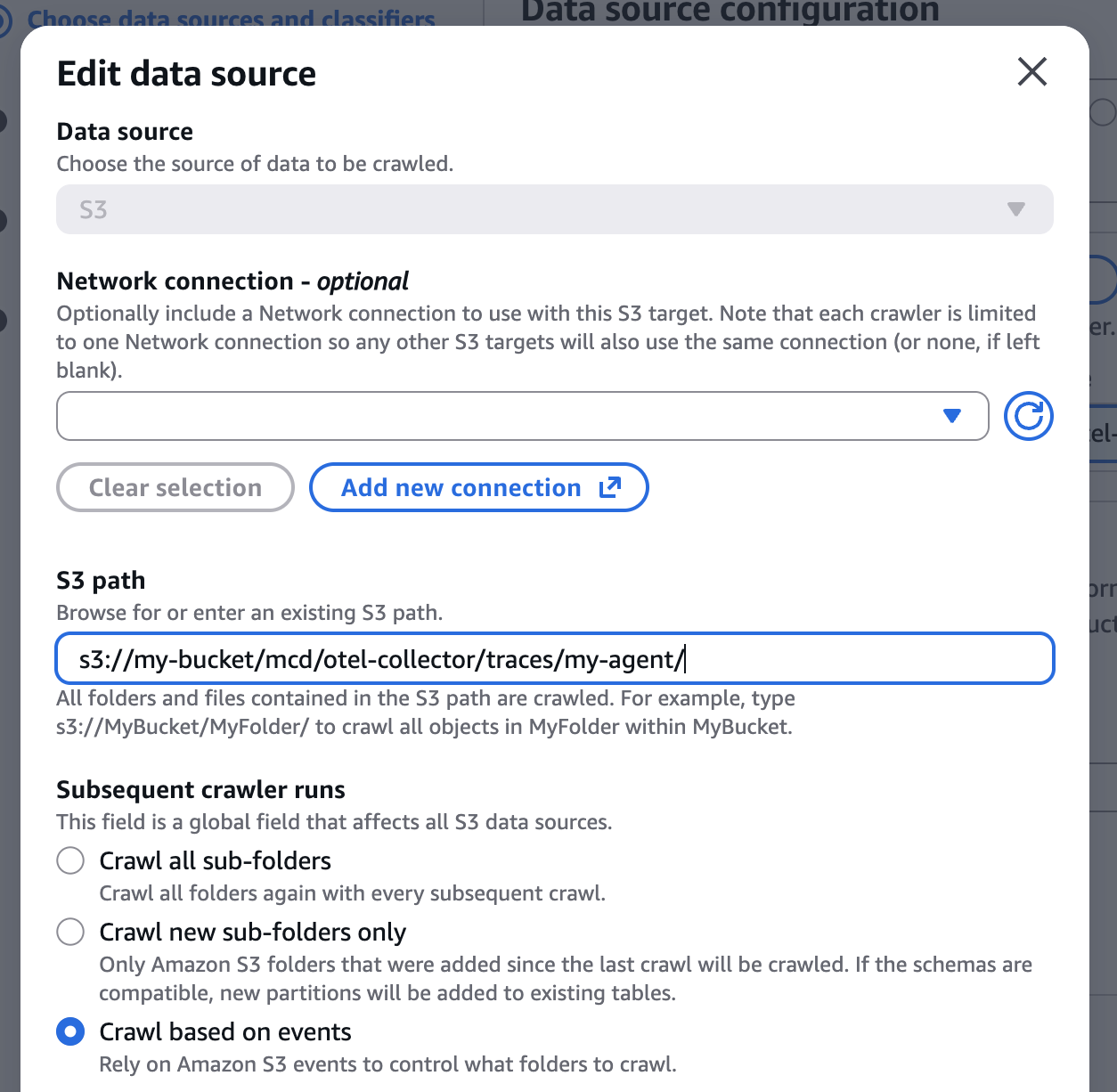
- Save changes to this crawler. It will now automatically write traces for your agent
my-agentto a Glue table calledmy_agent. - Modify the original Crawler to exclude the subdirectory
my-agent.
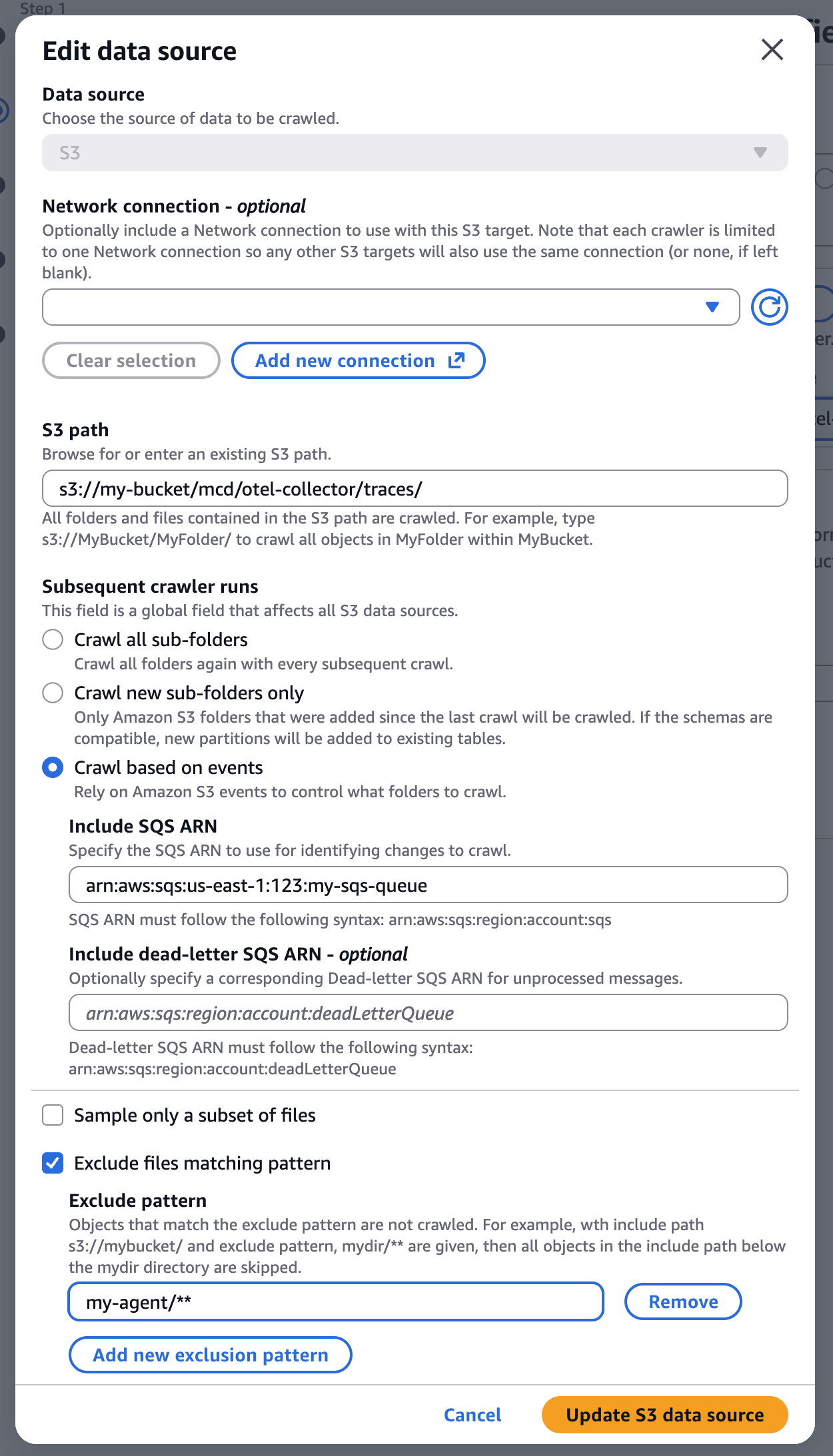
- Save changes to the original Crawler. It will not crawl all directories of your S3 bucket and continue to ingest traces for your remaining agents into the
tracestable. Traces from agentmy-agentwill not be written to thetracestable.
Updated about 1 month ago