
Troubleshooting
Bayes is Monte Carlo’s AI teammate. It observes your agents and the data that powers them, finds what breaks, proposes and verifies fixes, and gets better at your environment over time.
Bayes troubleshoots Monte Carlo alerts. It automatically works through 100s of hypotheses and highlights the ones most likely to have caused the issue. It considers changes in the data, system issues (e.g. Airflow or dbt failures) and code changes, and automatically traverses lineage to find the root cause.
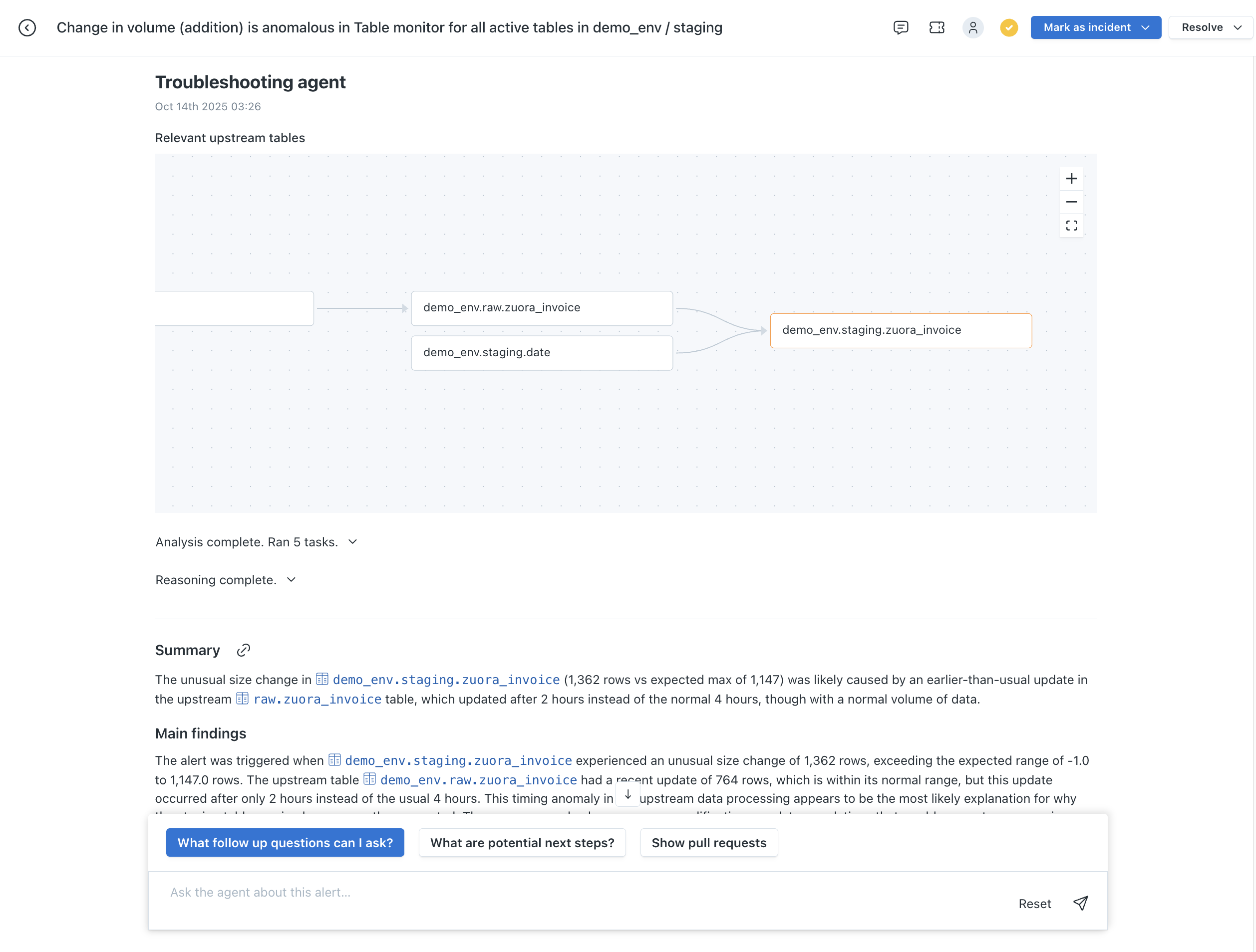
Bayes troubleshooting an alert
What Bayes knows
When Bayes troubleshoots an alert, it relies on the same metadata, query logs, and metrics collected from various integrations for monitoring to quickly rule out or further investigate many root-cause hypotheses. Bayes troubleshoots best on data warehouses and lakehouses with data sampling enabled, full lineage instrumentation, query history, and active integrations like GitHub, GitLab, dbt, Databricks Workflows, and Airflow.
You can also connect your own MCP servers so Bayes can check other systems, like an incident tracker, during an investigation. See Custom MCP servers. For example, Bayes can read your CloudWatch Logs to find why a job failed.
Investigations & hypotheses
Below are a few examples of investigation paths Bayes can follow.
| Type | Hypothesis investigated |
|---|---|
| Row count changes | Has there been similar row count changes upstream? |
| Query changes | Was there a query that usually runs that was modified? |
| Job failure | Has a dbt model, Databricks job, or Airflow DAG failed? |
| Failed queries | Did a query that usually runs fail/error? |
| Missing query | Is a query that usually runs missing in the logs? |
| Non-writing query | Is a query that usually writes or updates data writing zero updates? |
| Additional query | Did a query that hasn't been seen before run? |
| Validation failure | Has a validation on this asset recently failed? |
| Pull requests | Was there a recent pull request? |
| Data analysis | Are there underlying correlations in the data of affected records? (Currently only available for cloud Deployments) |
Starting troubleshooting
In the Monte Carlo UI
You can ask Bayes to troubleshoot from multiple surfaces:
- Alert detail page -- Troubleshooting is embedded directly in the alert page. Click Troubleshoot to start an investigation.
- Slack -- Click the Troubleshoot alert button on any Monte Carlo Slack alert notification. Bayes posts results in the alert thread with a link to open full findings in Monte Carlo.
- Bayes chat -- Ask Bayes to "troubleshoot this alert" in Bayes chat.
Via the Agent Toolkit (MCP)
The analyze-root-cause skill in the Agent Toolkit lets AI coding agents like Claude Code and Cursor ask Bayes to troubleshoot.
Instructions
You can give Bayes instructions for troubleshooting in Settings > AI Agents.
Usage restrictions
Go to Settings > Troubleshooting agent, under Agentic operations. Under Usage restrictions, choose:
- Unlimited (the default).
- Limited, with a maximum number of investigations per month. The first 3 investigations each month are included. The lowest limit you can set is 3.
The limit applies to the whole account. Monte Carlo counts one investigation per alert, when the investigation completes. Investigations count whether a user started them in Monte Carlo or Slack, or Monte Carlo started them automatically. Troubleshooting the same alert again does not count again. The count resets on the 1st of each month at 00:00 UTC.
When the account reaches its limit, Bayes stops troubleshooting for everyone until next month, including automatic runs. Users who can change the limit see a link to settings on the alert. Other users can click Request limit increase, which emails your Account Owners.
Auto-troubleshoot
With Auto-troubleshoot, Bayes automatically troubleshoots triaged alerts at or above the priority you choose: High priority alerts, High and medium priority alerts, or All triaged alerts. These investigations count toward the same monthly limit as the ones users start.
Who can change usage restrictions
Changing Usage restrictions or Auto-troubleshoot requires the settings/ai-agents/manage-usage permission. By default, only Account Owners have it.
Access control
Two different permissions apply to troubleshooting, and they are deliberately distinct:
- May run troubleshooting —
ai-agents/troubleshooting/access. Governs who can ask Bayes to troubleshoot alerts and view its analyses. Every built-in role grants it by default, including Viewers. Users without it see the Troubleshoot controls disabled and cannot view analyses. - May administer its settings —
settings/ai-agents/access(read) andsettings/ai-agents/edit(write). Govern who can open the troubleshooting settings and change settings that don't control whether or how much Bayes troubleshoots, such as its instructions. Changing usage restrictions and Auto-troubleshoot requiressettings/ai-agents/manage-usage, which by default only Account Owners have. This is separate from running troubleshooting: a user can run it without being able to reconfigure it, or vice versa.
To restrict troubleshooting — for example, to limit it to a specific team, to scope a team to only the alerts on the assets they own, or to control who may administer its settings — see Controlling access to the AI agents in the custom role recipes.
Preview caveats
During the preview phase, Bayes can't yet troubleshoot these monitor alert types:
- Comparison
- Merged alerts
FAQ
How do I restrict access to troubleshooting?
Running troubleshooting is controlled by the ai-agents/troubleshooting/access permission, which every built-in role grants by default (including Viewers). To take it away from a group of users — or limit it to a specific team — combine a custom role that denies the permission with your authorization groups. To control who may instead administer the troubleshooting settings in Settings > AI Agents, restrict the settings/ai-agents permissions — a separate lever. See Access control above, and the Controlling access to the AI agents recipe for the exact policy (deny both settings/ai-agents/access and settings/ai-agents/edit, not the wildcard).
Security & data privacy
For more detail on security and data privacy, see the AI Features and Technical Information documentation.
Feedback
Have feedback or requests on how Bayes troubleshoots? Reach out via in-app support.
Updated 4 days ago