
Configuring Data Sampling
About
Monte Carlo’s Data Sampling feature allows certain product workflows to retrieve a limited number of rows from your warehouse to provide richer context during investigation and alert triage. You can learn more about this in the Data Sampling docs.
Sampling can be controlled at multiple levels. You can enable or disable it for an entire warehouse integration, or use Data Sampling Exclusions to disable sampling for specific databases, schemas, tables, or tagged assets while keeping it enabled elsewhere.
For more advanced needs, the API also supports inclusion-based configurations, allowing you to explicitly define which assets are eligible for sampling.
Requirements
- Monte Carlo role: You must have the Account Owner role to modify sampling configuration.
Configuring data sampling with exclusion rules
This guide explains how to configure Data Sampling Exclusions for a warehouse integration. Exclusion rules allow you to disable sampling for specific databases, schemas, tables, or tagged assets while keeping sampling enabled at the integration level. For more advanced configurations, such as allowlisting specific assets for sampling, you can use the API. It is strongly recommended to review the FAQs before proceeding.
1. Select the integration
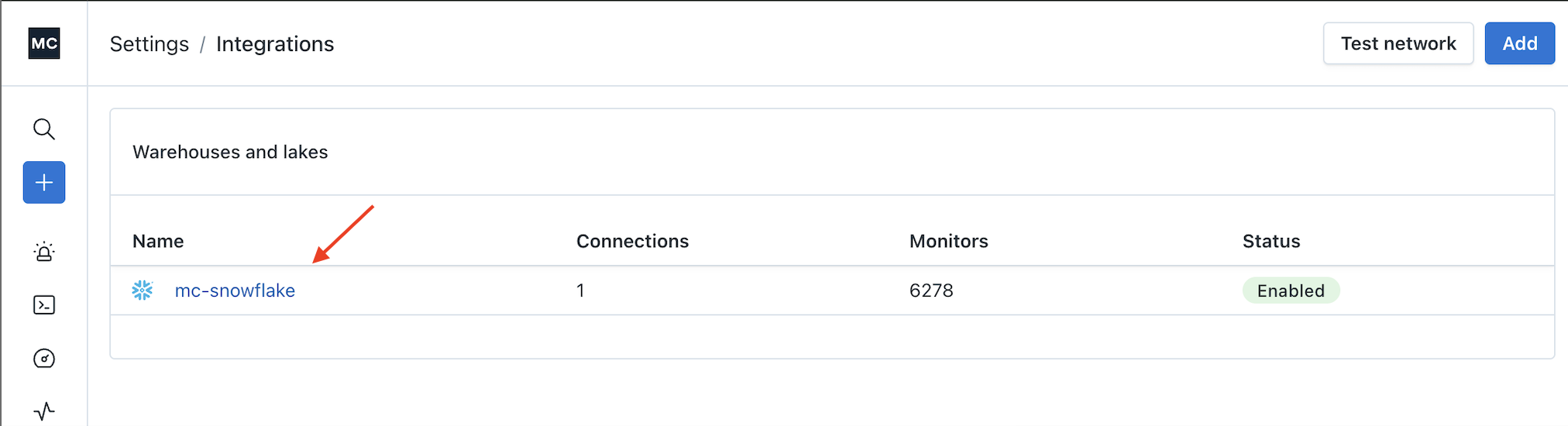
Navigate to Settings → Integrations, then select the warehouse integration you want to configure.
2. Open the Sampling settings
Within the integration, expand the Sampling section.
Data sampling is enabled by default for new integrations. From this section, you can disable sampling entirely for the integration using the toggle if desired.
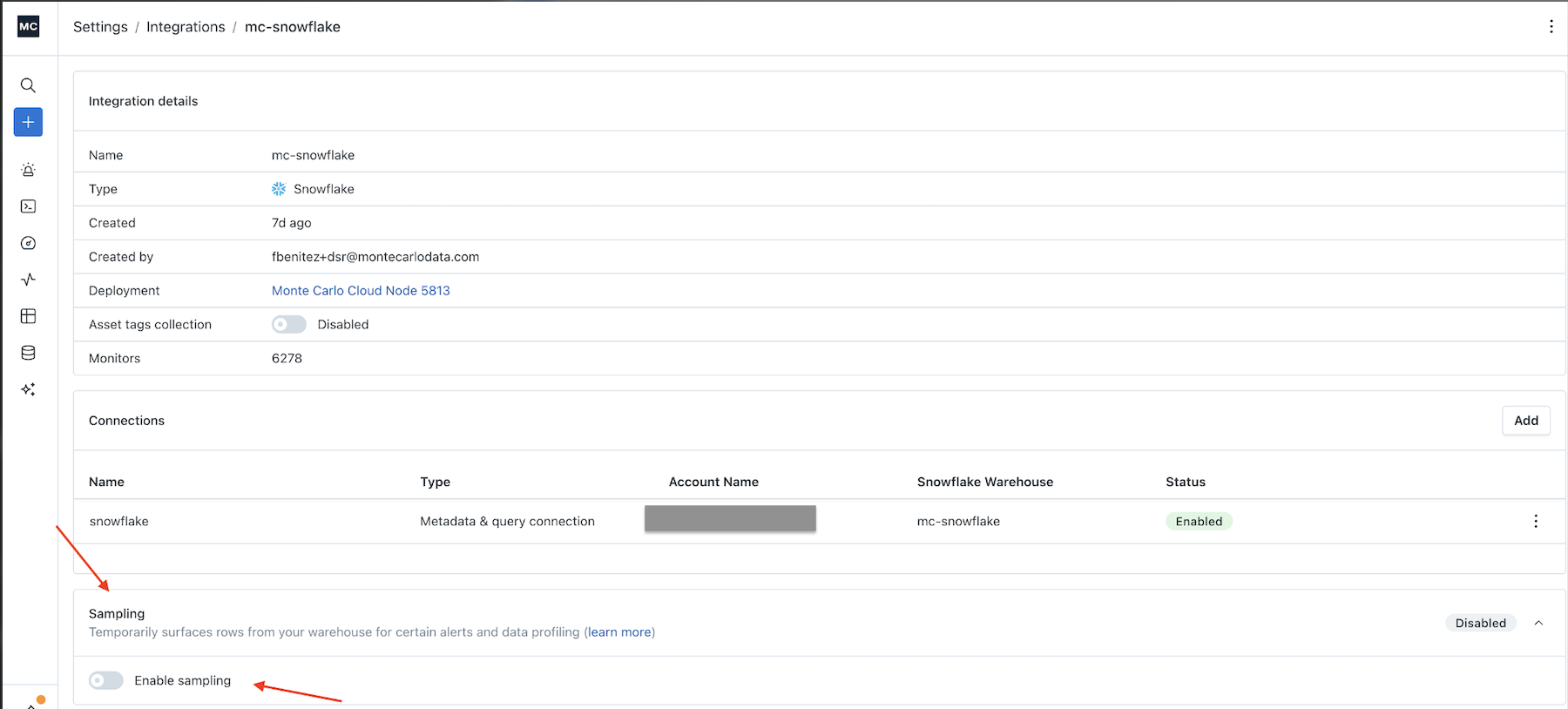
Monte Carlo UI Example
If sampling has been disabled and you would like to configure granular exclusions instead, re-enable it using the toggle.

Monte Carlo UI Example
Once sampling is enabled, you can define exclusions to prevent sampling on specific assets.
3. Configure exclusions
Click Add exclusion, then select the level at which you want to exclude sampling:
- Database
- Schema
- Table
- Tags
Any selected asset will be excluded from data sampling. After configuring your exclusions, click Save. A confirmation message will appear indicating that the exclusions were saved successfully
Features that rely on sampled data will not function for excluded assets. This includes RCA analysis, breached row inspection, and sampling-based context used by the Troubleshooting Agent
In the example below, sampling is disabled for:
- Database:
snowflake_sample_data - Schema:
TEST_SCHEMA.lower_1 - Tables:
analytics.prod_stage.accountsandanalytics.prod_stage.account_usage - Tag:
domain-mcsnowflake_data_sa-6370
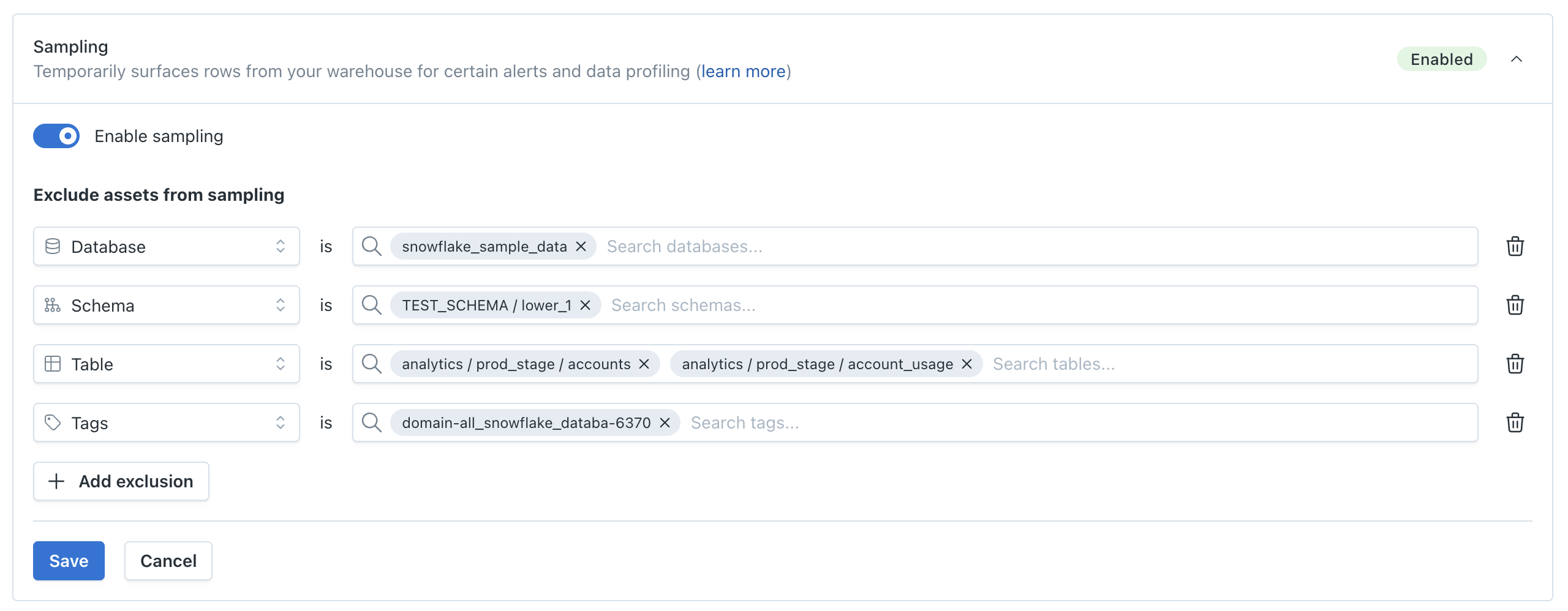
Monte Carlo UI Example
FAQs
Is sampling enabled by default?
Yes. Data sampling is enabled by default for new warehouse integrations.
You can disable sampling entirely at the integration level, configure granular exclusion rules (database, schema, table, or tag), or use API-based inclusion rules to explicitly allowlist specific assets. These configuration options are available after the first metadata job for the integration completes
How do I allowlist assets instead of excluding them?
The Monte Carlo UI supports configuring data sampling exclusions (a denylist approach).
If you want to explicitly define which assets are allowed for sampling (an allowlist approach), you must use the API.
Importantly, inclusion rules are not shown in the UI.
How can I use the API?
You can access the API through the API Explorer in the Monte Carlo UI. Learn more about the API Explorer here.
Alternatively, you can generate an API key and make API calls using tools such as cURL or Postman
Allowlisting can be configured via createOrUpdateDataSamplingRestrictions using:
assignments(MCONs for databases, schemas, or tables)tags(tag name/value allowlisting)
The flag: addNewDatabasesAutomatically is used to automatically apply the same data sampling restrictions to the new databases that are added to the Integration. By default this is set to true.
Example #1: Allowlisting databases, schemas, and tables
mutation createOrUpdateDataSamplingRestrictions(
  $warehouseUuid: UUID!
  $assignments: [String!]
  $excludedAssignments: [String]
  $excludedTags: [TagKeyValuePairInput]
  $tags: [TagKeyValuePairInput]
  $addNewDatabasesAutomatically: Boolean
) {
  createOrUpdateDataSamplingRestrictions(
    warehouseUuid: $warehouseUuid
    assignments: $assignments
    excludedAssignments: $excludedAssignments
    excludedTags: $excludedTags
    tags: $tags
    addNewDatabasesAutomatically: $addNewDatabasesAutomatically
  ) {
    success
  }
}
{
"warehouseUuid": "your-warehouse-uuid",
"assignments": [
"MCON++{ACCOUNT_ID}++{WAREHOUSE_ID}++project++database-1",
"MCON++{ACCOUNT_ID}++{WAREHOUSE_ID}++dataset++database-2::schema-1",
"MCON++{ACCOUNT_ID}++{WAREHOUSE_ID}++table++database-2::schema-1.table-1",
"MCON++{ACCOUNT_ID}++{WAREHOUSE_ID}++table++database-3::schema-2.table-2"
],
"addNewDatabasesAutomatically": true
}
{
  "data": {
    "createOrUpdateDataSamplingRestrictions": {
      "success": true,
      "__typename": "CreateOrUpdateDataSamplingRestrictions"
    }
  }
}
Example #2 Allowlisting by tags
mutation createOrUpdateDataSamplingRestrictions(
  $warehouseUuid: UUID!
  $assignments: [String!]
  $excludedAssignments: [String]
  $excludedTags: [TagKeyValuePairInput]
  $tags: [TagKeyValuePairInput]
  $addNewDatabasesAutomatically: Boolean
) {
  createOrUpdateDataSamplingRestrictions(
    warehouseUuid: $warehouseUuid
    assignments: $assignments
    excludedAssignments: $excludedAssignments
    excludedTags: $excludedTags
    tags: $tags
    addNewDatabasesAutomatically: $addNewDatabasesAutomatically
  ) {
    success
  }
}
{
"warehouseUuid": "your-warehouse-uuid",
"tags": [
{
"name": "tag-1",
"value": "value-1"
},
{
"name": "tag-2",
"value": "value-2"
}
],
"addNewDatabasesAutomatically": true
}
{
  "data": {
    "createOrUpdateDataSamplingRestrictions": {
      "success": true,
      "__typename": "CreateOrUpdateDataSamplingRestrictions"
    }
  }
}
Example #3: Allowlisting by assets and tags
Mutation
mutation createOrUpdateDataSamplingRestrictions(
  $warehouseUuid: UUID!
  $assignments: [String!]
  $excludedAssignments: [String]
  $excludedTags: [TagKeyValuePairInput]
  $tags: [TagKeyValuePairInput]
  $addNewDatabasesAutomatically: Boolean
) {
  createOrUpdateDataSamplingRestrictions(
    warehouseUuid: $warehouseUuid
    assignments: $assignments
    excludedAssignments: $excludedAssignments
    excludedTags: $excludedTags
    tags: $tags
    addNewDatabasesAutomatically: $addNewDatabasesAutomatically
  ) {
    success
  }
}
{
"warehouseUuid": "your-warehouse-uuid",
"assignments": [
"MCON++{ACCOUNT_ID}++{WAREHOUSE_ID}++project++database-1",
"MCON++{ACCOUNT_ID}++{WAREHOUSE_ID}++dataset++database-2::schema-1",
"MCON++{ACCOUNT_ID}++{WAREHOUSE_ID}++table++database-2::schema-1.table-1",
"MCON++{ACCOUNT_ID}++{WAREHOUSE_ID}++table++database-3::schema-2.table-2"
],
"tags": [
{
"name": "tag-1",
"value": "value-1"
},
{
"name": "tag-2",
"value": "value-2"
}
],
"addNewDatabasesAutomatically": true
}{
"data": {
"createOrUpdateDataSamplingRestrictions": {
"success": true,
"__typename": "CreateOrUpdateDataSamplingRestrictions"
}
}
}
How can I view the current inclusions and exclusions configured for data sampling?
You can retrieve the current data sampling configuration using the getDataSamplingRestrictions API.
This is useful to validate which assets are allowlisted (assignments, tags) and which ones are excluded (excludedAssignments, excludedTags).
Example:
query getDataSamplingRestrictions(
  $warehouseUuid: UUID!
) {
  getDataSamplingRestrictions(
    warehouseUuid: $warehouseUuid
  ) {
    assignments
    excludedAssignments
    tags {
      name
      value
    }
    excludedTags {
      name
      value
    }
    addNewDatabasesAutomatically
  }
}
{
"warehouseUuid": "your-warehouse-uuid"
}{
"data": {
"getDataSamplingRestrictions": {
"assignments": [
"MCON++{ACCOUNT_ID}++{WAREHOUSE_ID}++project++database-1",
"MCON++{ACCOUNT_ID}++{WAREHOUSE_ID}++dataset++database-2::schema-1",
"MCON++{ACCOUNT_ID}++{WAREHOUSE_ID}++table++database-2::schema-1.table-1",
"MCON++{ACCOUNT_ID}++{WAREHOUSE_ID}++table++database-3::schema-2.table-2"
],
"excludedAssignments": [
"MCON++{ACCOUNT_ID}++{WAREHOUSE_ID}++project++database-1"
],
"tags": [
{
"name": "tag-1",
"value": "value-1"
},
{
"name": "tag-2",
"value": "value-2"
}
],
"excludedTags": [
{
"name": "tag-3",
"value": "value-3"
}
],
"addNewDatabasesAutomatically": true
}
}
}What happens when new databases are added to an integration?
If sampling is enabled for the integration and no exclusions apply, Monte Carlo may sample data from assets in the new database.
If tag-based exclusions or other restrictions match assets in the new database, sampling will remain disabled for those assets.
If sampling restrictions were configured using the API, ensure the addNewDatabasesAutomatically flag is set to true (this is the default). When enabled, this flag automatically applies existing data sampling rules to newly added databases within the integration.
When using the API and no assignments are set, what data can be sampled for the integration?
If you configure sampling through the API and do not specify assignments, sampling is allowed for all databases, schemas, and tables in the integration, except those defined in excludedAssignments or excludedTags.
This is the default and expected behavior. If you want to restrict sampling to a specific set of assets, you can define assignments to allowlist those assets and optionally use excludedAssignments to further refine the configuration.
If data sampling is enabled for the integration and no exclusions apply, Monte Carlo may sample data from assets in the new database.
If tag-based exclusions or other configured restrictions match assets in the new database, sampling will remain disabled for those assets
What limitations exist when sampling is disabled for a warehouse or individual assets?
The following limitations apply when data sampling is disabled at the integration level or for specific assets through exclusion rules:
- Custom SQL monitors that define thresholds using values returned directly by the query are not supported if the query references assets excluded from sampling.
- SQL aggregation functions such as MAX(), MIN(), or similar are not considered data sampling. In these cases, raw values may still be returned and visible to users.
- To determine whether a query is eligible for sampling, Monte Carlo may parse the SQL query. This parsing is performed on a best-effort basis:
- If the query cannot be parsed, sampling will be denied.
- If the query references entities that are not ingested by Monte Carlo, sampling will also be denied.
- Sampling rules require metadata to be collected before they can be applied, so there may be a delay after an asset is first ingested.
For more details on data sampling and the features that are unavailable when it is disabled, refer to these docs.
Updated 3 months ago