
Network Access Control
Network Access Control Lists allow you to restrict access to Monte Carlo's API, web application, and certain endpoints by IP address. When configured, only requests originating from IP addresses in the allowlist are permitted for the specified scope. Allowlists can be managed directly in the web application under Settings → Network access controls, or programmatically via the GraphQL API.
Please note that this is different from the network controls and options used for data collection with most integrations, such as IP allowlisting, PrivateLink, and Agents/Data Stores.
See the networking documentation here for more details.
Scopes
Each Network Access Control List is associated with a scope that determines which endpoint it restricts. The following scopes are available:
| Category | Scope | Endpoint | Description |
|---|---|---|---|
| Agent | Agent | artemis.getmontecarlo.com | Restricts access to the Agent Service used by the Generic Agent |
| API | API | api.getmontecarlo.com | Restricts access to the Monte Carlo API |
| Airflow Callbacks | AirflowCallbacks | integrations.getmontecarlo.com/airflow/callbacks | Restricts access to the Airflow callback endpoint |
| Azure DevOps Webhook | AzureDevopsWebhook | integrations.getmontecarlo.com/gateway/azure-devops | Restricts access to the Azure DevOps webhook endpoint |
| Circuit Breaker | CircuitBreaker | integrations.getmontecarlo.com/checkpoint/circuit-breaker | Restricts access to the Circuit Breaker endpoint |
| Databricks Metadata | DatabricksMetadata | integrations.getmontecarlo.com/databrick/metadata | Restricts access to the Databricks metadata endpoint |
| Databricks Webhook | DatabricksWebhook | integrations.getmontecarlo.com/webhooks/databricks | Restricts access to the Databricks webhook endpoint |
| dbt Cloud Webhook | DbtCloudWebhook | integrations.getmontecarlo.com/webhooks/dbt-cloud | Restricts access to the dbt Cloud webhook endpoint |
| MCP | MCP | integrations.getmontecarlo.com/mcp/, mcp.getmontecarlo.com/mcp | Restricts access to the MCP Server endpoint |
| OpenTelemetry | OpenTelemetry | integrations.getmontecarlo.com/otel | Restricts access to the OpenTelemetry collector endpoint |
| Push Ingest API v1 | Ingestion | integrations.getmontecarlo.com/ingest/v1/ | Restricts access to the Push Ingest API endpoint |
| Redeem Codes | RedeemCodes | graphql.getmontecarlo.com/sso/recovery/redeem | Restricts access to the SSO recovery code redemption endpoint |
| SCIM v2 | SCIM_v2 | integrations.getmontecarlo.com/scim/v2/ | Restricts access to the SCIM provisioning endpoint |
| UI | UI | Monte Carlo web application | Restricts access to the Monte Carlo web application based on source IP address |
| Global | Global | All of the above | Restricts all scopes listed above |
Network Access Control is supported on both global and regional endpoints — for example,
api.getmontecarlo.comandapi.eu1.getmontecarlo.com.
UI scope
The UI scope restricts access to the Monte Carlo web application based on the user's source IP address. When enabled, IP address validation is performed at login time and on subsequent requests. Users outside the allowlist will not be able to complete loading the application.
ImportantThe
UIscope does not preventgetmontecarlo.comfrom loading in the browser or block the login page from appearing. After a user authenticates, Monte Carlo validates the source IP address against the allowlist. If the address is not allowed, the application will not finish loading and the user will see an error message on the login page indicating that their IP address is not allowed.
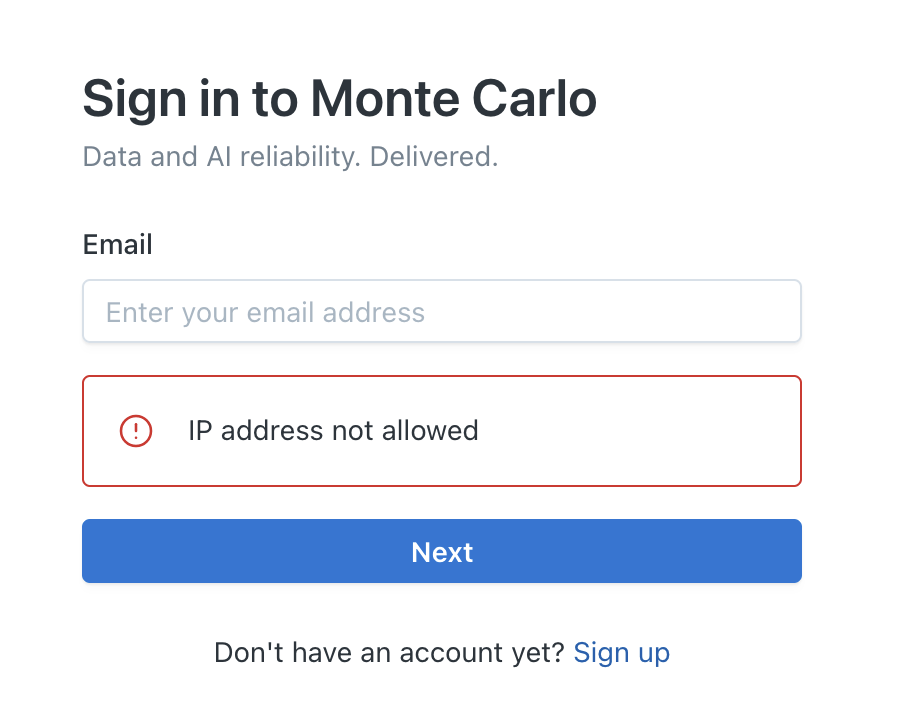
Error displayed when a user's IP address is not in the allowlist
Scope precedence
When a request is received, Monte Carlo first checks for a scope-specific access control list. If no scope-specific rule exists for that endpoint, it falls back to the Global configuration. This means a scope-specific rule takes precedence over the global rule.
Global scopeSetting a Network Access Control List on the
Globalscope restricts all endpoints listed above. If you set a global restriction, only IP addresses in the global allowlist will be able to access any scope that does not have its own scope-specific rule.
Managing access controls in Settings
Network access controls are managed in the Monte Carlo web application under Settings → Network access controls. The page shows one row per configured scope with the endpoint it protects and its allowed IP addresses.
Viewing the page requires the
settings/network/accesspermission; adding, editing, or deleting allowlists requiressettings/network/edit. The same permissions apply to the API operations described further down.
Setting up an allowlist
-
Go to Settings → Network access controls and select Add.
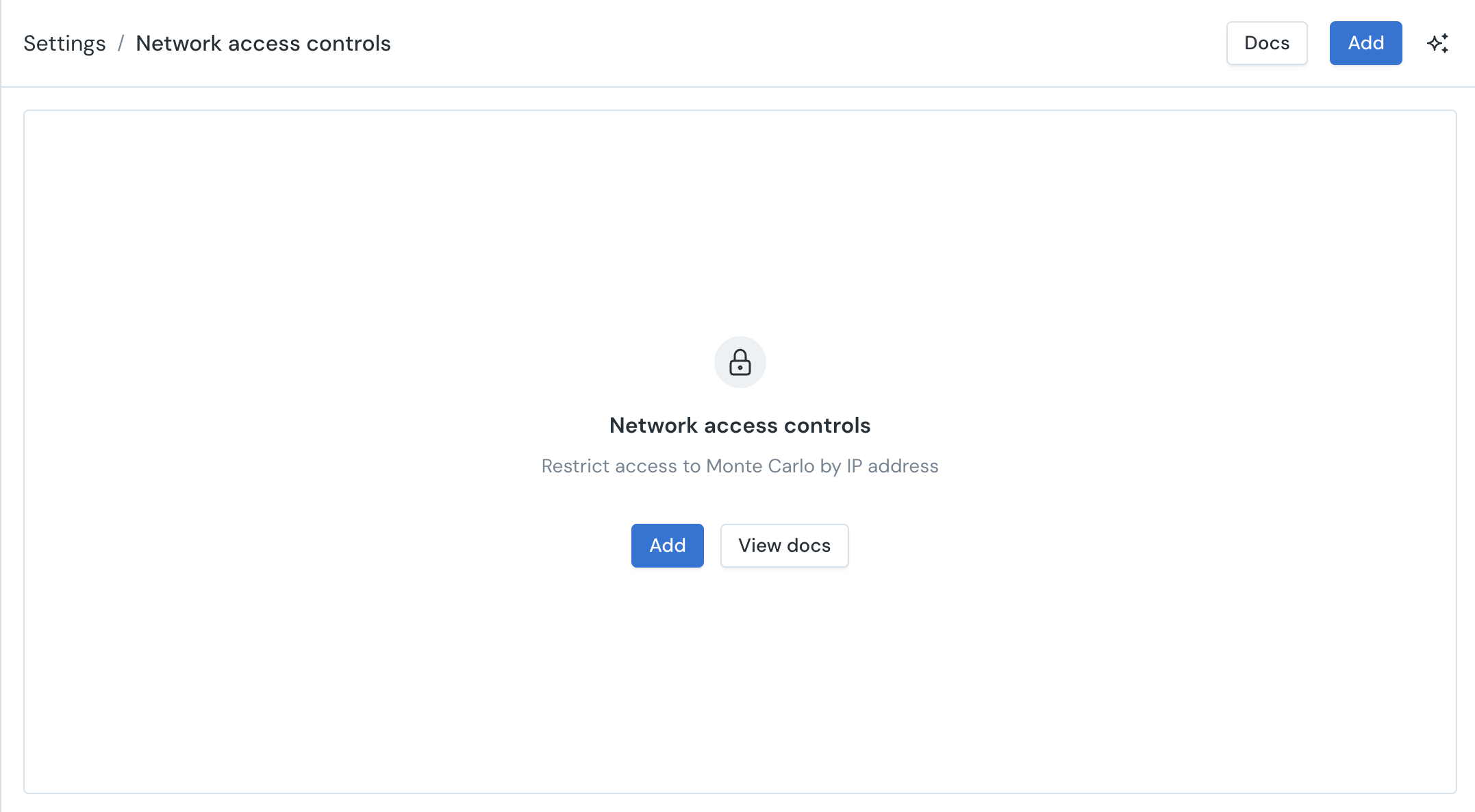
-
Choose the scope to restrict. The selector shows the endpoint each scope protects. Scopes that already have an allowlist are disabled here — edit them from the list page instead.
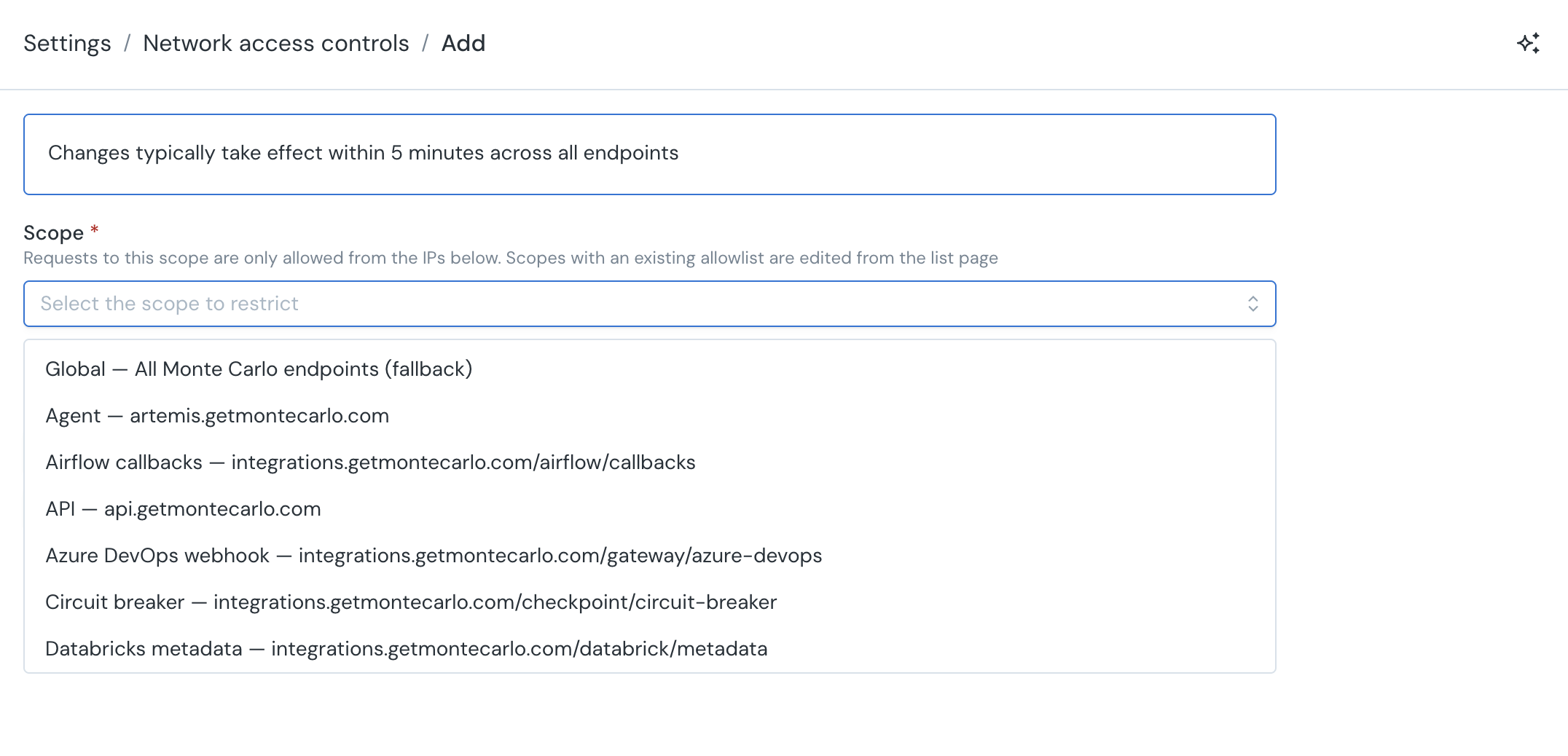
-
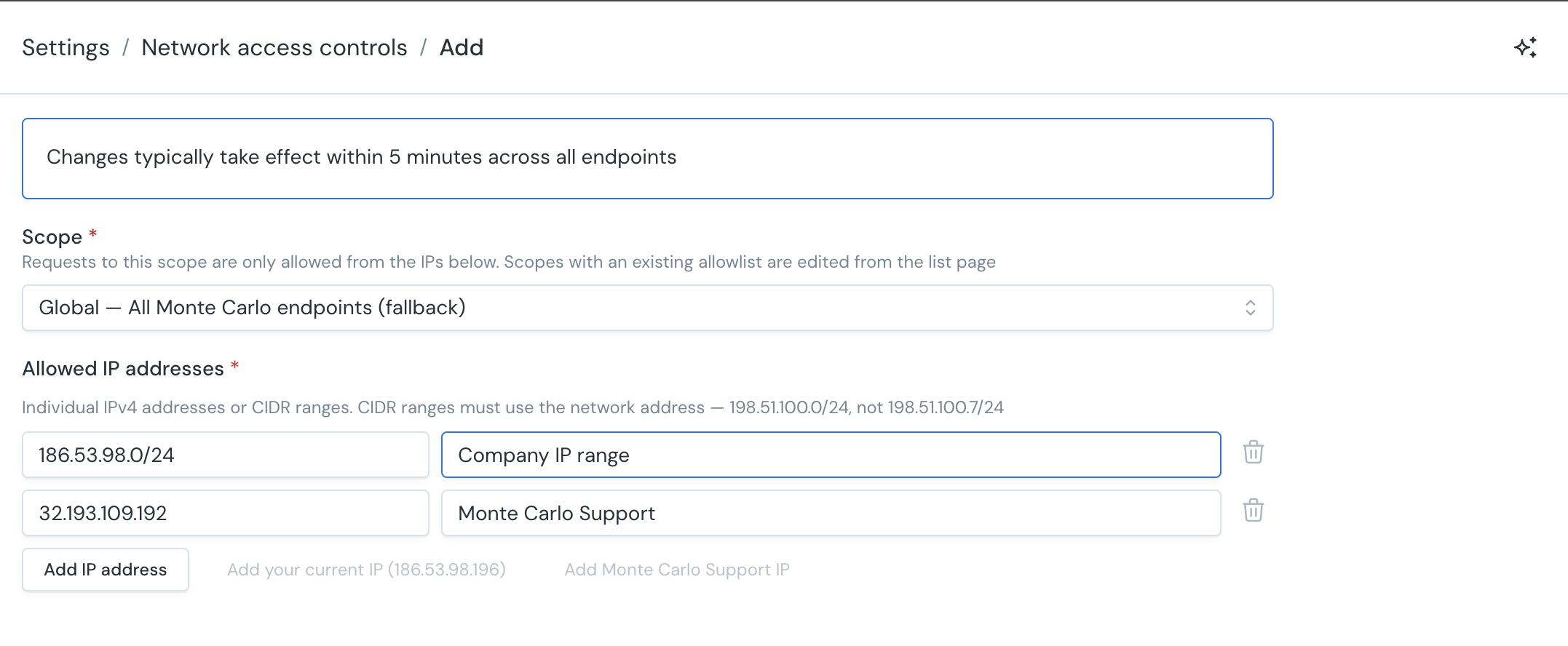
Enter the allowed IP addresses or CIDR ranges, each with an optional description (for example "Office VPN"). Use Add your current IP to include the address Monte Carlo currently sees for your session.
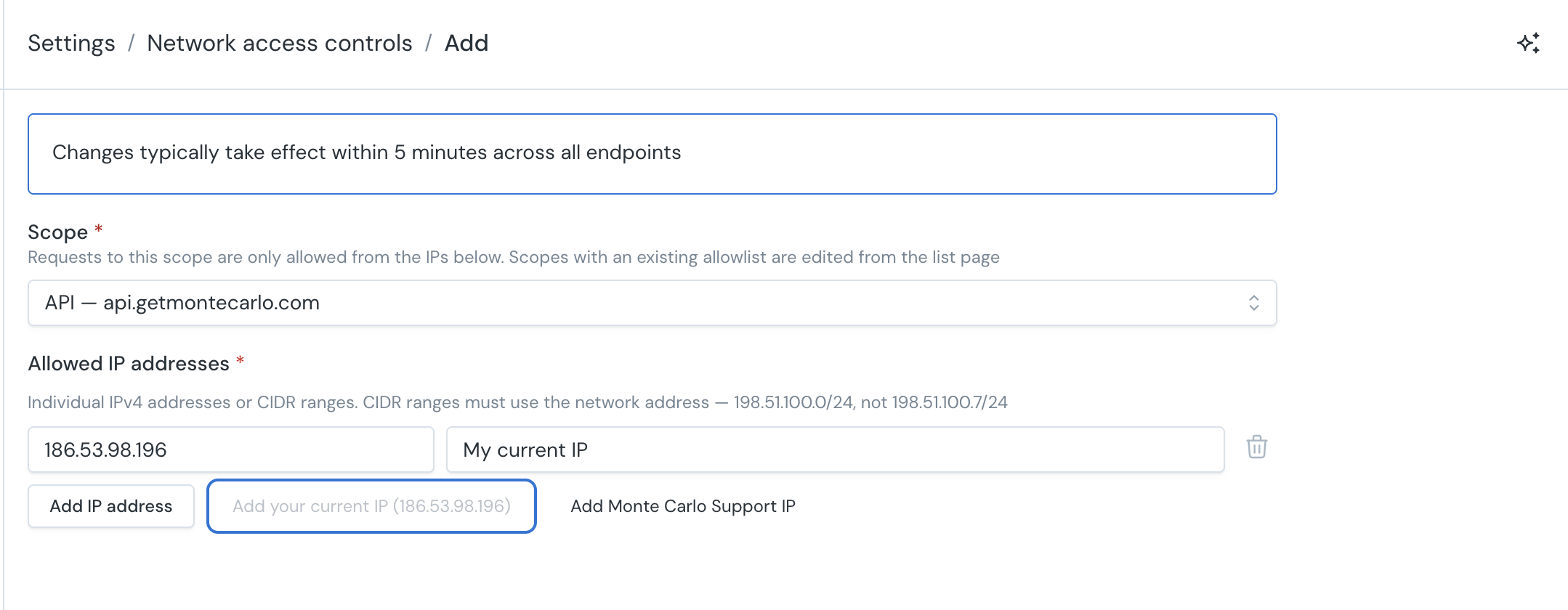
-
If you are configuring the
UIorGlobalscope and the entries may not cover your current IP address, Monte Carlo shows a warning and requires an explicit acknowledgement before you can save — see Lockout protection for the UI and Global scopes. You can select "Add Monte Carlo Support IP" to include the IP support will use to connect and avoid the Monte Carlo support lock out.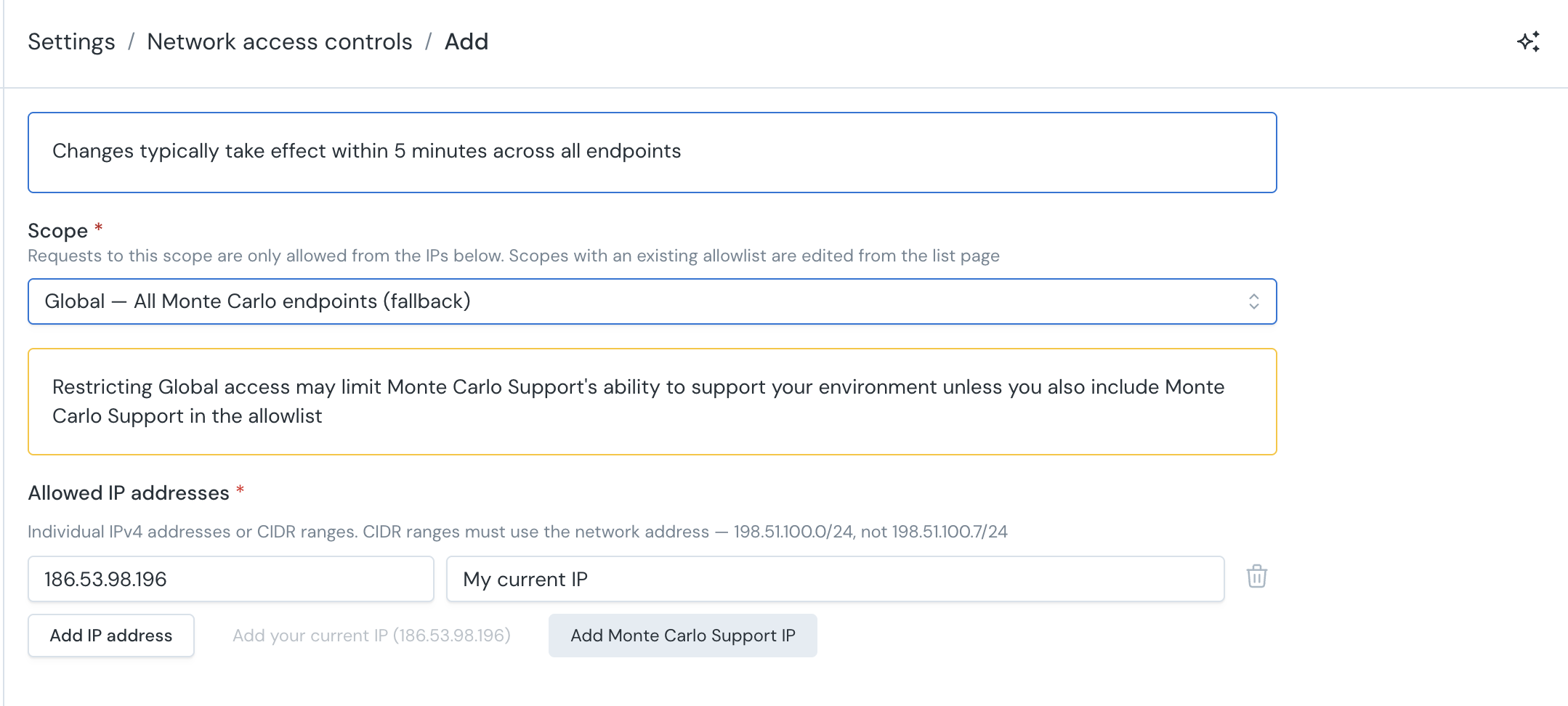
-
Select Add. Changes typically take effect within 5 minutes across all endpoints. (When editing an existing allowlist, the button is labeled Update.)
Entries are validated before saving: values must be individual IPv4 addresses or CIDR ranges that use the network address (for example 198.51.100.0/24, not 198.51.100.7/24), with no duplicates and at least one entry per allowlist. Ranges that would allow any IP address (0.0.0.0/0) are rejected — delete the allowlist instead of adding one.
Editing an allowlist
Open the row's menu on the list page and select Edit. The form loads the scope's complete allowlist, so you can add or remove individual entries without re-entering the addresses you want to keep. The scope itself cannot be changed.
Deleting an allowlist
Open the row's menu and select Delete. What happens next depends on the scope:
- Deleting a scope-specific allowlist makes that scope fall back to the
Globalallowlist, if one exists. If there is noGlobalallowlist, the scope becomes accessible from any IP address. - Deleting the
Globalallowlist opens up every scope that does not have its own allowlist.
The confirmation dialog explains which of these applies before you confirm.
Lockout protection for the UI and Global scopes
The UI and Global scopes deserve extra care. A UI allowlist that does not include your own network blocks you from the web application — and because Global is the fallback for every scope, a Global allowlist affects the web application too, along with every endpoint that does not have its own scope-specific list.
When you save a UI or Global allowlist in Settings, Monte Carlo compares the entries against your current IP address:
- If no entry covers your current IP address, a warning explains that saving will block your own access within about 5 minutes, and you must check I understand that I may lose access to Monte Carlo before saving.
- Selecting Add your current IP adds the address Monte Carlo sees for your session and clears the warning.
Before saving a UI or Global allowlist, we recommend that you:
- Include your own current IP address, or a range that covers it.
- Include every network your team signs in from — office ranges, VPN egress addresses, and home networks for remote users.
- Include Monte Carlo Support's egress IP address (
32.193.109.192) — see the note below. - For
Global, also include the egress addresses of systems that call Monte Carlo's endpoints (for example CI/CD pipelines using the API, Airflow callbacks, webhook senders, and self-hosted agents) — or configure scope-specific allowlists for those endpoints so they do not inherit theGlobalrestriction. - Verify access from an allowed network once the change propagates (about 5 minutes).
Monte Carlo Support accessRestricting the
UIorGlobalscope also applies to Monte Carlo's support team: if the allowlist does not include Monte Carlo Support's egress IP address (32.193.109.192), Monte Carlo Support will not be able to access your environment to help you — including during a lockout. We recommend keeping this address in anyUIorGlobalallowlist.
If you are using the Monte Carlo UI there is a button "Add Monte Carlo Support IP" that you can use to add the Monte Carlo IP.
If you do lock yourself out, see What happens if I set a restriction that excludes my current IP address? in the FAQs.
Managing with the API
How Can I Use the API?
You can access the API through the API Explorer in the Monte Carlo UI. Learn more about the API Explorer here.
Alternatively, you can generate an API key and make API calls using tools such as cURL or Postman
Listing Network Access Control Lists
Use the getNetworkAccessControlLists query to retrieve all configured restrictions and their allowed IP addresses.
query GetNetworkAccessControlLists {
  getNetworkAccessControlLists {
    scope
    allowedIps {
      value
      description
    }
  }
}
{
"data": {
"getNetworkAccessControlLists": [
{
"scope": "API",
"allowedIps": [
{
"value": "203.0.113.10",
"description": "Office VPN"
},
{
"value": "198.51.100.0/24",
"description": "CI/CD pipeline"
}
]
}
]
}
}Creating or updating a restriction
Use the saveNetworkAccessControl mutation to create a new restriction or update an existing one for a given scope.
Replace behaviorThe
saveNetworkAccessControlmutation replaces the entire allowlist for the specified scope. If you want to add a new IP address to an existing list, you must include all previously allowed IP addresses in theallowedIpsarray along with the new one. (The Edit form in Settings handles this for you.)
If you save a restriction on the
APIor an integration scope that excludes your current IP address, you can still log into the Monte Carlo web application and use the API Explorer to update or remove the restriction — unless theUIorGlobalscope also blocks your IP address.
mutation SaveNetworkAccessControl {
  saveNetworkAccessControl(
    scope: API
    allowedIps: [
      { value: "203.0.113.10", description: "Office VPN" },
      { value: "198.51.100.0/24", description: "CI/CD pipeline" }
    ]
  ) {
    saved
  }
}
{
"data": {
"saveNetworkAccessControl": {
"saved": true
}
}
}Parameters:
scope(required) — One of the scope values from the table above.allowedIps(required) — Array of IP address entries:value(required) — An IP address or CIDR range (e.g.,203.0.113.10or198.51.100.0/24). CIDR ranges must use the network address (198.51.100.0/24, not198.51.100.7/24).description(optional) — A human-readable label for the IP address entry.
Validate values carefullyWhen saving via the API, take care to submit well-formed values. A malformed entry — for example a CIDR range that does not use the network address — can prevent the allowlist from being enforced as intended. The Settings screen validates entries before saving.
Deleting a restriction
Use the deleteNetworkAccessControl mutation to remove the entire allowlist for a scope. The scope then falls back to the Global allowlist, if one exists; if there is no Global allowlist, the endpoint becomes accessible from any IP address.
mutation DeleteNetworkAccessControl {
  deleteNetworkAccessControl(scope: API) {
    deleted
  }
}
{
"data": {
"deleteNetworkAccessControl": {
"deleted": true
}
}
}Parameters:
scope(required) — The scope to remove the restriction from.
Examples
Restricting API access to office IP addresses
To restrict API access so only your office network can make API calls:
Step 1: Save the restriction with your office IP addresses.
mutation SaveNetworkAccessControl {
  saveNetworkAccessControl(
    scope: API
    allowedIps: [
      { value: "203.0.113.10", description: "Office - Main" },
      { value: "203.0.113.11", description: "Office - Backup" }
    ]
  ) {
    saved
  }
}
Step 2: Verify the restriction is in place.
query GetNetworkAccessControlLists {
  getNetworkAccessControlLists {
    scope
    allowedIps {
      value
      description
    }
  }
}
Restricting a single integration
To restrict only the Circuit Breaker endpoint to requests from a specific Airflow instance:
mutation SaveNetworkAccessControl {
  saveNetworkAccessControl(
    scope: CircuitBreaker
    allowedIps: [
      { value: "10.0.1.50", description: "Airflow production instance" }
    ]
  ) {
    saved
  }
}
This does not affect access to other endpoints like the API or other integrations.
Restricting UI access to corporate network
To restrict Monte Carlo web application access to your corporate network:
mutation SaveNetworkAccessControl {
  saveNetworkAccessControl(
    scope: UI
    allowedIps: [
      { value: "203.0.113.0/24", description: "Corporate network" },
      { value: "198.51.100.0/24", description: "VPN egress" }
    ]
  ) {
    saved
  }
}
Users outside these IP address ranges will still see the Monte Carlo login page, but after authenticating, the application will not finish loading and they will see an error message indicating their IP address is not allowed.
Setting a global restriction
To restrict all endpoints at once using the Global scope:
mutation SaveNetworkAccessControl {
  saveNetworkAccessControl(
    scope: Global
    allowedIps: [
      { value: "203.0.113.0/24", description: "Corporate network" }
    ]
  ) {
    saved
  }
}
With this in place, any scope that does not have its own scope-specific rule will only accept requests from the corporate network. If you later add a scope-specific rule (e.g., for CircuitBreaker), that scope will use its own allowlist instead of the global one.
To remove the global restriction:
mutation DeleteNetworkAccessControl {
  deleteNetworkAccessControl(scope: Global) {
    deleted
  }
}
FAQs
Who can view or manage network access controls?
Viewing Settings → Network access controls requires the settings/network/access permission, and making changes (add, edit, delete) requires settings/network/edit. The API operations enforce the same permissions. Contact your account administrator if you need access.
Are controls on a per–Monte Carlo account (workspace) basis?
Yes. Controls are applied per Monte Carlo account (workspace). If you have multiple accounts, you can manage controls independently for each one.
How long does it take for changes to apply?
Updates to allowlists typically take effect within a few minutes, generally within 5 minutes. In some cases, propagation may take slightly longer due to caching or network distribution delays.
What is the behavior if there are no network rules or access controls set?
If no IP addresses are explicitly allowlisted, access is permitted from any IP address.
Authentication (for example, token verification) is still always enforced, and all traffic is transmitted over HTTPS.
What IP address format is supported?
Both individual IPv4 addresses (e.g., 203.0.113.10) and IPv4 CIDR notation (e.g., 198.51.100.0/24) are supported. CIDR ranges must use the network address of the range — 198.51.100.0/24 is valid, 198.51.100.7/24 is not.
What happens if I set a restriction that excludes my current IP address?
When you configure the UI or Global scope in Settings → Network access controls, Monte Carlo warns you if the allowlist does not cover your current IP address and requires an explicit acknowledgement before saving, so this should not happen by accident.
If the restriction is on the API or an integration scope, you will not be fully locked out — you can still log into the Monte Carlo web application and use the API Explorer to update or remove the restriction.
If the restriction is on the UI scope only and excludes your IP address, you will not be able to use the web application — but the API is not restricted by the UI scope, so you can use the Monte Carlo CLI or direct API calls to update or remove the restriction (unless the API scope has its own allowlist). If the restriction is on the Global scope, those calls must come from an IP address in the allowlist.
Does restricting the UI or Global scope affect Monte Carlo Support?
Yes. Monte Carlo Support accesses your environment through the web application, so a UI or Global allowlist that does not include Monte Carlo Support's egress IP address (32.193.109.192) also locks out the support team. Include that address in the allowlist to preserve Monte Carlo's ability to support your environment.
Will a Global allowlist affect my integrations?
Yes. The Global allowlist applies to every scope that does not have its own scope-specific list — including integration endpoints such as Airflow callbacks, webhooks, the Push Ingest API, and self-hosted agents. Before saving a Global allowlist, include the egress addresses of any systems that call Monte Carlo's endpoints, or configure scope-specific allowlists for those endpoints so they do not inherit the Global restriction.
How does the global scope interact with scope-specific restrictions?
Monte Carlo checks for a scope-specific rule first. If one exists, it is used. If no scope-specific rule is found, the global rule is checked. This means scope-specific rules take precedence over the global rule.
The Global scope is used as a fallback when no scope-specific rule exists.
Does this affect the Monte Carlo UI?
Yes, when the UI scope (or Global scope) is configured. The UI scope validates the user's source IP address at login time and on subsequent requests. Users outside the allowlist will see the login page but will not be able to complete loading the application after authenticating — an error message will be displayed indicating that their IP address is not allowed.
Other scopes (API, integration-specific scopes) do not affect the web application UI.
Alternatively, you can restrict UI access by configuring IP address restrictions directly in your SSO identity provider.
How do I add a new IP address to an existing restriction without removing the old ones?
In Settings → Network access controls, open the scope's menu and select Edit — the form loads the complete allowlist, so add the new entry and save.
Via the API: first query the current list using getNetworkAccessControlLists to get all existing IP addresses for the scope, then call saveNetworkAccessControl with the full list of IP addresses (existing plus new). The save operation replaces the entire list, so you must include all IP addresses you want to keep.
API documentation
Detailed documentation for these operations is available in our API documentation:
Updated 14 days ago