
Azure Synapse (Dedicated SQL Pool) External Tables
Overview
Azure Dedicated SQL Pool is the data warehouse engine within Azure Synapse Analytics. Azure Synapse is the broader analytics service that brings together data warehousing, big data analytics, data integration, and orchestration under a single workspace. When you create a Dedicated SQL Pool, it runs inside a Synapse workspace and is managed, secured, and accessed through Synapse.
From a functional perspective, Dedicated SQL Pool is the successor to Azure SQL Data Warehouse and provides massively parallel processing (MPP) for analytical workloads. Features such as external tables, PolyBase, and access to Azure Blob Storage and Azure Data Lake Storage Gen2 are capabilities of the Dedicated SQL Pool engine, even though they are configured and operated through Azure Synapse.
In practice, this means that when documentation refers to Azure Dedicated SQL Pool external tables, it is referring to external tables created and queried within a Synapse-managed Dedicated SQL Pool.
Create Dedicated SQL Pool External Tables
Types of external tables
Depending on the type of the external data source, you can use two types of external tables:
Hadoop external tables: Legacy external tables in Synapse that use PolyBase and Hadoop/WebHDFS protocols to query data in Blob Storage or ADLS.Native external tables: Modern external tables that use Synapse’s native storage APIs to query data in ADLS or Blob Storage.
File Type Support
| File Type | Azure Synapse (Dedicated SQL Pool) Hadoop external tables | Azure Synapse (Dedicated SQL Pool) Native external tables |
|---|---|---|
| CSV | ✅ | ❌ |
| JSON | ✅ | ❌ |
| Parquet | ✅ | ✅ |
| ORC | ✅ | ❌ |
| Hive RCFile (Record Columnar File) | ✅ | ❌ |
| RCFile (Record Columnar File) | ✅ | ❌ |
File type support is controlled by Azure. Please reach out to Azure if you need additional file formats supported.
Steps
Already have external tables in your Dedicated SQL Pool?If you already have external tables in your Dedicated SQL pool, skip to Add Dedicated SQL Pool integration in Monte Carlo.
You can create and monitor external tables in Dedicated SQL pools via the following steps:
- CREATE EXTERNAL DATA SOURCE to reference an external Azure storage and specify the credential that should be used to access the storage.
- CREATE EXTERNAL FILE FORMAT to describe format of files.
- CREATE EXTERNAL TABLE on top of the files placed on the data source with the same file format.
- Add Azure Dedicated SQL Pool integration in Monte Carlo.
- Create Table Monitors for the external tables.
Example of creating Hadoop external tables from CSV files stored in ADLS Gen2:
-- Create a Data source for ADLS Gen2 with Hadoop type.
CREATE EXTERNAL DATA SOURCE AzureDataLakeStore
WITH (
    TYPE = HADOOP,
    LOCATION = 'abfss://[email protected]'
);

-- Create a file format to describe the file type, in this
-- case a comma delimited text file.
CREATE EXTERNAL FILE FORMAT CSVFileFormat
WITH
(
 FORMAT_TYPE = DELIMITEDTEXT,
 FORMAT_OPTIONS (
 FIELD_TERMINATOR = ',',
  STRING_DELIMITER = '',
  DATE_FORMAT = 'yyyy-MM-dd HH:mm:ss.fff',
  USE_TYPE_DEFAULT = FALSE
 )
);

-- Create the external table. You will need provide a table name
-- and specify the columns in the file. DATA_SOURCE and FILE_FORMAT
-- are the values created above.
CREATE EXTERNAL TABLE [dbo].[DimProduct_external]
(
    [ProductKey] [int] NOT NULL,
    [ProductLabel] nvarchar NULL,
    [ProductName] nvarchar NULL
)
WITH
(
    LOCATION='/DimProduct/' ,
    DATA_SOURCE = AzureDataLakeStore ,
    FILE_FORMAT = CSVFileFormat ,
    REJECT_TYPE = VALUE ,
    REJECT_VALUE = 0
);
For detailed instructions, configuration options, limitations, and other information refer to the Azure documentation.
Add Azure Dedicated SQL Pool Integration in Monte Carlo
Now that you have external tables created in your Azure Dedicated SQL Pool, we can add an Azure Synapse integration in Monte Carlo to monitor the external tables.
See our guide for creating a service user and creating credentials in Azure Synapse:
First, refer to the Azure Synapse Creating a service user guide for details on creating a service user, managing permissions, and related setup (such as network configuration).
If you’ve already integrated Synapse with Monte Carlo, you can skip this step.
Onboard Azure Dedicated SQL Pool Integration
Add an Azure Dedicated SQL Pool integration using the onboarding wizard. Integrations can also be added via the CLI or API if you prefer.
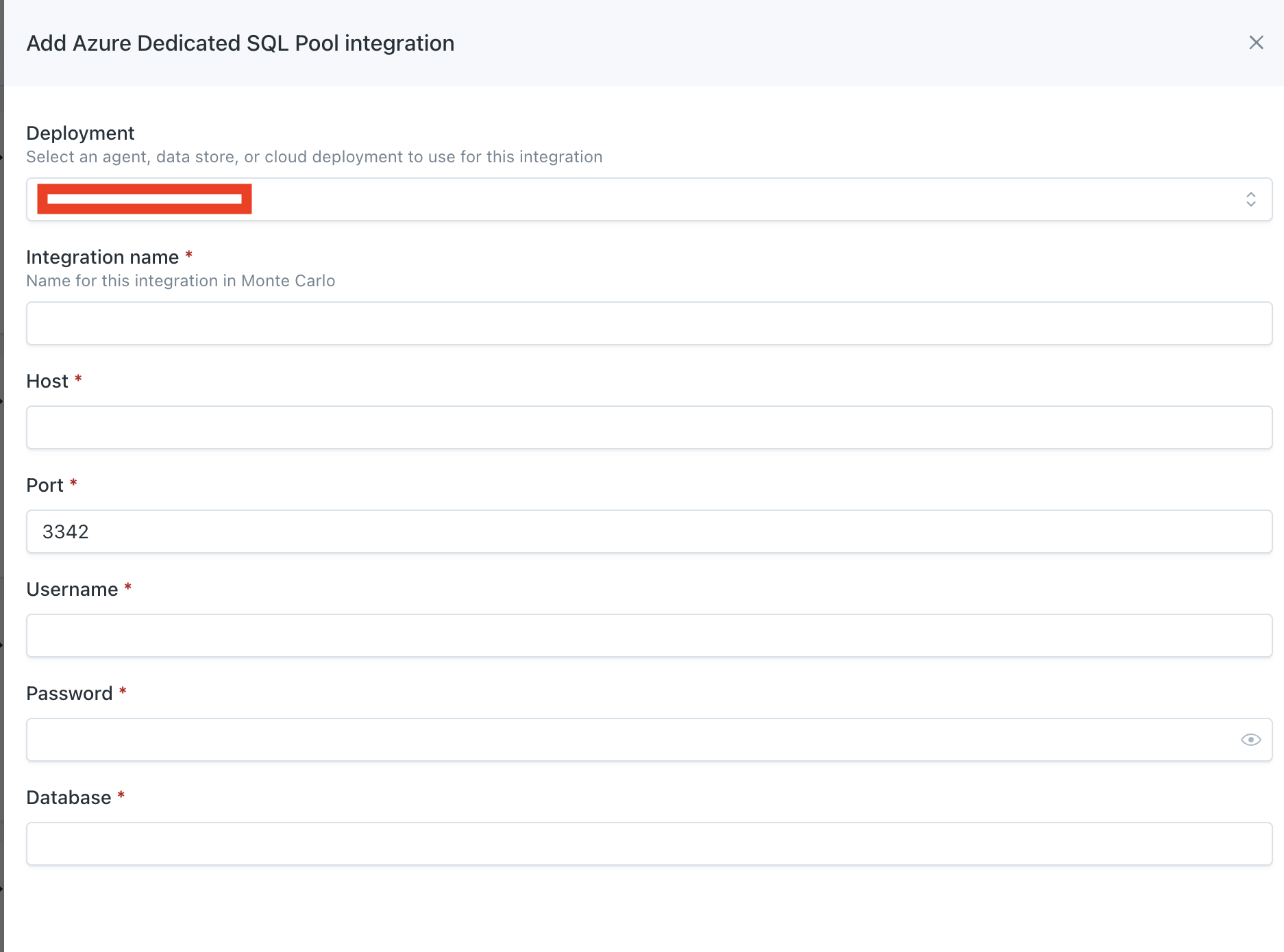
Deployment:[Optional] If you have multiple deployments already in your Monte Carlo account, choose the deployment you want to use for this integration. If you do not have multiple deployments, this field will not be shown.Integration name: The user-friendly name for this integration.Host: The hostname of the Dedicated SQL pool.Port: The port of the Dedicated SQL pool, typically 3342.Username: The username created in Step 2.Password: The password created in Step 1.Database: The database name the user was created in that contains the external tables.
Create Table Monitors on External tables
With the Azure Dedicated SQL Pool integration added, you can now create table monitors for schema, freshness and volume on the external tables. See our guide on creating table monitors.
You can also create additional monitors types if you’d like (e.g., custom).
Updated 10 months ago