
Custom Warehouse, Database, and Lake Integrations (Public Preview)
This feature requires an Enterprise or higher plan to use.
This feature is in Public Preview. See here for more information on what this means.
AI-first by design
Each building block ships with Claude skills that handle the implementation work: scaffolding, code generation, testing, and deployment.
- Push Ingest API: skills generate complete scripts for your source's metadata, query logs, and lineage.
- Custom Connectors: skills scaffold, implement, and deploy a connector through guided conversation.
Monte Carlo natively supports a wide range of data platforms. Custom integrations let you bring SQL-based data sources that aren't covered natively, fill coverage gaps in sources we do support, or customize how Monte Carlo collects from a source.
In scope: SQL warehouses, lakehouses, transactional databases, and any source that speaks SQL
Custom integrations give you three building blocks. You can use them individually or combine them to get the coverage you need.
Building blocks
| Native Connector | Push Ingest API | Custom Connector | |
|---|---|---|---|
| Metadata | Yes | Yes | Yes (full mode) |
| Query logs | Yes | Yes | Yes (full mode) |
| SQL query execution (custom SQL monitors, metric monitors) | Yes | No | Yes |
For each job type, you choose which building block handles it. You can mix building blocks on the same data source — for example, use a native connector for metadata, the Push Ingest API for query logs, and a custom connector for SQL query execution.
The one constraint: if you need custom SQL monitors or metric monitors, you must have a connector (native or custom) for SQL query execution. The Push Ingest API cannot execute queries.
When to use each
| Your situation | Option |
|---|---|
| Monte Carlo natively supports your source | Native connector |
| Your native integration is missing coverage you need | Push API (augment) |
| Monte Carlo doesn't natively support your source, but it speaks a SQL dialect we already support | Push + native SQL connector (hybrid) |
| You use a SQL source whose dialect Monte Carlo doesn't support | Custom SQL connector (standalone or combined with Push) |
Native connector — Monte Carlo already supports your database. This is the default starting point. Use it for any job type it covers.
Push Ingest API — You want to send metadata or query logs to Monte Carlo from your own pipeline. Use it when:
- Your data source doesn't support SQL queries (e.g., APIs, file-based systems)
- You already have a metadata or query log pipeline
- You want to supplement a native connector's coverage with additional data it doesn't collect
Custom connector — You want Monte Carlo to actively query a database that it doesn't natively support. Use it when:
- Your database supports SQL queries through a Python driver
- You need SQL query execution for custom SQL monitors and/or metric monitors
- You want automated metadata and query log collection from a non-native database
Example combinations
- Native + push — Use native Snowflake for metadata and SQL query execution, push query logs via the API from your own logging pipeline.
- Custom connector (hybrid mode) + push — Your database supports SQL but lacks system catalog views. Use a custom connector for SQL query execution and push metadata via the API. See hybrid mode.
- Custom connector (full mode) — Your database supports SQL and has queryable system catalog views. A single custom connector handles all three job types.
- Native + custom connector — Use a native connector for metadata and query logs, but a custom connector for SQL query execution with different behavior.
Setting up a custom integration
Navigate to Settings > Integrations > Add and select Custom integration from the sidebar.
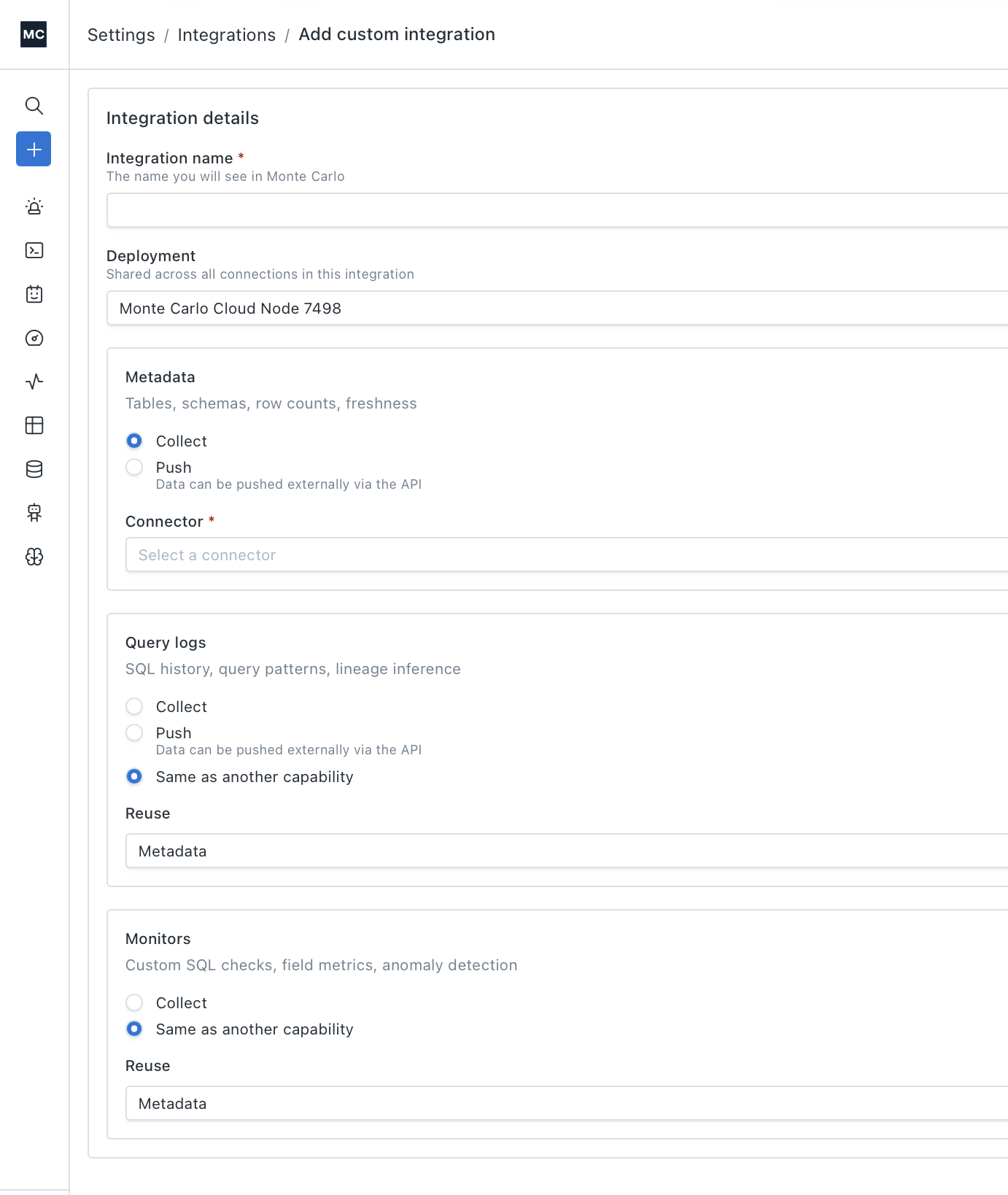
Monte Carlo UI Example
Integration details
| Field | Description |
|---|---|
| Integration name (required) | The display name for this integration in Monte Carlo. |
| Deployment | The data collector that all connections in this integration share. Select the agent where your custom connector is deployed, or another option if using only native connectors and push. |
Capabilities
The form has a section for each capability: Metadata, Query logs, and Monitors. For each one, choose how Monte Carlo gets the data:
| Option | Available for | What it does |
|---|---|---|
| Collect | Metadata, Query logs, Monitors | Monte Carlo actively collects data using a connector. Select a connector from the dropdown — this can be a native connector (e.g., BigQuery) or a custom connector deployed on your agent. |
| Push | Metadata, Query logs | Data is pushed externally via the Push Ingest API. No connector required. |
| Same as another capability | Query logs, Monitors | Reuses the connector and credentials from another capability (e.g., reuse the Metadata connector for Query logs). |
You can mix options across capabilities — for example, Collect for Metadata, Push for Query logs, and Same as another capability for Monitors.
Credentials
When you select Collect and choose a connector, you configure how Monte Carlo authenticates with it. The credential fields vary by connector, but there are two modes:
Monte Carlo managed credentials — You provide the credentials directly in the form. For example, uploading a JSON service account key file for BigQuery.
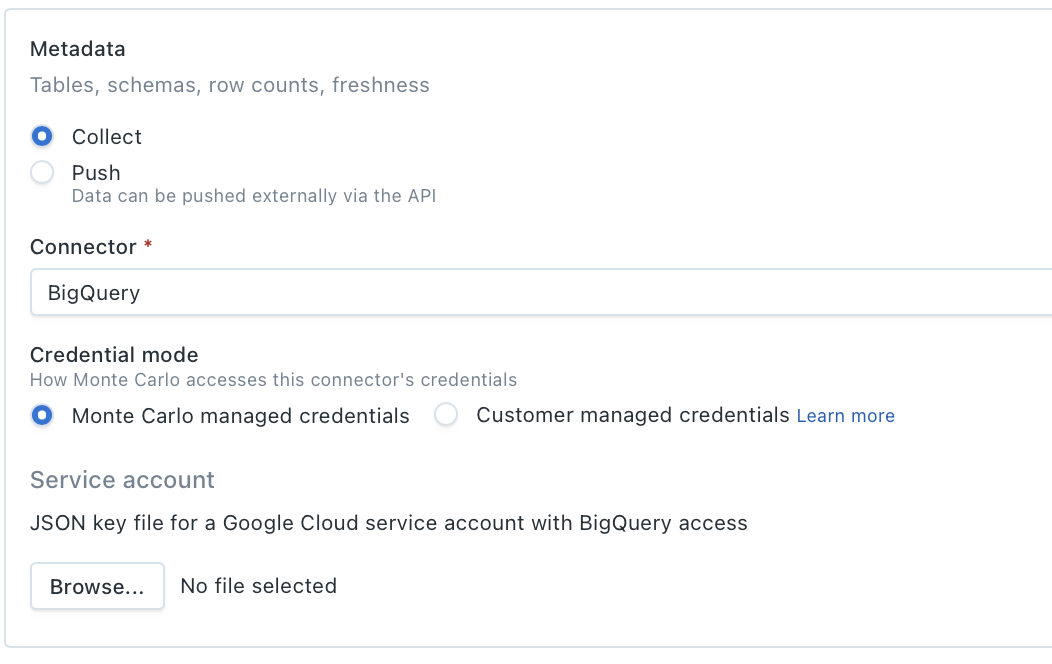
Monte Carlo UI Example
Customer managed credentials — Monte Carlo reads credentials from a secret store in your environment. Select a secret store and provide the store-specific configuration:
| Secret store | Required fields |
|---|---|
| AWS Environment variables w/ KMS encryption | Environment variable name, KMS key ID |
| AWS Secrets Manager | Secret ARN or name |
| GCP Secret Manager | Secret resource name |
| Azure Key Vault | Vault URL, secret name |
| Generic file (Kubernetes, etc.) | File path on the agent |
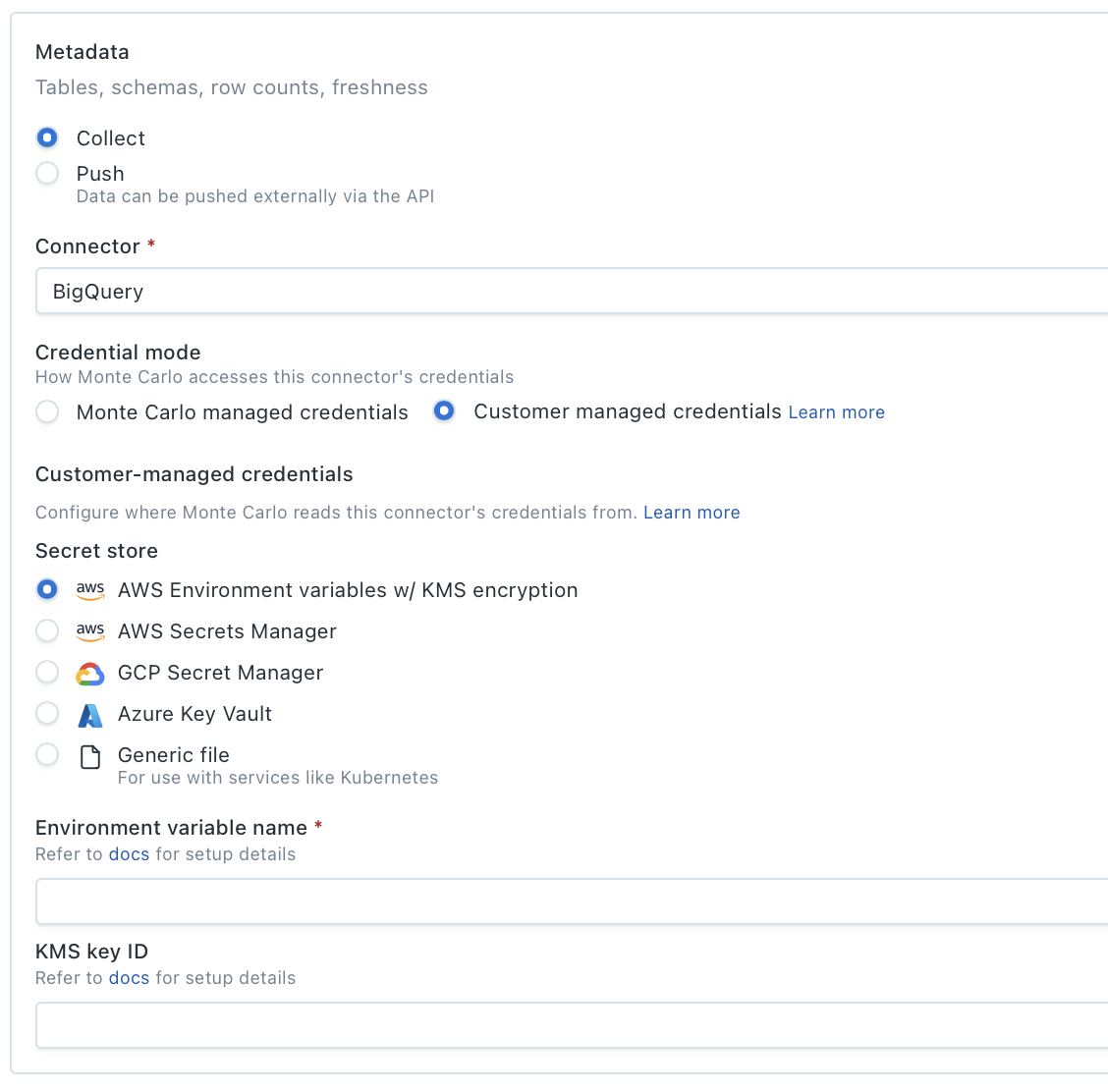
Monte Carlo UI Example
For details on configuring customer-managed credentials, see Self-hosted credentials.
Validation
After you provide credentials, Monte Carlo runs validators for each unique connector in the integration. Validators confirm that Monte Carlo can connect to your data source and execute the operations it needs. Only connectors using Collect (native or custom) go through validation — capabilities set to Push are skipped.
Once all validators pass, you can submit the form to add the integration.
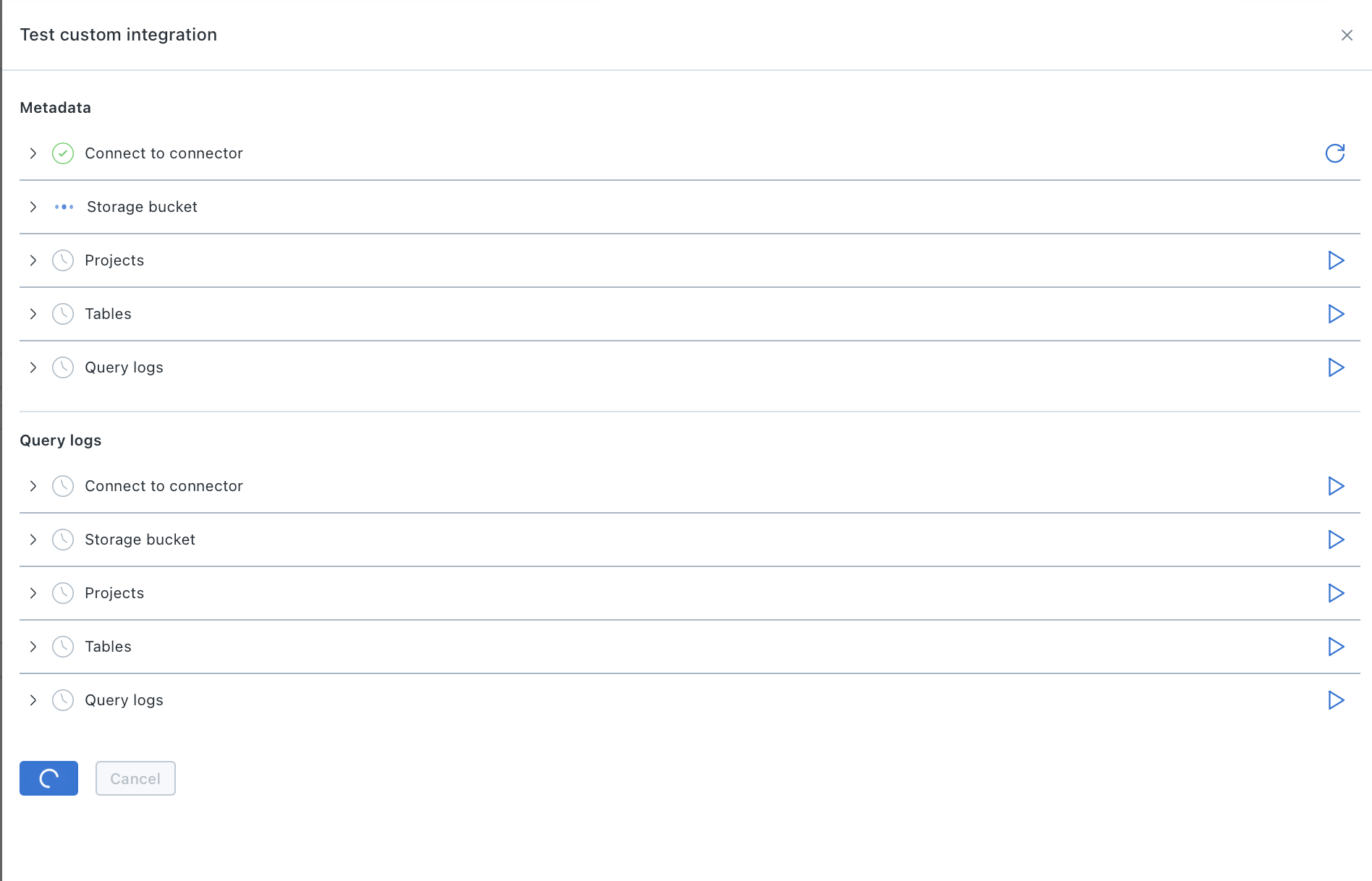
After setup
When the integration is created:
- Collect capabilities — Monte Carlo kicks off an initial metadata collection job. Assets (tables, views, schemas) will appear in your workspace shortly after the job completes.
- Push capabilities — No automatic job runs. Begin pushing metadata to Monte Carlo whenever you're ready — assets appear as data is received.
From there you can start building domains, monitors, and other observability workflows on top of your new assets.
FAQs
Is this only for SQL sources?
Custom integrations support SQL-based sources today: warehouses, lakehouses, transactional databases, and anything that speaks SQL.
Can I combine multiple building blocks on the same source?
Yes! See here
What happens if Monte Carlo later adds native support for a source I built a custom integration for?
The two run independently. You can keep your existing setup or migrate to the native integration.
Updated 4 months ago