
Push Ingest API
This feature requires an Enterprise or higher plan to use
This feature is in Public Preview. See here for more information on what this means.
What is the Ingest API?
The Ingest API lets you push observability data directly to Monte Carlo from any data source, without waiting for a standard (pull-based) collection job to complete. Use it to:
- Fill gaps your integration does not cover natively (column lineage, query history, freshness timestamps)
- Send lineage and metadata you already have in your own systems (dbt, Airflow, custom ETL)
- Complement Monte Carlo's collected data with authoritative lineage from sources the pull model cannot reach
The primary use case is augmenting an existing integration: your Monte Carlo integration might not support (metadata collection, table or column lineage or query logs collection), and the Push Ingest API fills in the gaps — so you can end up with your desired data ingested in Monte Carlo.
Three endpoints cover everything:
| Endpoint | What it ingests | Typical latency |
|---|---|---|
POST /ingest/v1/metadata | Table/view schema, columns, row counts, byte counts, last-update timestamps | Normally under 15 minutes |
POST /ingest/v1/lineage | Table-level and column-level data lineage | Normally under 15 minutes |
POST /ingest/v1/querylogs | SQL query history | Normally under 1 hour |
Every accepted request returns an invocation_id. Save it — it is your primary handle for tracing a push through the downstream systems. The Monte Carlo engineering team will ask for it to investigate any issue.
Build your data collector and pusher using AIThe mcd-agent-toolkit let you generate a complete, working push integration in minutes. Install our plugin in Claude and use these slash commands:
/mc-build-metadata-collector— generate a metadata push script for your warehouse/mc-build-lineage-collector— generate a lineage push script/mc-build-query-log-collector— generate a query log push script/mc-validate-metadata— validate what you've pushedThe skills also explain how to convert a one-off push into a scheduled recurring script.
Architecture overview
flowchart LR
    A["Your script\npycarlo SDK or direct HTTP"] --> B["Integration Gateway\nhttps://integrations.getmontecarlo.com"]
    B --> C{"Auth + schema validation"}
    C -->|"202 + invocation_id"| A
    C --> D["Processing pipeline"]
    D --> E["Monte Carlo\ncatalog · lineage graph · query logs"]
End-to-end workflow
Before you push data, you need a Monte Carlo integration in place. Here is the full flow:
- Set up your integration — Go to Settings → Integrations and create a connection for your data source. This establishes the warehouse record and gives you a warehouse UUID.
- Create an Ingestion key — See Prerequisites below. Push requests require a dedicated Ingestion key, not a standard API key.
- Push data — Use the pycarlo SDK or direct HTTP. See Getting started.
- Create monitors — Once data is in Monte Carlo, create freshness, volume, or custom SQL monitors on your pushed tables from the Monitors UI.
Prerequisites
1. Create an Ingestion key
Push requests use a dedicated integration key with scope Ingestion. A standard Monte Carlo API key will not work. See
Option A — GraphQL mutation (recommended)
Use the API Explorer with a GraphQL API key:
mutation {
  createIntegrationKey(
    description: "Push ingestion key"
    scope: Ingestion
    warehouseIds: ["<warehouse-uuid>"]   # optional — omit to allow all warehouses
  ) {
    key { id secret }
  }
}
Option B — CLI
pip install montecarlodata
montecarlo configure            # enter your GraphQL API key when prompted
montecarlo integrations create-key \
  --scope Ingestion \
  --description "Push ingestion key"
Output:
Key id:     <id>
Key secret: <secret>    ← shown only once — store it immediately
Store the key secret immediatelyThe key secret is shown only once at creation time. Save it to a secure secrets manager before closing the terminal.
2. Create a GraphQL API key (for verification)
You also need a separate GraphQL API key to verify pushed data. Go to Settings → API in the Monte Carlo UI, click Add, and copy the key ID and secret immediately.
GraphQL endpoint: https://api.getmontecarlo.com/graphql
Go to API Authentication for more details.
3. Find your warehouse UUID
Every push request must include resource.uuid — the UUID of the Monte Carlo resource you are pushing data for.
Query it via the GraphQL API:
query {
  getUser {
    account {
      warehouses {
        uuid
        name
        connectionType
      }
    }
  }
}
Or in the UI: Settings → Integrations → [click your warehouse] — the UUID appears in the URL.
4. Install pycarlo (optional)
The pycarlo SDK simplifies push calls. Minimum required version: v0.12.251.
pip install "pycarlo>=0.12.251"You can also call the APIs directly over HTTPS without the SDK — see the Direct HTTP API section.
Getting started — first push
Initialize the client
import os
from pycarlo.core import Client, Session
from pycarlo.features.ingestion import IngestionService

service = IngestionService(mc_client=Client(session=Session(
    mcd_id=os.environ["MC_INGEST_KEY_ID"],
    mcd_token=os.environ["MC_INGEST_KEY_TOKEN"],
    scope="Ingestion",
)))
Recommended environment variables:
export MC_INGEST_KEY_ID="<ingestion-key-id>"
export MC_INGEST_KEY_TOKEN="<ingestion-key-secret>"
export MC_RESOURCE_UUID="<warehouse-uuid>"
Keep credentials out of source controlReplace placeholder values with your actual credentials. Never commit real key secrets to version-controlled files or CI configuration.
Send metadata
Illustrative exampleThe table name, database, schema, field names, volume, and freshness values below are illustrative. Replace them with your actual values.
from pycarlo.features.ingestion.models import (
    AssetField, AssetFreshness, AssetMetadata, AssetVolume, RelationalAsset,
)

result = service.send_metadata(
    resource_uuid=os.environ["MC_RESOURCE_UUID"],
    resource_type="snowflake",   # lowercase — e.g. snowflake, bigquery, data-lake
    events=[
        RelationalAsset(
            type="TABLE",
            metadata=AssetMetadata(
                name="orders",
                database="analytics",
                schema="public",
                description="Customer orders",
            ),
            fields=[
                AssetField(name="id",         type="INTEGER"),
                AssetField(name="amount",     type="DECIMAL(10,2)"),
                AssetField(name="created_at", type="TIMESTAMP_NTZ"),
            ],
            volume=AssetVolume(row_count=1_000_000, byte_count=111_111_111),
            freshness=AssetFreshness(last_update_time="2024-03-01T14:30:00Z"),
        )
    ],
)
print("invocation_id:", service.extract_invocation_id(result))
A 202 response with an invocation_id means the push was accepted. Metadata appears in Monte Carlo within a few minutes.
API reference
Base URL (production): https://integrations.getmontecarlo.com
Authentication
All three endpoints use the same headers:
| Header | Value |
|---|---|
x-mcd-id | Integration key ID |
x-mcd-token | Integration key secret |
Content-Type | application/json |
Success response
All three endpoints return 202 Accepted on success:
{ "invocation_id": "<uuid>" }Error codes
| Status | Meaning |
|---|---|
400 | Schema validation failed. Check details in the response body for field-level errors. |
401 | Authentication failed — wrong key ID or secret. |
403 | The key is not authorized for the resource.uuid in the payload. |
413 | Payload too large — compressed body exceeds 1 MB. Split into smaller batches. |
5xx | Server error — retry with exponential backoff. |
POST /ingest/v1/metadata
Push table or view metadata, column definitions, volume, and freshness.
Table Schema
{
  "event_type": {
    "type": "string",
    "required": true,
    "description": "Always \"METADATA\""
  },
  "resource": {
    "uuid": {
      "type": "string",
      "required": true,
      "description": "Warehouse UUID"
    },
    "resource_type": {
      "type": "string",
      "required": true,
      "description": "Warehouse type — e.g. snowflake, bigquery, data-lake"
    }
  },
  "events": [
    {
      "relational_asset": {
        "type": {
          "type": "string",
          "required": true,
          "description": "One of: TABLE, VIEW, EXTERNAL, WILDCARD"
        },
        "metadata": {
          "name": { "type": "string", "required": true, "description": "Table or view name" },
          "database": { "type": "string", "required": true, "description": "Database name" },
          "schema": { "type": "string", "required": true, "description": "Schema name" },
          "description": { "type": "string", "required": false, "description": "Human-readable description" },
          "view_query": { "type": "string", "required": false, "description": "SQL definition — views only" },
          "created_on": { "type": "string", "required": false, "description": "Creation timestamp (ISO 8601)" }
        },
        "tags": {
          "type": "array",
          "required": false,
          "description": "Key-value pairs: [{ \"key\": \"...\", \"value\": \"...\" }]"
        },
        "fields": [
          {
            "name": { "type": "string", "required": true, "description": "Column name" },
            "type": { "type": "string", "required": true, "description": "Column data type" },
            "description": { "type": "string", "required": false, "description": "Column description" }
          }
        ],
        "volume": {
          "row_count": { "type": "integer", "required": false, "description": "Number of rows" },
          "byte_count": { "type": "integer", "required": false, "description": "Table size in bytes" }
        },
        "freshness": {
          "last_update_time": {
            "type": "string",
            "required": true,
            "description": "ISO 8601 timestamp of most recent data modification. Required if the freshness block is included. See Anomaly detection for detector requirements."
          }
        }
      }
    }
  ]
}
{
"event_type": "METADATA",
"resource": {
"uuid": "a1b2c3d4-e5f6-7890-abcd-ef1234567890",
"resource_type": "snowflake"
},
"events": [
{
"relational_asset": {
"type": "TABLE",
"metadata": {
"name": "orders",
"database": "analytics",
"schema": "public",
"description": "Customer orders",
"created_on": "2023-01-01T00:00:00Z"
},
"tags": [
{ "key": "team", "value": "data-eng" }
],
"fields": [
{ "name": "id", "type": "INTEGER", "description": "Primary key" },
{ "name": "amount", "type": "DECIMAL(10,2)" },
{ "name": "created_at", "type": "TIMESTAMP_NTZ" }
],
"volume": {
"row_count": 1000000,
"byte_count": 111111111
},
"freshness": {
"last_update_time": "2024-03-01T14:30:00Z"
}
}
}
]
}View Schema
{
  "event_type": {
    "type": "string",
    "required": true,
    "description": "Always \"METADATA\""
  },
  "resource": {
    "uuid": { "type": "string", "required": true, "description": "Warehouse UUID" },
    "resource_type": { "type": "string", "required": true, "description": "Warehouse type — e.g. snowflake, bigquery, data-lake" }
  },
  "events": [
    {
      "relational_asset": {
        "type": {
          "type": "string",
          "required": true,
          "description": "Always \"VIEW\" for views"
        },
        "metadata": {
          "name": { "type": "string", "required": true, "description": "View name" },
          "database": { "type": "string", "required": true, "description": "Database name" },
          "schema": { "type": "string", "required": true, "description": "Schema name" },
          "description": { "type": "string", "required": false, "description": "Human-readable description" },
          "view_query": { "type": "string", "required": false, "description": "SQL definition of the view" }
        }
      }
    }
  ]
}
{
"event_type": "METADATA",
"resource": {
"uuid": "a1b2c3d4-e5f6-7890-abcd-ef1234567890",
"resource_type": "snowflake"
},
"events": [
{
"relational_asset": {
"type": "VIEW",
"metadata": {
"name": "orders_view",
"database": "analytics",
"schema": "public",
"description": "View over the orders table",
"view_query": "SELECT id, amount, created_at FROM analytics.public.orders WHERE amount > 0"
}
}
}
]
}POST /ingest/v1/lineage
Push table-level or column-level data lineage. Both use the same endpoint; event_type determines the shape.
Table Lineage Schema
{
  "event_type": {
    "type": "string",
    "required": true,
    "description": "Always \"LINEAGE\" for table lineage"
  },
  "resource": {
    "uuid": { "type": "string", "required": true, "description": "Warehouse UUID" },
    "resource_type": { "type": "string", "required": true, "description": "Warehouse type" }
  },
  "events": [
    {
      "destination": {
        "type": { "type": "string", "required": true, "description": "One of: TABLE, VIEW, EXTERNAL, WILDCARD" },
        "database": { "type": "string", "required": true },
        "schema": { "type": "string", "required": true },
        "name": { "type": "string", "required": true }
      },
      "sources": [
        {
          "type": { "type": "string", "required": true, "description": "One of: TABLE, VIEW, EXTERNAL, WILDCARD" },
          "database": { "type": "string", "required": true },
          "schema": { "type": "string", "required": true },
          "name": { "type": "string", "required": true }
        }
      ]
    }
  ]
}
{
"event_type": "LINEAGE",
"resource": {
"uuid": "a1b2c3d4-e5f6-7890-abcd-ef1234567890",
"resource_type": "snowflake"
},
"events": [
{
"destination": { "type": "TABLE", "database": "analytics", "schema": "public", "name": "orders_curated" },
"sources": [
{ "type": "TABLE", "database": "analytics", "schema": "public", "name": "orders_raw" }
]
}
]
}Column lineage Schema
{
  "event_type": {
    "type": "string",
    "required": true,
    "description": "Always \"COLUMN_LINEAGE\" for column lineage"
  },
  "resource": {
    "uuid": { "type": "string", "required": true, "description": "Warehouse UUID" },
    "resource_type": { "type": "string", "required": true, "description": "Warehouse type" }
  },
  "events": [
    {
      "destination": {
        "type": { "type": "string", "required": true, "description": "One of: TABLE, VIEW, EXTERNAL, WILDCARD" },
        "database": { "type": "string", "required": true },
        "schema": { "type": "string", "required": true },
        "name": { "type": "string", "required": true },
        "asset_id": { "type": "string", "required": true, "description": "Local alias for cross-referencing within the payload — not stored externally" }
      },
      "sources": [
        {
          "type": { "type": "string", "required": true },
          "database": { "type": "string", "required": true },
          "schema": { "type": "string", "required": true },
          "name": { "type": "string", "required": true },
          "asset_id": { "type": "string", "required": true, "description": "Local alias for cross-referencing" }
        }
      ],
      "fields": [
        {
          "name": { "type": "string", "required": true, "description": "Destination column name" },
          "source_fields": [
            {
              "asset_id": { "type": "string", "required": true, "description": "Matches the asset_id on the source asset" },
              "field_name": { "type": "string", "required": true, "description": "Source column name" }
            }
          ]
        }
      ]
    }
  ]
}
{
"event_type": "COLUMN_LINEAGE",
"resource": { "uuid": "a1b2c3d4-e5f6-7890-abcd-ef1234567890", "resource_type": "snowflake" },
"events": [
{
"destination": { "type": "TABLE", "database": "analytics", "schema": "public", "name": "orders_curated", "asset_id": "dest" },
"sources": [
{ "type": "TABLE", "database": "analytics", "schema": "public", "name": "orders_raw", "asset_id": "src" }
],
"fields": [
{
"name": "order_id",
"source_fields": [ { "asset_id": "src", "field_name": "id" } ]
}
]
}
]
}
Column lineage expires after 10 daysColumn lineage pushed via this endpoint expires after 10 days — the same retention as our data collector pull-model column lineage. Table lineage never expires.
Pushed table lineage nodes and edges will be set with an
expireAt: "9999-12-31"so they will never expire. In the case that you use the GraphQL mutations to handle custom lineage ie (createOrUpdateLineageNodeorcreateOrUpdateLineageEdge) set theexpireAt: "9999-12-31"if you do not want them to expire.
TTL summary:
| Lineage type | Expiration |
|---|---|
| Table lineage (push API) | Never expires |
| Column lineage (push API) | 10 days |
Custom nodes/edges (createOrUpdateLineageEdge) | 7 days by default; set expireAt: "9999-12-31" for permanent |
POST /ingest/v1/querylogs
Push SQL query history.
log_type, notresource_typeThis endpoint uses
log_typeinstead ofresource_typeon theresourceobject. This is the only endpoint where the field name differs.
Query logs Schema
{
  "event_type": {
    "type": "string",
    "required": true,
    "description": "Always \"QUERY_LOG\""
  },
  "resource": {
    "uuid": { "type": "string", "required": true, "description": "Warehouse UUID" },
    "log_type": {
      "type": "string",
      "required": true,
      "description": "Warehouse type — snowflake, redshift, bigquery, athena, teradata, clickhouse, databricks-metastore-sql-warehouse, s3, presto-s3, hive-s3, generic"
    }
  },
  "events": [
    {
      "start_time": { "type": "string", "required": true, "description": "Query start time (ISO 8601)" },
      "end_time": { "type": "string", "required": true, "description": "Query end time (ISO 8601)" },
      "query_text": { "type": "string", "required": true, "description": "SQL query text" },
      "query_id": { "type": "string", "required": false, "description": "Warehouse-assigned query ID" },
      "user": { "type": "string", "required": false, "description": "User who ran the query" },
      "returned_rows": { "type": "integer", "required": false, "description": "Number of rows returned" },
      "error_code": { "type": "string", "required": false, "description": "Error code if the query failed; null if successful" },
      "error_text": { "type": "string", "required": false, "description": "Error message if the query failed; null if successful" },
      "extra": { "type": "object", "required": false, "description": "Additional metadata" }
    }
  ]
}
{
"event_type": "QUERY_LOG",
"resource": {
"uuid": "a1b2c3d4-e5f6-7890-abcd-ef1234567890",
"log_type": "snowflake"
},
"events": [
{
"start_time": "2024-03-01T12:00:00Z",
"end_time": "2024-03-01T12:00:05Z",
"query_text": "SELECT * FROM analytics.public.orders LIMIT 100",
"query_id": "01b2c3d4-0000-1234-0000-ab00ef567890",
"user": "[email protected]",
"returned_rows": 100,
"error_code": null,
"error_text": null,
"extra": {}
}
]
}Query logs are processed asynchronously. Allow 45–60 minutes after pushing before checking results.
When to uselog_type: "generic"Pick
"generic"when your warehouse doesn't fit any of the other log types — for example, a transactional Postgres/MySQL/Oracle database, or any custom SQL source. Monte Carlo parses these queries with a permissive generic SQL dialect. If you aren't sure whether"generic"(or any other value) produces the lineage you expect for your queries, preview withparseQueryForLogTypesbefore pushing.
Preview which log_type to use
Not sure which log_type will extract the lineage you expect from your queries? Use the parseQueryForLogTypes GraphQL query to preview, for a sample SQL statement, the sources and destination Monte Carlo's parser produces under each candidate log_type. Pick the one whose extracted lineage matches the upstream/downstream tables you actually expect — or, if every candidate returns the same result, any of them will work for that query shape.
This query hits the main Monte Carlo GraphQL API — not the ingest endpoint — so it uses a standard API key, not your Ingestion-scoped integration key. Create one via Settings → API in the Monte Carlo UI (or see API Authentication).
Preview request
query ParseQueryForLogTypes($query: String!, $logTypes: [String!]!) {
  parseQueryForLogTypes(query: $query, logTypes: $logTypes) {
    logType
    sources {
      name
    }
    destination {
      name
    }
    errors
    success
  }
}
{
"query": "insert into analytics.prod.customers (id, name) select id, name from raw.events.users",
"logTypes": ["snowflake", "bigquery", "redshift", "databricks-metastore-sql-warehouse", "generic"]
}curl -s https://api.getmontecarlo.com/graphql \
-H "x-mcd-id: <api-key-id>" \
-H "x-mcd-token: <api-key-secret>" \
-H "Content-Type: application/json" \
--data @- <<'JSON' | jq
{
"query": "query ParseQueryForLogTypes($query: String!, $logTypes: [String!]!) { parseQueryForLogTypes(query: $query, logTypes: $logTypes) { logType sources { name } destination { name } errors success } }",
"variables": {
"query": "insert into analytics.prod.customers (id, name) select id, name from raw.events.users",
"logTypes": ["snowflake", "bigquery", "redshift", "databricks-metastore-sql-warehouse", "generic"]
}
}
JSONReading the output:
success: truewith populatedsources/destination→ thatlog_typeextracts lineage for this query. Pick it if the names match what you expect.success: falsewitherrorspopulated → that dialect's parser couldn't extract lineage from this query. Avoid thatlog_typefor queries of this shape.- Every candidate returns the same
sources/destination→ the query is dialect-portable; pick whicheverlog_typematches your warehouse.
Limits and scope:
logTypesaccepts 1 to 15 values per call; duplicates are deduped.- The preview does not resolve table names to Monte Carlo MCONs. Once you've picked a
log_type, call the separateparseQueryGraphQL query if you want MCONs resolved against a specific warehouse. - Any standard Monte Carlo API key (Settings → API) will work — every built-in role (including
Viewer) grants thelineage/readpermission this query requires. The call returns403if the key is anIngestion-scoped integration key (those can only call the push-ingest endpoints) or if a custom role has explicitly excludedlineage/read.
pycarlo SDK guide
For the full pycarlo API reference, see apidocs.getmontecarlo.com.
Illustrative examplesThe table name, database, schema, field names, volume, and freshness values below are illustrative. Replace them with your actual values.
Push table lineage
from pycarlo.features.ingestion.models import LineageAssetRef, LineageEvent

result = service.send_lineage(
    resource_uuid=os.environ["MC_RESOURCE_UUID"],
    resource_type="snowflake",
    events=[
        LineageEvent(
            destination=LineageAssetRef(
                type="TABLE", name="orders_curated",
                database="analytics", schema="public",
            ),
            sources=[
                LineageAssetRef(
                    type="TABLE", name="orders_raw",
                    database="analytics", schema="public",
                )
            ],
        )
    ],
)
print("invocation_id:", service.extract_invocation_id(result))
Push column lineage
from pycarlo.features.ingestion.models import (
    ColumnLineageField, ColumnLineageSourceField, LineageAssetRef, LineageEvent,
)

result = service.send_lineage(
    resource_uuid=os.environ["MC_RESOURCE_UUID"],
    resource_type="snowflake",
    events=[
        LineageEvent(
            destination=LineageAssetRef(
                type="TABLE", name="orders_curated",
                database="analytics", schema="public",
                asset_id="dest",
            ),
            sources=[
                LineageAssetRef(
                    type="TABLE", name="orders_raw",
                    database="analytics", schema="public",
                    asset_id="src",
                )
            ],
            fields=[
                ColumnLineageField(
                    name="order_id",
                    source_fields=[ColumnLineageSourceField(asset_id="src", field_name="id")],
                )
            ],
        )
    ],
)
print("invocation_id:", service.extract_invocation_id(result))
Push query logs
from datetime import datetime, timezone, timedelta
from pycarlo.features.ingestion.models import QueryLogEntry

now = datetime.now(timezone.utc)

result = service.send_query_logs(
    resource_uuid="<warehouse-uuid>",
    log_type="snowflake",
    events=[
        QueryLogEntry(
            start_time=now - timedelta(minutes=5),
            end_time=now - timedelta(minutes=4),
            query_text="SELECT * FROM analytics.public.orders LIMIT 100",
            query_id="<optional-warehouse-query-id>",
            user="[email protected]",
            returned_rows=100,
        )
    ],
)
print("invocation_id:", service.extract_invocation_id(result))
Batching large payloads
The compressed request body must not exceed 1 MB. For large collections of tables, lineage edges, or query log entries, split your events list into batches of ~500. Each batch returns its own invocation_id.
BATCH_SIZE = 500
for i in range(0, len(all_events), BATCH_SIZE):
    batch = all_events[i : i + BATCH_SIZE]
    result = service.send_metadata(
        resource_uuid=resource_uuid,
        resource_type=resource_type,
        events=batch,
    )
    print(f"Batch {i // BATCH_SIZE + 1} invocation_id: {service.extract_invocation_id(result)}")
Direct HTTP API
The pycarlo SDK is optional. You can call the push APIs directly over HTTPS.
Keep credentials out of source controlReplace placeholder values with your actual credentials. Never commit real key secrets to version-controlled files or CI configuration.
Metadata:
curl -X POST "https://integrations.getmontecarlo.com/ingest/v1/metadata" \
  -H "Content-Type: application/json" \
  -H "x-mcd-id: <key-id>" \
  -H "x-mcd-token: <key-secret>" \
  -d '{
    "event_type": "METADATA",
    "resource": { "uuid": "<warehouse-uuid>", "resource_type": "snowflake" },
    "events": [{
      "relational_asset": {
        "type": "TABLE",
        "metadata": { "name": "orders", "database": "analytics", "schema": "public" }
      }
    }]
  }'
Table lineage:
curl -X POST "https://integrations.getmontecarlo.com/ingest/v1/lineage" \
  -H "Content-Type: application/json" \
  -H "x-mcd-id: <key-id>" \
  -H "x-mcd-token: <key-secret>" \
  -d '{
    "event_type": "LINEAGE",
    "resource": { "uuid": "<warehouse-uuid>", "resource_type": "snowflake" },
    "events": [{
      "destination": { "type": "TABLE", "database": "analytics", "schema": "public", "name": "orders_curated" },
      "sources": [{ "type": "TABLE", "database": "analytics", "schema": "public", "name": "orders_raw" }]
    }]
  }'
Query logs:
curl -X POST "https://integrations.getmontecarlo.com/ingest/v1/querylogs" \
  -H "Content-Type: application/json" \
  -H "x-mcd-id: <key-id>" \
  -H "x-mcd-token: <key-secret>" \
  -d '{
    "event_type": "QUERY_LOG",
    "resource": { "uuid": "<warehouse-uuid>", "log_type": "snowflake" },
    "events": [{
      "start_time": "2024-03-01T12:00:00Z",
      "end_time": "2024-03-01T12:00:05Z",
      "query_text": "SELECT * FROM analytics.public.orders LIMIT 100",
      "user": "[email protected]",
      "returned_rows": 100
    }]
  }'
Best practices
Push frequency
Push freshness and volume once per hour. Do not push more frequently — the training pipeline aggregates data into hourly buckets. Sub-hourly pushes do not improve coverage and may produce unpredictable detector behavior.
Batching
Keep batches to ~500 events per request. The compressed body must not exceed 1 MB. Smaller batches also make debugging easier — each batch returns its own invocation_id.
Recurring scripts
A one-off push is useful for testing, but real observability requires consistent, scheduled delivery. To convert your push script into a recurring job:
- Cron / task scheduler: Schedule your Python script with
cron, AWS EventBridge, or Airflow. - Claude skills: The mcd-agent-toolkit include
/mc-build-metadata-collectorand related commands that generate complete, schedulable collectors for your warehouse.
Push table deletion
Push-ingested tables are not automatically deleted by Monte Carlo's periodic cleanup — they are customer-managed, so automatic deletion is not what customers that push their table metadata desire. You are responsible for cleaning them up when tables are removed from your source system. Use the deletePushIngestedTables mutation to delete them explicitly:
mutation DeletePushTables($mcons: [String!]!) {
  deletePushIngestedTables(mcons: $mcons) {
    success
    deletedCount
  }
}
Maximum 1,000 MCONs per call. The mutation also removes associated lineage nodes from the graph.
Real-world examples
Example 1: Postgres metastore — push metadata and lineage for non-native tables
Monte Carlo's Postgres integration crawls the native Postgres catalog. If your data lives in S3 but metadata is registered in a Postgres metastore — and MC can't directly query those tables — push the metadata and lineage instead.
Push metadata:
1. Setup
Follow the steps in the prerequisites to get:
- Ingestion keys, API keys, warehouse uuid
2. Install AI skills (Optional)
For now we only support the automatic installation of skills for Claude.
To install the skills follow the instructions from the mcd-agent-tookit on how to install the Monte Carlo skills.
Then in Claude Code / Cowork you should be able to see the skills by using the / command:
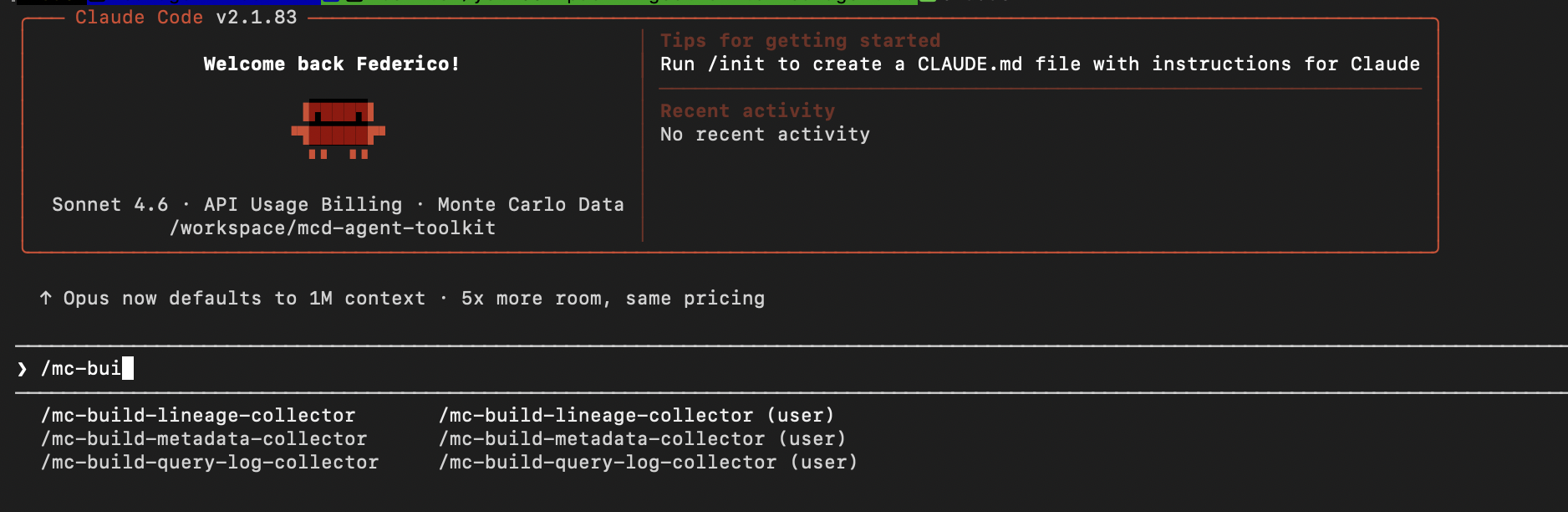
Choose the /mc-build-metadata-collector and it will help you build (as a best effort) a script to collect the metadata of your tables and then push them.
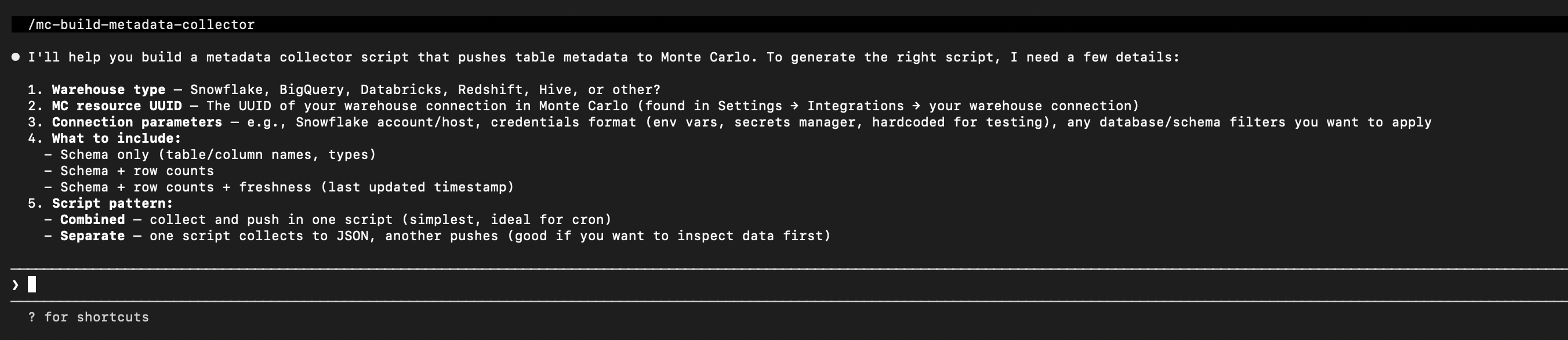
It will ask you questions, just keep answering them and it will try to do its best to come up with a script that will collect and push the tables metadata.
Once its done you can execute the script and it should return you an invocation_id or a list of invocation_ids in the case of using batches. These are useful for Monte Carlo engineers in the case you face issues after pushing the table metadata as it will allow us to understand the issue faster.
In the case you do not want to use AI to do this, the pushing script should look like this:
# Initialize service as shown in "Getting started — first push"
from pycarlo.features.ingestion.models import (
    AssetField, AssetFreshness, AssetMetadata, AssetVolume, RelationalAsset,
)

result = service.send_metadata(
    resource_uuid=os.environ["MC_RESOURCE_UUID"],
    resource_type="data-lake",
    events=[
        RelationalAsset(
            type="TABLE",
            metadata=AssetMetadata(
                name="events_raw",
                database="metastore_db",
                schema="raw",
                description="Raw clickstream events from S3",
            ),
            fields=[
                AssetField(name="event_id",   type="VARCHAR"),
                AssetField(name="user_id",    type="BIGINT"),
                AssetField(name="event_type", type="VARCHAR"),
                AssetField(name="ts",         type="TIMESTAMP"),
            ],
            volume=AssetVolume(row_count=50_000_000, byte_count=8_000_000_000),
            freshness=AssetFreshness(last_update_time="2024-03-01T06:00:00Z"),
        )
    ],
)
print("invocation_id:", service.extract_invocation_id(result))
Push lineage (e.g., a Spark job writing events_raw → events_enriched):
In the case of wanting to use AI skills just use the /mc-build-lineage-collector this will do its best effort to build a script to collect the lineage (if it is possible) and push it to Monte Carlo.
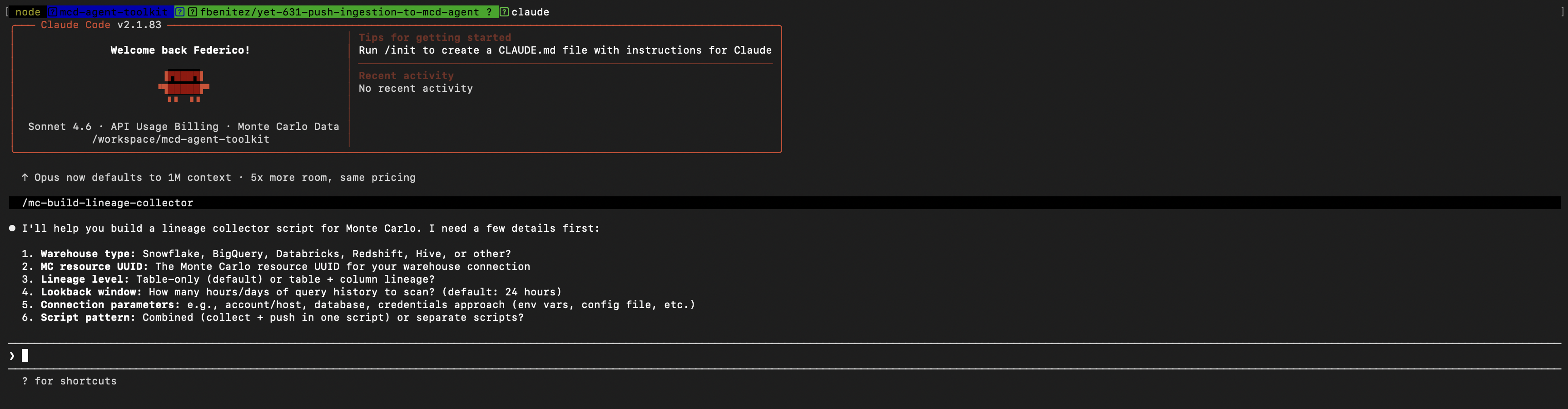
If you do not want to use AI, the script should look similar to this one:
# Initialize service as shown in "Getting started — first push"
from pycarlo.features.ingestion.models import LineageAssetRef, LineageEvent

result = service.send_lineage(
    resource_uuid=os.environ["MC_RESOURCE_UUID"],
    resource_type="data-lake",
    events=[
        LineageEvent(
            destination=LineageAssetRef(type="TABLE", name="events_enriched", database="metastore_db", schema="curated"),
            sources=[LineageAssetRef(type="TABLE", name="events_raw", database="metastore_db", schema="raw")],
        )
    ],
)
print("invocation_id:", service.extract_invocation_id(result))
Example 2: Data lake query logs — push Spark/custom ETL query history
If your data lake processes don't emit query logs to a supported warehouse connector, push them directly. This powers Monte Carlo's query-based lineage and usage analytics.
If you want to use AI use the /mc-build-query-log-collector skill that will help you doing its best effort to build a script that collects the query logs (when possible) and pushes them into Monte Carlo.
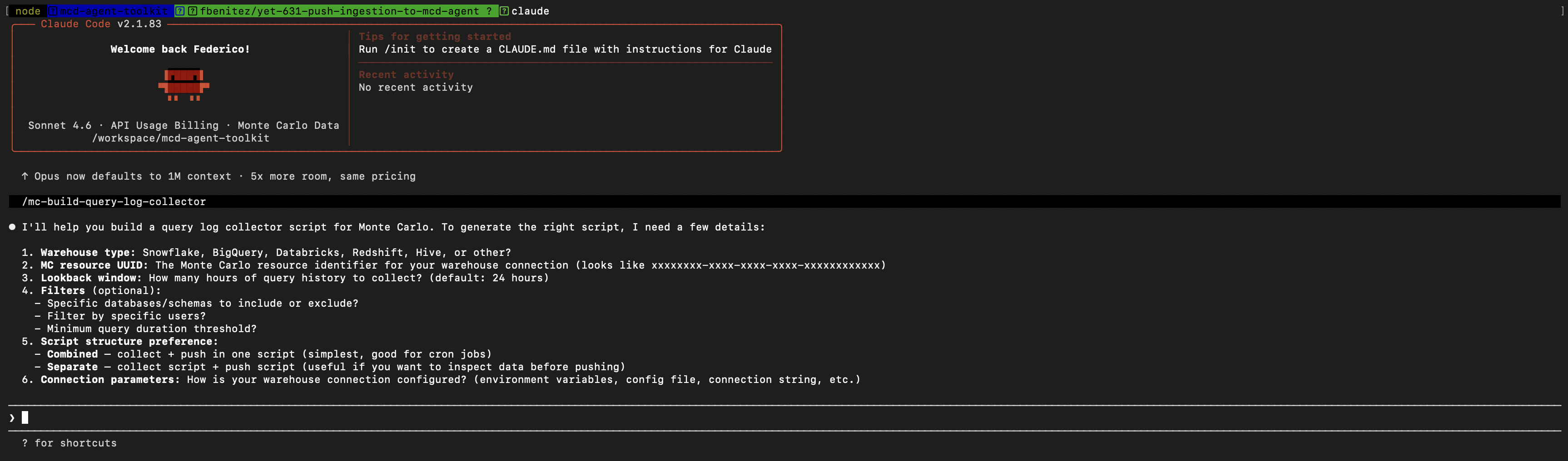
On the other hand if you do not want to use AI, the script would be similar to this one:
# Initialize service as shown in "Getting started — first push"
from datetime import datetime, timezone, timedelta
from pycarlo.features.ingestion.models import QueryLogEntry

now = datetime.now(timezone.utc)

# Push a batch of Spark job executions
spark_queries = [
    QueryLogEntry(
        start_time=now - timedelta(hours=1, minutes=5),
        end_time=now - timedelta(hours=1),
        query_text="INSERT INTO metastore_db.curated.events_enriched SELECT * FROM metastore_db.raw.events_raw WHERE ts > '2024-03-01'",
        user="[email protected]",
        returned_rows=1_234_567,
    ),
    QueryLogEntry(
        start_time=now - timedelta(minutes=30),
        end_time=now - timedelta(minutes=25),
        query_text="SELECT user_id, COUNT(*) as event_count FROM metastore_db.curated.events_enriched GROUP BY user_id",
        user="[email protected]",
        returned_rows=5_000,
    ),
]

result = service.send_query_logs(
    resource_uuid=os.environ["MC_RESOURCE_UUID"],
    log_type="s3",
    events=spark_queries,
)
print("invocation_id:", service.extract_invocation_id(result))
Verifying pushed data
All verification queries use the GraphQL API key at https://api.getmontecarlo.com/graphql — not the Ingestion key.
Confirm a table was ingested
fullTableId format: <database>:<schema>.<table> — e.g. analytics:public.orders
query GetTable($fullTableId: String!, $dwId: UUID!) {
  getTable(fullTableId: $fullTableId, dwId: $dwId) {
    mcon
    fullTableId
    displayName
    versions { edges { node { fields { name fieldType } } } }
  }
}
Check volume and freshness metrics
query GetMetrics($mcon: String!, $metricName: String!, $startTime: DateTime!, $endTime: DateTime!) {
  getMetricsV4(dwId: null, mcon: $mcon, metricName: $metricName, startTime: $startTime, endTime: $endTime) {
    metricsJson
  }
}
Useful metricName values: "total_row_count", "total_byte_count".
Check table lineage
Table lineage is typically visible within seconds to a few minutes after a push.
query GetTableLineage($mcon: String!) {
  getTableLineage(mcon: $mcon, direction: "upstream", hops: 1) {
    connectedNodes { objectId displayName mcon }
    flattenedEdges { directlyConnectedMcons }
  }
}
Check query logs
Allow 45–60 minutes before querying.
query GetAggregatedQueries($mcon: String!, $startTime: DateTime!, $endTime: DateTime!) {
  getAggregatedQueries(
    mcon: $mcon, queryType: "read",
    startTime: $startTime, endTime: $endTime,
    first: 100
  ) {
    edges { node { queryHash queryCount lastSeen } }
    pageInfo { hasNextPage endCursor }
  }
}
Troubleshooting
Push returns 401 — The key ID or secret is wrong, or the key does not exist. Check x-mcd-id and x-mcd-token.
Push returns 403 — The key is scoped to specific warehouse UUIDs and the resource.uuid in your payload is not in the allowed list. Use an unscoped key or add the warehouse UUID to the key's allowlist.
Push returns 400 with "Unsupported ingest query-log log_type" — Either you used resource_type on the query-log endpoint (query logs use log_type; metadata and lineage use resource_type), or the log_type value is not in the supported list. If you're unsure which value to pick, use parseQueryForLogTypes to preview extraction across candidates before pushing.
Push returns 413 — The compressed payload exceeds 1 MB. Split your events list into smaller batches.
Data isn't appearing after a push — Timing expectations: metadata (a few minutes), table lineage (seconds to a few minutes), column lineage (a few minutes), query logs (15–20 minutes). If data still hasn't appeared after these windows, note the invocation_id and contact Monte Carlo support.
Anomaly detectors aren't firing — Detectors need consistent historical data. Push at least once per hour over several weeks. A training detector hasn't reached the minimum sample count yet. An inactive detector hit a deactivation condition — most commonly: not enough samples, coverage too low, or a gap of 14+ days without any push. See Anomaly detection in the FAQ for full thresholds.
FAQ
Anomaly detection
Pushed freshness and volume data feeds the same anomaly detectors as the pull model, but only once the detectors have enough historical data to train on.
Recommended push frequency: once per hour. Do not push more frequently — the training pipeline aggregates into hourly buckets and sub-hourly pushes produce unpredictable detector behavior.
Freshness detector
| Parameter | Value |
|---|---|
| Training window | 35 days |
| Minimum samples to activate | 7 pushes with a changed last_update_time |
| Minimum coverage to activate | 0.15 |
| Hard deactivation gap | 14 days without any push |
| Supported update cycle | 5 minutes – ~7.7 days |
Each push must carry a freshness.last_update_time that has actually changed since the previous push. Repeated identical timestamps do not count as new samples.
Volume detector
| Parameter | Value |
|---|---|
| Minimum samples to activate | 10 (daily) / 48 (sub-daily) / 5 (weekly) |
| Minimum coverage to activate | 0.30 |
| Training window | 42 days |
| Deactivation | Coverage degrades as the 42-day window rolls forward with no new data |
Both row_count and byte_count in the volume object contribute to volume anomaly detection.
What to expect
Detectors show training or inactive status during the ramp-up period — this is expected. Freshness detectors need roughly 7 samples spread over ~2 weeks. Volume detectors need 10–48 samples over up to 42 days.
Check detector status via GraphQL:
query GetDetectorStatus($mcon: String!) {
  getTable(mcon: $mcon) {
    thresholds {
      freshness { lower { value } upper { value } status }
      size      { lower { value } upper { value } status }
    }
  }
}
Are NAC (Network Access Controls) supported by the push ingest API endpoint?
Yes. The Ingest API (integrations.getmontecarlo.com/ingest/v1/) supports Network Access Controls. You can use the APIs to restrict access to this endpoints to the IPs you want.
Can I exclude some tables from the normal (pull) data collection and push them instead?
Yes. You need to configure the Ingestion Rules to exclude the tables that you do not want by adding exception rules and then using the APIs for push ingestion described above you can push the desired tables.
If I am pushing BigQuery Iceberg tables metadata, do I need to also push query logs?
No. Query logs are collected automatically for BigQuery Iceberg tables so there is no need to push the query logs for these.
Updated 11 days ago