
Generic Agent: On-Premises Private Connectivity
Private connectivity options for on-premises deployments
If you are running the Generic Agent on-premises and need private connectivity to the Monte Carlo platform, you can leverage an existing connection to AWS or Azure to route traffic through their Private Link services. This avoids exposing agent traffic to the public internet.
Direct private connectivity from on-premises to Monte Carlo (e.g. via a dedicated site-to-site VPN) is not currently supported. The approaches below use your existing cloud connectivity as a bridge.
Via AWS PrivateLink
If your on-premises infrastructure has connectivity to AWS (e.g. via AWS Direct Connect or a site-to-site VPN), you can create a VPC endpoint in your AWS account and route agent traffic through it.
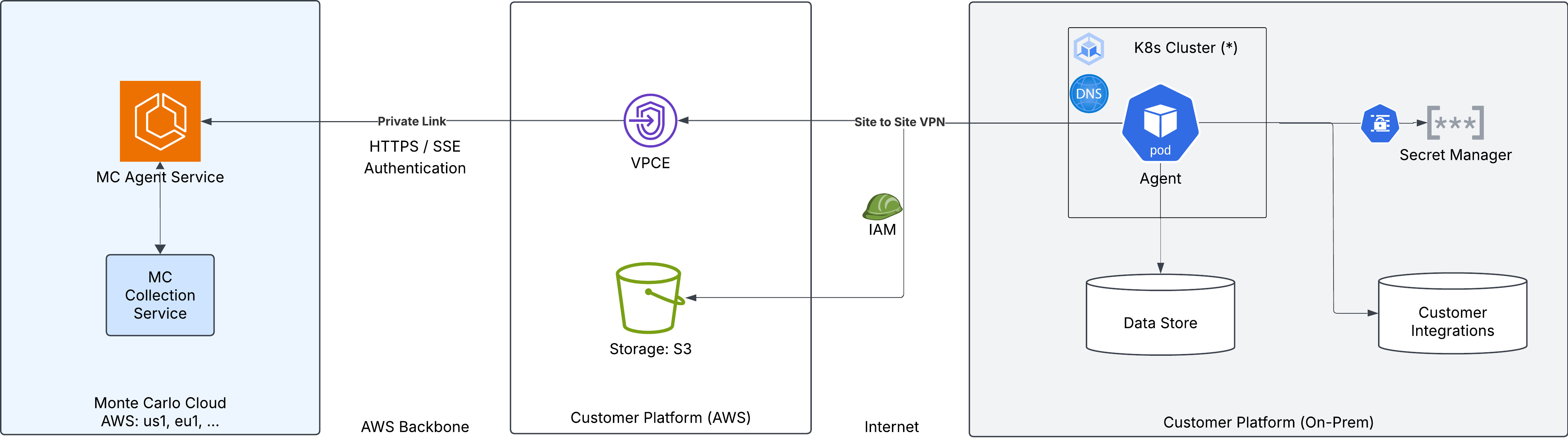
The traffic path is:
- The on-premises agent connects to the VPC endpoint in your AWS account through your existing Direct Connect or VPN connection.
- The VPC endpoint routes traffic over the AWS backbone to the Monte Carlo Agent Service via PrivateLink.
Object storage: The diagram shows an S3 bucket in the customer's AWS account, which the agent can use for temporary data storage. This requires configuring AWS credentials on the agent. Alternatively, you can use MinIO or any other S3-compatible storage service running on-premises — see the Kubernetes or Docker Compose deployment guides for examples using MinIO.
To set this up:
- Ensure your on-premises network has connectivity to an AWS VPC (via Direct Connect or site-to-site VPN).
- Create a VPC endpoint and configure DNS resolution following the Agent Service AWS PrivateLink guide.
- Configure DNS in your on-premises network so that the Private Link hostname (e.g.
artemis.privatelink.getmontecarlo.com) resolves to the VPC endpoint's private IP address. This may require configuring a DNS forwarder or conditional forwarding rule that routes queries to the Route 53 private hosted zone in your VPC. - Set the agent's
backendServiceUrlto the Private Link endpoint (e.g.https://artemis.privatelink.getmontecarlo.com).
Via Azure Private Link
If your on-premises infrastructure has connectivity to Azure (e.g. via Azure ExpressRoute or a site-to-site VPN), you can create a private endpoint in your Azure subscription and route agent traffic through it.
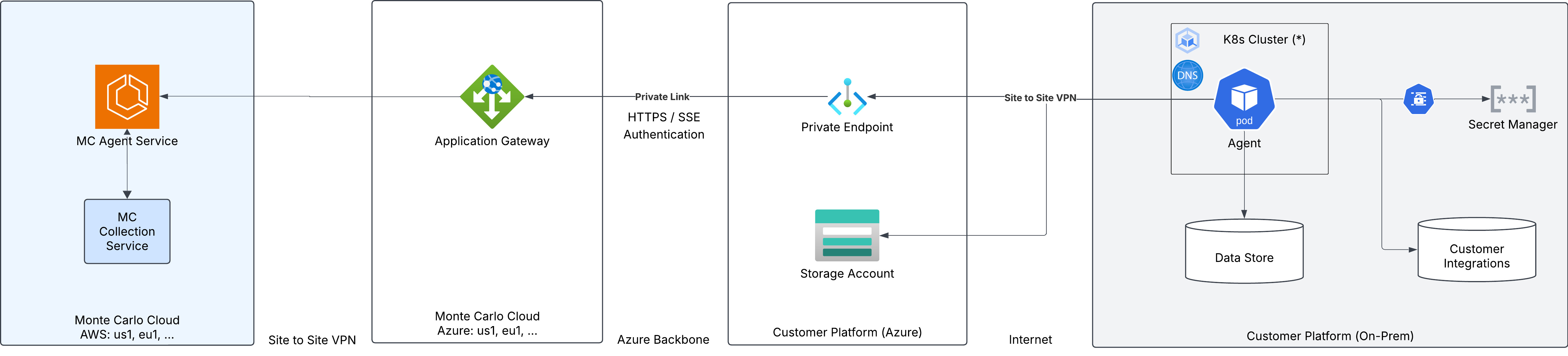
The traffic path is:
- The on-premises agent connects to the private endpoint in your Azure VNet through your existing ExpressRoute or VPN connection.
- The private endpoint routes traffic over the Azure backbone to the Monte Carlo Application Gateway, which forwards to the MC Agent Service.
Object storage: The diagram shows an Azure Storage Account in the customer's Azure subscription, which the agent can use for temporary data storage. This requires configuring Azure credentials on the agent. Alternatively, you can use MinIO or any other S3-compatible storage service running on-premises — see the Kubernetes or Docker Compose deployment guides for examples using MinIO.
To set this up:
- Ensure your on-premises network has connectivity to an Azure VNet (via ExpressRoute or site-to-site VPN).
- Create a private endpoint and configure DNS resolution following the Agent Service Azure Private Link guide.
- Configure DNS in your on-premises network so that the Private Link hostname (e.g.
artemis.privatelink.getmontecarlo.com) resolves to the private endpoint's IP address. This may require configuring a DNS forwarder or conditional forwarding rule that routes queries to the Azure Private DNS zone linked to your VNet. - Set the agent's
backendServiceUrlto the Private Link endpoint (e.g.https://artemis.privatelink.getmontecarlo.com).
Updated 4 months ago