
Airflow DAG and Task Lineage
Once you've completed the Airflow integration setup, the same callbacks that power incident attribution also emit lineage — the relationships between your DAGs, tasks, and the datasets they read or write. Lineage shows up in two places on every Airflow DAG asset page in Monte Carlo.
Prerequisites
airflow-mcd0.3.12 or newer installed in your Airflow environment.- DAG-level callbacks configured. (DAG callbacks are required whenever Task callbacks are used — see the integration setup.)
Lineage starts populating on the next DAG run after these are in place.
Where it appears
Task Graph
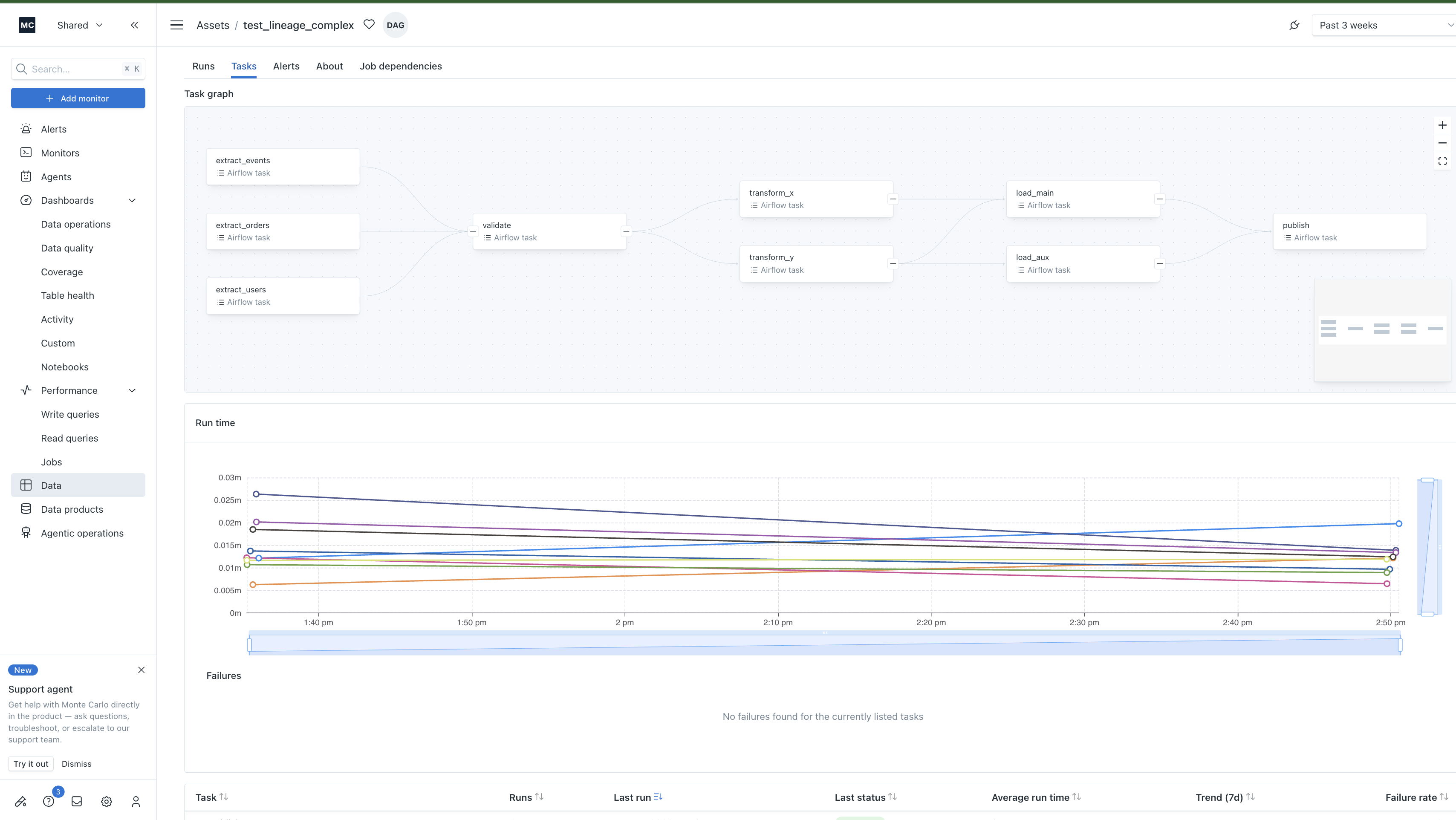
Embedded at the top of the Tasks tab on a DAG asset page. This is the directed graph of tasks within a single DAG — every node is one of your tasks, every edge is one >> (or set_downstream) relationship from your DAG definition.
Useful for: orienting yourself in an unfamiliar DAG, spotting which tasks fan into a single downstream task, or seeing how a failure or quality issue might propagate.
Job Dependencies
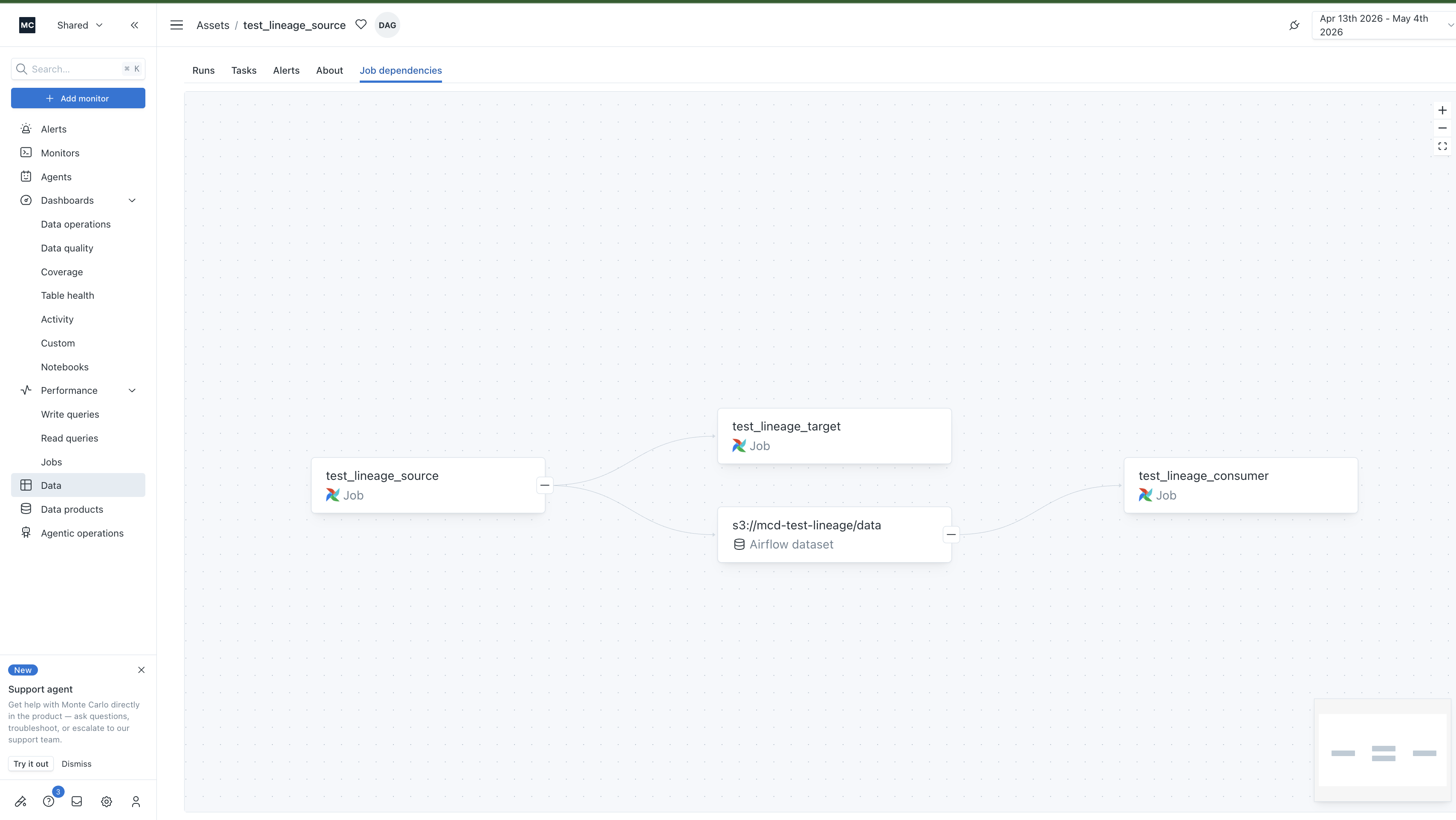
A new top-level tab on the asset page. Shows the cross-DAG and dataset reachability for the focal DAG — DAGs that trigger this one (via TriggerDagRunOperator), DAGs this one triggers, and any Airflow Datasets sitting in between.
Useful for: understanding the upstream and downstream blast radius of a DAG, especially in environments with many DAGs that depend on each other through shared datasets.
What gets captured
The table below maps each kind of edge to the Airflow construct that produces it.
| Edge | Where it comes from | Airflow construct |
|---|---|---|
| task → task within a DAG | dag.task_dict (the >> graph) | Any >> / set_downstream between tasks |
| DAG → DAG | triggered_dags | A TriggerDagRunOperator task in the upstream DAG |
| Producer DAG → dataset | dataset_outlet_uris | Per-task outlets=[Dataset("...")] |
| Dataset → consumer DAG | dataset_schedule_uris and dataset_trigger_events | A schedule=[Dataset("...")] argument on the consumer DA |
Notes and limitations
Multi-source DAGs. When a DAG has several tasks with no upstream (parallel ingestion paths converging downstream), all sources render in the leftmost column of the Task Graph. The view picks the highest fan-in task as the focal point so every source remains visible.
Dynamic task mapping. Tasks expanded with .expand(...) collapse to a single node — one node per task_id, regardless of how many map_index instances ran. This matches Airflow's task-definition model.
Coverage refresh. Edges expire on a 7-day TTL. Each DAG run refreshes the edges it knows about, so as long as your DAGs run at least weekly the live graph stays current. DAGs that haven't run in 7+ days will fall out of the graph until the next run.
Updated 5 months ago