
Service Level Objectives (SLOs)
Configure SLO policies to enforce response time standards for alerts and track compliance across your team.
Overview
Service Level Objectives (SLOs) let you define and enforce response time standards for alerts in Monte Carlo. You configure thresholds for how quickly alerts should be acknowledged (Time to Acknowledge, or TTA) and resolved (Time to Resolve, or TTR).
When an alert exceeds its configured threshold, Monte Carlo re-notifies the original audience and surfaces the breach in the Alerts table and alert detail view. This helps teams prioritize the most overdue alerts and maintain accountability without relying on manual tracking.
SLOs are opt-in. Enabling the feature exposes the configuration options, but no policies are enforced until you explicitly create one.
Configuring SLO policies
Account owners and domain managers can configure SLO policies in Settings > SLOs.
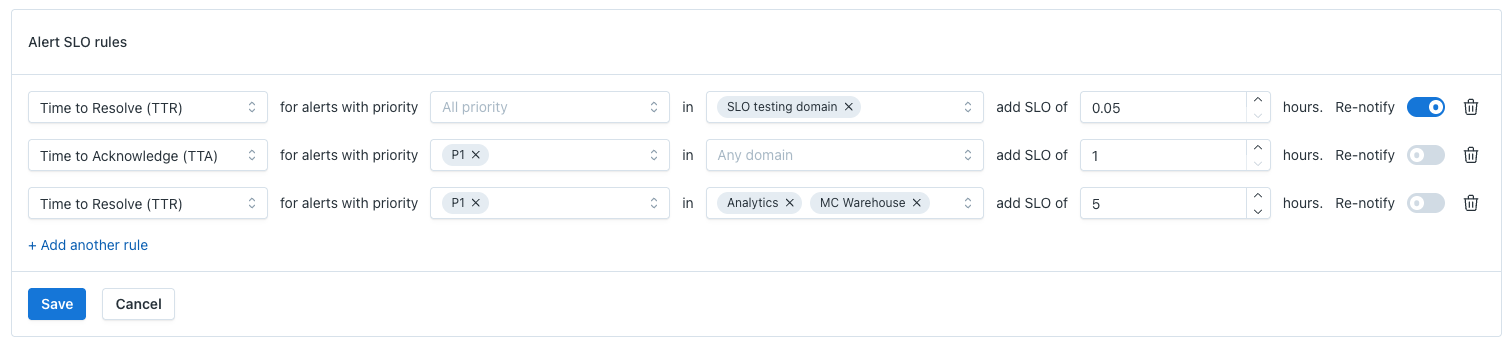
Each policy includes the following fields:
| Field | Description |
|---|---|
| Policy type | TTA (Time to Acknowledge) or TTR (Time to Resolve) |
| Threshold | Number of hours before the SLO is considered breached |
| Priority filter | Limit the policy to alerts of specific priorities (e.g., P1, P2) |
| Domain filter | Limit the policy to one or more domains (multi-select) |
| Re-notification | Toggle on to re-notify the original audience when the threshold is breached |
You can create multiple policies. For example, a P1 TTA policy of 8 hours and a P2 TTA policy of 24 hours can coexist.
Note: Only Account owners and Domain managers can create or modify SLO policies. Monitor editors can lower the priority on noisy monitors to reduce SLO pressure.
Viewing SLO status in the Alerts table
Once a policy is active, an SLO Status column appears in the Alerts table. This column indicates whether each alert is within or has breached its threshold.
You can:
- Sort by SLO Status to surface the most overdue alerts
- Filter by SLO Status to view only alerts that have or have not breached their threshold
Viewing SLO status in alert detail
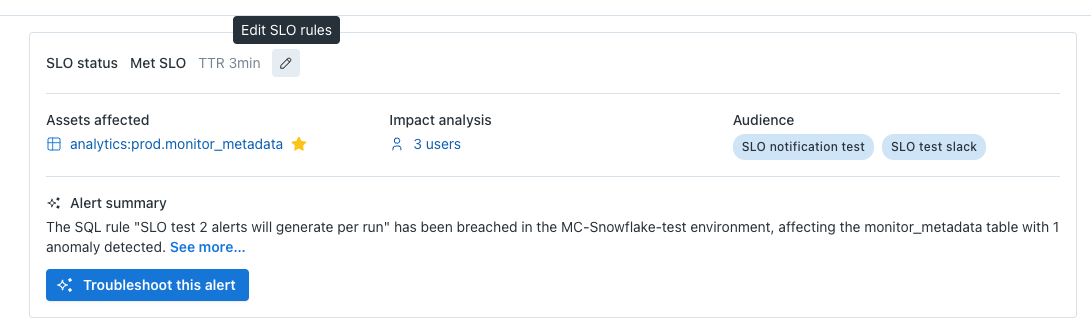
On the Alert detail page, Monte Carlo displays a running count of time remaining until or since the threshold was breached:
- 2 hours until SLO breach — the alert is within the threshold
- 30 minutes past SLO — the alert has exceeded the threshold
The detail view also shows which SLO policy applies to the alert. This is especially useful when multiple policies are in effect across domains or priorities.
Re-notifications
When an alert exceeds its SLO threshold and re-notification is enabled on the policy, Monte Carlo sends a second notification to the original alert audience. The notification indicates that the alert is in breach of SLO.
Re-notification is configured per policy rule and is off by default.
Tip: If SLO re-notifications are adding noise, navigate to Settings > SLOs to adjust your thresholds or disable re-notification on specific rules. You can also lower the priority on monitors that are too sensitive.
Policy conflicts and precedence
If multiple SLO rules could apply to the same alert (for example, two policies with different thresholds that both match the alert's domain and priority), Monte Carlo applies the rule with the strictest time window.
Note: SLOs are only supported for monitors associated with a specific domain. Legacy monitors that have no domain association are not able to support domain filtering on the SLO rule.
Known limitations
Breach detection delay. The breach verifier runs on a periodic schedule. It can take up to 15 minutes after a threshold is exceeded for the alert to be marked as breached and for re-notifications to fire.
Re-notification channel support. SLO breach re-notifications are currently supported on the following channels: Email, Slack, MS Teams, PagerDuty, and Webhook. Other notification providers (Jira, ServiceNow, Azure DevOps, Webex, OpsGenie, Datadog, Incident.io, FireHydrant, Google Chat) do not yet support SLO breach re-notifications.
Updated 4 months ago