
GitHub
Integrate Monte Carlo with your Github to gain visibility into code impact on your data
GitHub Integration
Overview
The GitHub integration allows customers to:
-
Reduce time to resolution by easily checking potentially relevant pull requests in the context of an incident via PRs overlaid on incident charts. See more under Pull requests documentation.
-
Prevent bad data changes before they reach production using MC Prevent — Monte Carlo's suite of agents that surfaces data observability context at every stage of the development lifecycle.
-
Get context on tables via reviewing recent pull request history on the asset page (requires dbt integration).
GitHub Integration Setup
You can set up the integration by installing an instance of the official MC GitHub App for your organization. If you manage multiple GitHub organizations with code relevant to data collected by MC, you need to install the app for each organization.
GitHub Enterprise Server (GHES) has a different setup process. See the GHES specific documentation.
Permissions required:
- Read access to administration and metadata
- Read and write access to issues and pull requests
- Read and write access to repository checks
- Read-only access to repository contents
Write access to issues and pull requests is limited to pull request comments and check runs, used by the PR Agent and CI Agent. Read access to contents is required to read the PR diff.
Steps:
- In Monte Carlo, go to Settings → Integrations
- Click Add
- Under the Code Repositories section, select GitHub
- In the GitHub UI, select:
- The organization
- Optionally, the specific repositories accessible to MC
- Click Install and Authorize
- You will be redirected back to Monte Carlo
If you have the owner role in GitHub, the integration will appear immediately in Settings → Integrations → Code repositories.
If you are not the owner, a request is sent to the GitHub account owner for approval. The integration will appear once they approve.
Once set up, MC will start collecting pull requests that merged after the integration setup time. MC does not have access to historical PRs.
The PR Agent is enabled automatically when you install the GitHub App. See the Repo allowlist section below to control which repos it comments on.
dbt Integrations
Note: Having a dbt integration configured is no longer required for the GitHub integration, but having both provides information for mapping between dbt models and assets for code changes. The PR Agent's validation notebook generation also requires a dbt integration.
Follow docs here to set up your dbt integration.
dbt Cloud
The setup should be automatic. Follow the GitHub Integration Setup steps below to enable.
For legacy data collector customers before v14050, the remote location of dbt projects needs to be configured manually (see dbt Core below).
dbt Core
For dbt Core integrations, the remote location of each dbt project needs to be provided. Go to the Integrations settings page once you have completed the GitHub Integration setup. Under Code repositories, the GitHub integration row will show an alert requiring more GitHub information. Click into the editing drawer via the alert or pen icon to input the missing remote URL.
Alternatively, configure the remote location of each dbt project using the GraphQL API:
mutation updateDbtProjectInfo($uuid: UUID!, $remoteUrl: String, $subdirectory: String) {
    updateDbtProjectInfo(uuid: $uuid, remoteUrl: $remoteUrl, subdirectory: $subdirectory) {
        project {
            uuid
        }
    }
}
Parameters:
| Parameter | Description |
|---|---|
uuid | dbt project UUID |
remoteUrl | e.g. [email protected]:monte-carlo-data/dbt.git |
subdirectory | Root directory of the dbt project within the repo (e.g. analytics). Only needed if the dbt project is in a subdirectory. Leave empty for projects at the repo root. |
PR Agent
The PR Agent reviews pull requests in your enabled GitHub repos and posts an explainable risk assessment comment. It identifies data assets affected by the PR, scores the overall risk as Low, Medium, or High, and surfaces concrete checks to complete before merging.
The PR Agent is also the source of truth for the CI Agent. If you add the CI Agent to GitHub Actions or CircleCI, the CI Agent reads the PR Agent assessment and applies your configured gate policy.
The PR Agent evaluates:
- Which Monte Carlo-monitored tables are affected by the PR's file changes
- Code review findings from the PR diff
- Schema and contract changes, such as removed columns, renamed fields, and type changes
- Downstream lineage and blast radius, including Key Assets
- Asset criticality
- Active open alerts on impacted or upstream assets
- Monitor coverage gaps
- Validation opportunities for dbt model SQL changes
Triggers:
- Automatically when a PR is opened in an allowlisted repo
- On demand by creating a PR comment that says
mc review(case-insensitive)
The PR Agent does not automatically re-run on every new commit. After pushing a fix or meaningful update, comment
mc reviewto request a fresh assessment for the new head commit.
Enabling and disabling the PR Agent
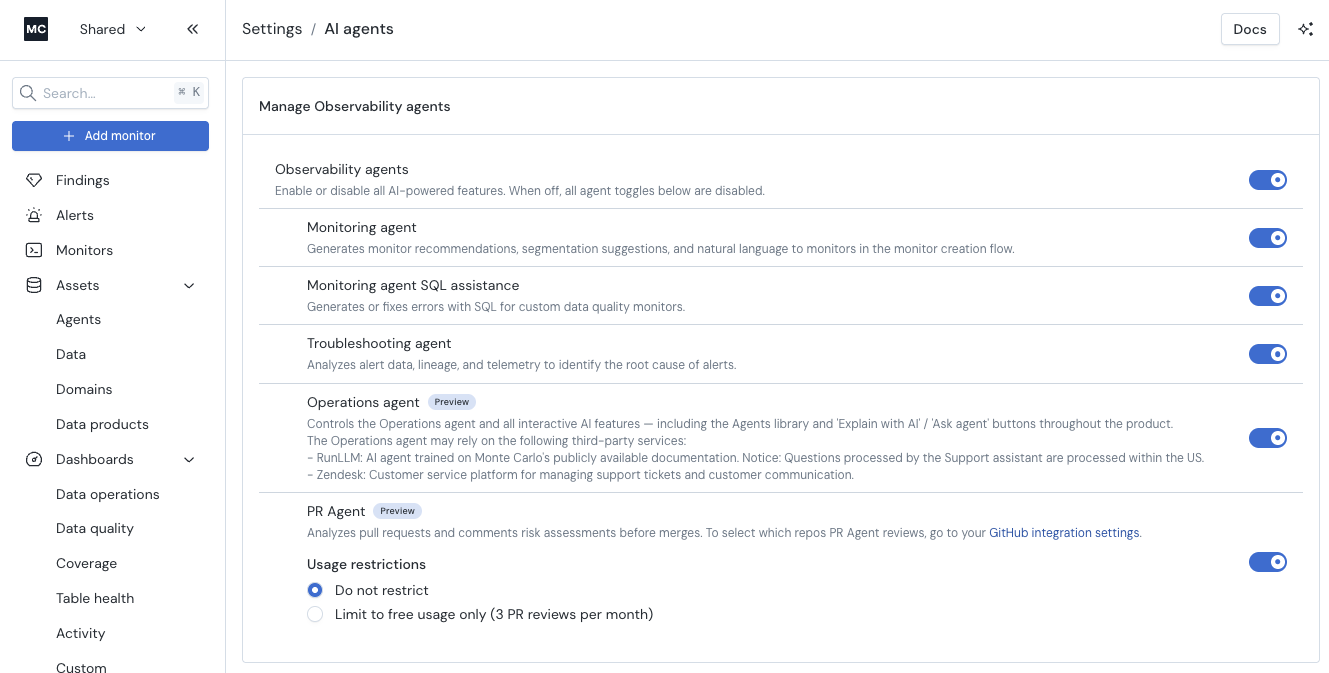
To enable or disable the PR Agent for your account, go to Settings → AI Agents and toggle PR Agent.
When the PR Agent is disabled, Monte Carlo will fall back to the legacy impact assessment comment if that feature is enabled on your account.
Adjusting PR Agent usage
You control how much of the PR Agent your account uses from Settings → AI Agents. There are two options:
- Do not restrict (default) — every pull request receives a full review.
- Limit to free usage only — every pull request still receives a free
review (risk score and summary), and the account is never charged for full
reviews.
You can switch between these at any time, and the change takes effect on subsequent pull requests. Setting an account to Limit to free usage only caps usage immediately without disabling the integration — PRs keep getting reviewed at the free level.
Free review vs. full review
The PR Agent reviews every pull request in your enabled repos. What appears in the review comment depends on whether the PR receives a free review or a full review.
A free review runs on every pull request and is never charged. It gives you a fast read on whether a change is risky and why. A full review goes further — it tells you which parts of the change are risky and what to do about them before the PR merges.
| Capability | Free review | Full review |
|---|---|---|
| Runs on every pull request | ✅ | ✅ |
| Overall risk score (Low / Medium / High) | ✅ | ✅ |
| Control over how the risk score is calculated | ✅ | ✅ |
| Plain-language summary of the PR and its risk | ✅ | ✅ |
| Details of the risky parts of the change, each with a specific recommendation to mitigate it | — | ✅ |
| Auto-generated SQL validation queries for the change | — | ✅ |
| Warnings about open alerts on upstream assets | — | ✅ |
| Suggestions for monitor coverage gaps the change exposes | — | ✅ |
Repo allowlist
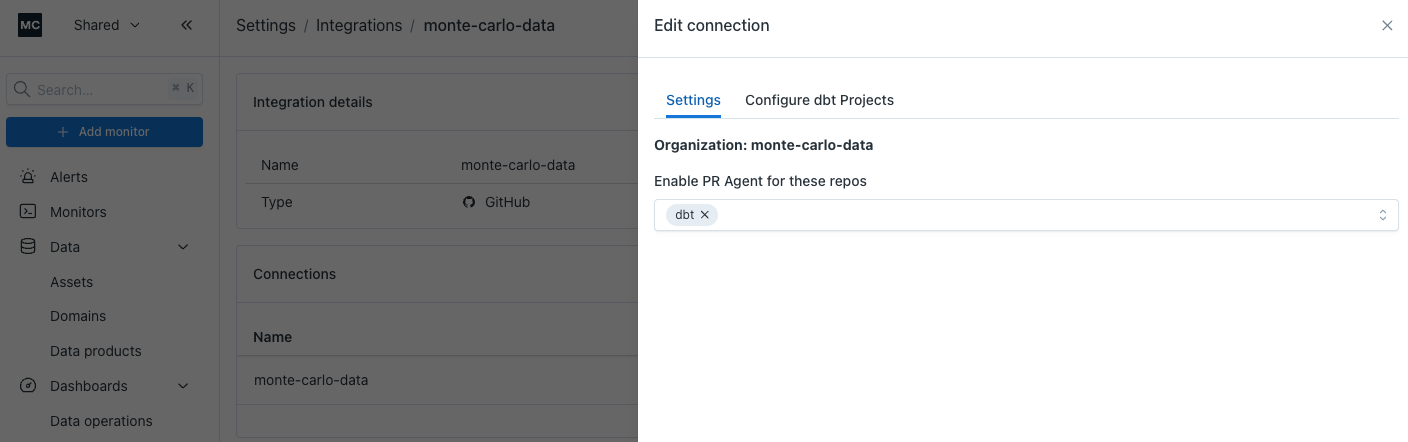
You control which repos the PR Agent comments on via a per-installation allowlist. By default, existing customers have their allowlist seeded with the repos that already have dbt projects connected to Monte Carlo.
To view or change the allowlist:
- Go to Settings → Integrations → GitHub
- Click into the organization you want to configure
- In the Edit connection drawer, open the Settings tab
- Add or remove repos under Enable PR Agent for these repos
If the allowlist is empty, the PR Agent will not post on any PR in that installation — by design. Commenting
mc reviewon a non-allowlisted repo has no effect.
Programmatic access is available via the experimental getPrAgentConfig query and updatePrAgentConfig mutation on the GraphQL API.
What the PR comment looks like
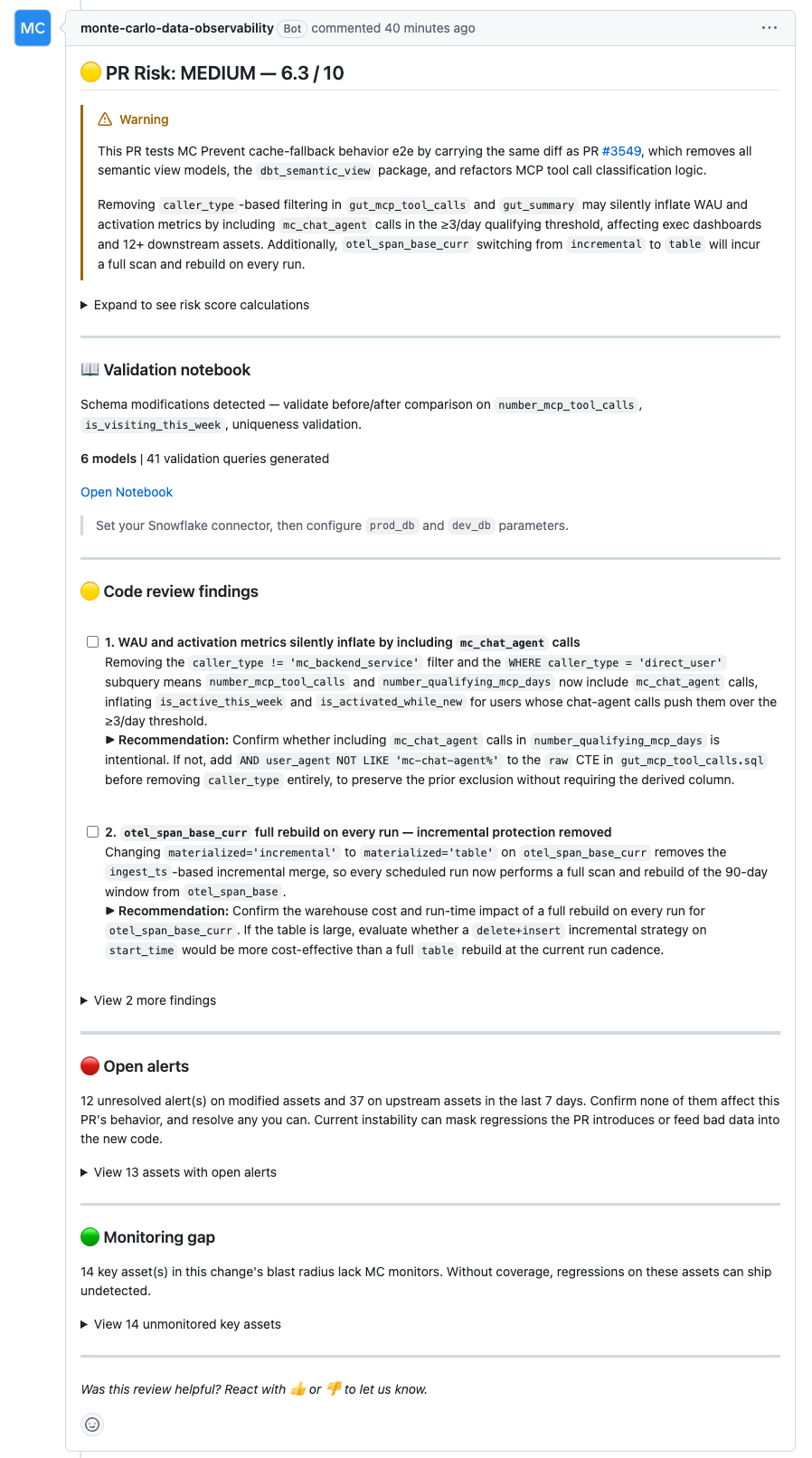
The PR Agent posts a structured comment with the following sections:
The PR Agent posts a rubric-based comment with the following sections:
- Risk title —
PR Risk: Low | Medium | High, including the overall score out of 10. - Risk summary — a short callout explaining the main reason for the rating and the highest-risk issue to review.
- Risk score calculations — an expandable table showing each rubric category, score, configured weight, weighted contribution, and rationale.
- Validation Notebook — when dbt SQL changes are detected, the PR Agent can generate a SQL Notebook with validation queries. The comment includes the detected validation focus, model count, query count, notebook link, and required parameters.
- Code review findings — actionable findings from the PR diff, shown as checklist items with recommended fixes. Additional findings may be collapsed to keep the comment readable.
- Open alerts — when relevant, active Monte Carlo alerts on modified or upstream assets.
- Monitoring gap — key assets in the change's blast radius that do not have Monte Carlo monitor coverage, including asset links and scope.
- Feedback prompt — react with 👍 or 👎 on the bot comment to send feedback to Monte Carlo. Reactions are collected when the PR closes.
Note: For very large PRs, the diff may be truncated before analysis. The PR Agent notes this in the comment when it happens.
Risk factor weights
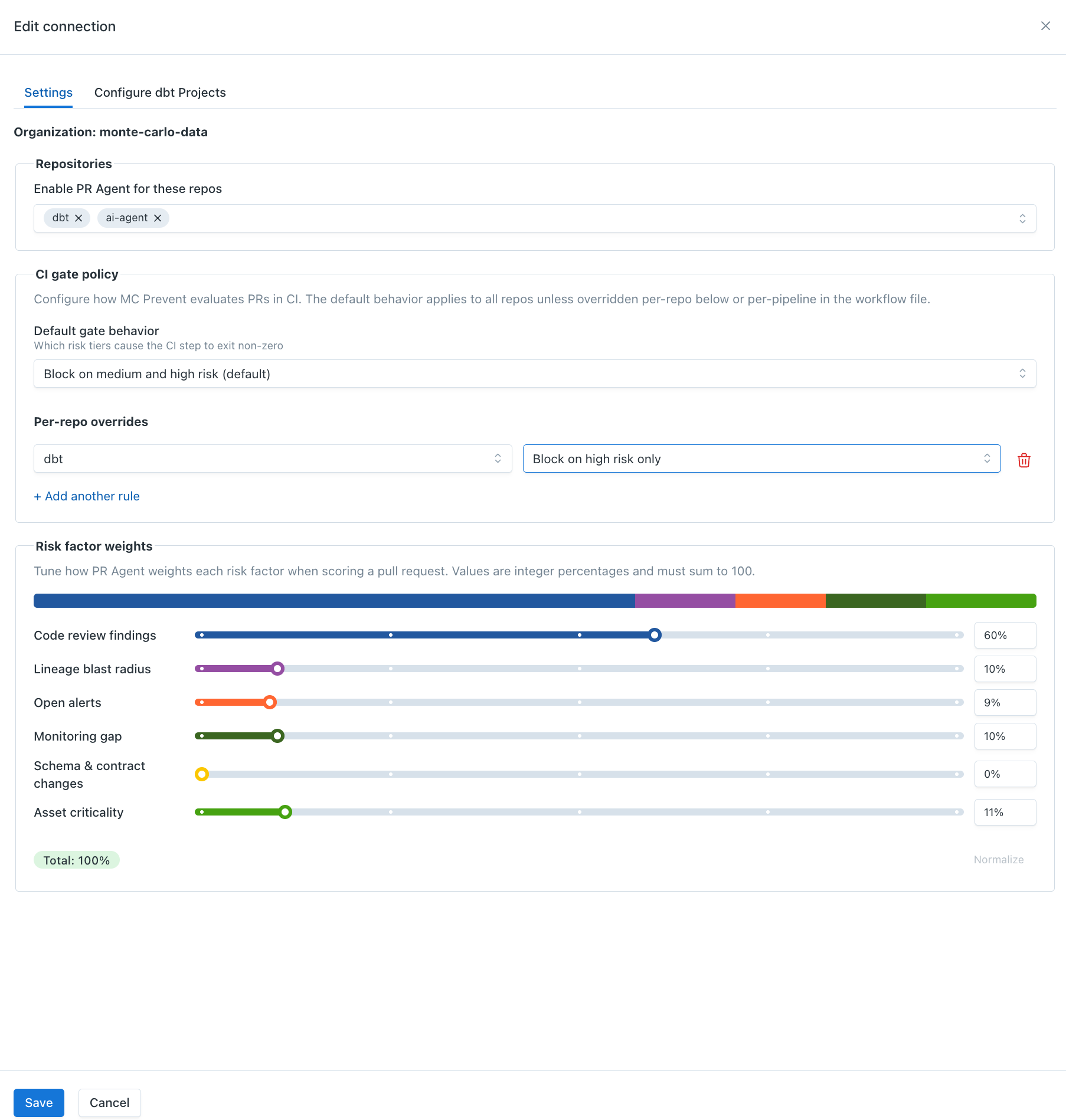
You can tune how the PR Agent weights each risk factor when calculating the overall PR risk score.
To configure risk factor weights:
- Go to Settings → Integrations → GitHub
- Click into the organization you want to configure
- In the Edit connection drawer, open the Settings tab
- Under Risk factor weights, adjust the category percentages
The six configurable categories are:
- Code review findings — risks intrinsic to the code changes
- Lineage blast radius — downstream assets that may be affected
- Open alerts — unresolved Monte Carlo alerts on modified tables and upstream feeders
- Monitoring gap — monitor coverage on modified, upstream, and downstream assets
- Schema & contract changes — column removes, renames, type changes, primary key changes, and contract breaks
- Asset criticality — how much the directly changed asset matters to the business
Weights must be whole-number percentages and must sum to 100%. Monte Carlo shows the live total while you edit, and the Normalize button rescales the current values to 100% while preserving their relative proportions.
Default weights are:
| Risk factor | Default weight |
|---|---|
| Code review findings | 40% |
| Lineage blast radius | 15% |
| Open alerts | 15% |
| Monitoring gap | 15% |
| Schema & contract changes | 10% |
| Asset criticality | 5% |
Changes apply to new PR Agent reviews for that GitHub installation. Existing PR comments and check runs are not recalculated automatically; comment mc review on a PR to request a fresh assessment using the latest configuration.
Missing permissions
If the GitHub App is missing the required contents:read permission on a repo, the PR Agent posts a "missing permissions" comment with a link back to these docs. Re-authorize the app in GitHub → Settings → Applications → Monte Carlo to grant the permission.
CI Agent
The CI Agent is an optional step you add to GitHub Actions or CircleCI. It reads the PR Agent's MC Prevent risk assessment, applies your gate policy, and posts an MC Prevent: CI Gate Result GitHub Check Run.
When combined with GitHub branch protection rules, the CI Agent can block PRs whose risk tier meets your configured threshold.
PR Agent vs. CI Agent
The PR Agent reviews pull requests and produces the MC Prevent risk assessment.
The CI Agent is the enforcement step. Add it to your CI pipeline when you want a required check that can block merges based on the PR Agent's risk tier.
Setup
Choose your CI platform:
- GitHub Actions —
monte-carlo-data/mc-prevent-action - CircleCI —
monte-carlo-data/mc-prevent-orb
Each repository includes setup instructions, examples, and parameter documentation.
How It Works
- The CI Agent runs on pull request events. Draft PRs are skipped.
- It calls Monte Carlo's
/ci/assessAPI with the repo, PR number, commit SHA, and optional CI policy. - Monte Carlo fetches the PR Agent's rubric assessment from GitHub.
- The PR risk score is mapped to a risk tier:
< 3.5= low< 6.5= medium>= 6.5= high
- Monte Carlo compares the tier against your
block-onpolicy and returnspassorfail. - The result appears in the CI job output, step summary, and the MC Prevent: CI Gate Result check run.
If no assessment is available for the current commit, the CI Agent can reuse the cached CI Gate verdict from a previous workflow run on the same branch.
Gate Policy
Use block-on to choose which risk tiers fail CI.
| Setting | Behavior |
|---|---|
low+ | Block low, medium, and high risk PRs |
medium+ | Block medium and high risk PRs |
high+ | Block only high risk PRs |
none | Never block; show results only |
Default: when block-on is not set in CI, Monte Carlo uses the policy configured in the UI.
Configuration Precedence
Monte Carlo resolves the effective policy in this order:
block-onin the CI workflow or CircleCI job- Per-repo override in Monte Carlo UI
- Installation-wide default in Monte Carlo UI
- System default:
medium+
Use CI-level block-on only when a specific pipeline needs to override the central UI policy.
Configure in Monte Carlo UI
- Go to Settings → Integrations → GitHub
- Click into the organization you want to configure
- In the Edit connection drawer, open the Settings tab
Under MC Prevent CI Configuration, set:
- Default gate behavior: applies to all repos in the GitHub installation.
- Per-repo overrides: exception rules for specific repos.
Per-repo overrides are useful when one repo should gate differently than the org default. For example, use high+ for an experimental repo while keeping medium+ as the default for production repos.
Remediating a failed gate
If MC Prevent blocks a PR, push the fix first, then comment mc review on the PR to request a fresh PR Agent assessment for the new head commit.
The CI Agent uses the latest PR Agent assessment available for the commit being checked. If the PR Agent review finishes while CI is still polling, the gate can pick up the updated assessment automatically. If no assessment exists yet before CI times out, the previous verdict is preserved so the gate never silently downgrades. To get an updated assessment, comment mc review and rerun CI — the CI Agent will pick up the new assessment as soon as the PR Agent completes.
If the team has reviewed the fix and is comfortable proceeding before a fresh assessment is available, add the mc-override label to bypass the gate for the current PR
Override
Add the mc-override label to a PR to bypass the CI Agent.
The gate returns pass, and Monte Carlo posts a green MC Prevent: CI Gate Result check run for the current commit, so no new commit or CI re-run is required. Override activity is recorded in service logs.
Progressive Adoption
| Stage | Result |
|---|---|
| CI step added, credentials missing | Pass; skips without API call |
| Credentials configured, PR Agent disabled or repo not allowlisted | Pass after polling with no assessment |
| Credentials configured, PR Agent enabled | Full risk-tier gate result |
See GitHub Action and CircleCI setup guide on how to setup credentials.
Example configuration on Monte Carlo UI
Limitations
- MC only collects PRs that merged after the integration setup time. Historical PRs are not available.
- Schema change monitors do not display GitHub pull requests.
- Pull request history on the asset page requires a dbt integration.
- Organizations using IP allowlists must add Monte Carlo's SaaS public IP address (see Account Information).
- The PR Agent automatically runs when a PR is opened in an allowlisted repo. It does not automatically re-review every new commit; after pushing a fix, comment
mc reviewto request a fresh assessment for the new head commit. - Very large files may be skipped for full-content inspection. The PR Agent can still review the PR diff, but individual file reads are limited.
- MC Prevent currently runs on GitHub only. GitLab and Azure DevOps PRs are supported for incident-chart PR overlays, but not for PR Agent reviews or the CI Agent gate.
FAQ
Q: I have a dbt Core integration and I'm not sure my remote URL and subdirectory are correct. What's the right format?
Remote URL should be one of:
https://github.com/<org>/<repo>git://github.com/<org>/<repo>.git
Subdirectory should be the root directory of the dbt models within the repo, and is only needed if the dbt project is in a subdirectory. For example:
- Model path
analytics/models/foo/bar.sql→ subdirectory isanalytics - Model path
models/foo/bar.sql→ leave subdirectory empty
Q: I just set up the integration. Why don't I see pull requests showing up yet?
MC only collects PRs that merged after the integration setup time. It does not have access to historical PRs, so it may take a few hours or days for PRs to start appearing depending on how frequently your team merges.
Q: The PR Agent isn't commenting on one of my repos. Why?
Check the repo allowlist: Settings → Integrations → GitHub → (org) → Edit connection → Settings tab → Enable PR Agent for these repos. If the repo isn't in the list, add it. The allowlist applies to both auto-triggered reviews and manual mc review comments.
Q: Why can't I see pull requests for schema change alerts?
Schema change monitors don't use machine learning or GitHub integration. They compare table schema hour-over-hour and identify differences — they will not show GitHub pull requests.
Q: Why can't I see pull requests in the asset summary page?
dbt integration is required to see pull request history on the asset page.
Q: My PRs are not showing up in Monte Carlo and my GitHub organization uses an IP allowlist. Do I need to allowlist any Monte Carlo IPs?
Yes. Add Monte Carlo's SaaS public IP address to your GitHub organization's IP allowlist. You can find the IP address on the Account Information page.
Q: The CI Agent action is waiting but never getting an assessment. What's happening?
The CI Agent looks for a PR Agent assessment on the commit being checked.
Common causes:
- The repo is not in the PR Agent allowlist. Add the repo, then comment
mc reviewon the PR to trigger an assessment. - The PR Agent has not reviewed the latest commit yet. After pushing a fix, comment
mc reviewto request a fresh assessment for the new head commit. - The PR Agent is still running. The CI Agent polls every 30 seconds for up to 5 minutes by default. If no assessment is found for the current commit, it may reuse a cached verdict from a previous commit; if no cached verdict exists, it defaults to
pass.
If your PR Agent reviews consistently take longer than the polling window, increase the max-wait input.
Q: Can I trigger the PR Agent manually?
Yes. Comment mc review on any PR in an allowlisted repo to trigger a new assessment. This is useful after pushing changes to address a prior risk finding. The comment should be created after the new commit is pushed so the PR Agent reviews the latest head commit.
Q: I set up the GitHub integration but didn't add the CI Agent GitHub Action/CircleCI. Will I still get risk assessments?
Yes. You will receive PR Agent risk assessment comments on new PRs in your allowlisted repos. The CI Agent GitHub Action/CircleCI is only needed if you want a pipeline gate that can block merges based on that assessment.
Q: How do I turn the PR Agent off?
Two options:
- For a specific repo: remove it from the allowlist at Settings → Integrations → GitHub → (org) → Edit connection → Settings tab.
- For the whole account: go to Settings → AI Agents and toggle PR Agent off. You will fall back to the legacy impact assessment comment if that feature is enabled on your account.
Updated 4 months ago