
PII / Compliance Agent
Warehouse-native PII discovery and monitoring for compliance and governance teams.
Discover, monitor, and govern sensitive data across your warehouse — without writing SQL, and without your data ever leaving your environment.
The PII agent helps compliance, data governance, and platform teams answer three questions with confidence:
- Where does PII live in my warehouse?
- Is sensitive data sitting unmasked where it shouldn't be?
- When new PII appears (or leaks) how do I know?
It runs entirely inside your warehouse using SQL-based detection, then aggregates findings alongside your existing warehouse classification tags into a single, exportable inventory view — the audit-ready map of PII posture that compliance and audit teams have always wanted, but never had a straightforward way to produce.
How to get started
- Go to Compliance in the left nav
- "Add your first PII scan"
- The form will allow you to define for the agent: scope, PII types, threshold, optional tags, and more
Under the hood, the agent creates a Bulk PII monitor — a dedicated monitor type that scans across multiple columns and PII types in a single pass, with sampling enabled by default. This isn't something you'd replicate through the standard metric monitor UI, which requires configuring each PII type individually and doesn't support bulk sampling.
The monitor only alerts on PII that's unmasked from MC's perspective.MC scans through the role you granted it in your warehouse (typically MONTE_CARLO_ROLE). If dynamic masking policies mask values for that role, MC sees the masked values and doesn't flag them.
The PII Inventory — your single source of truth
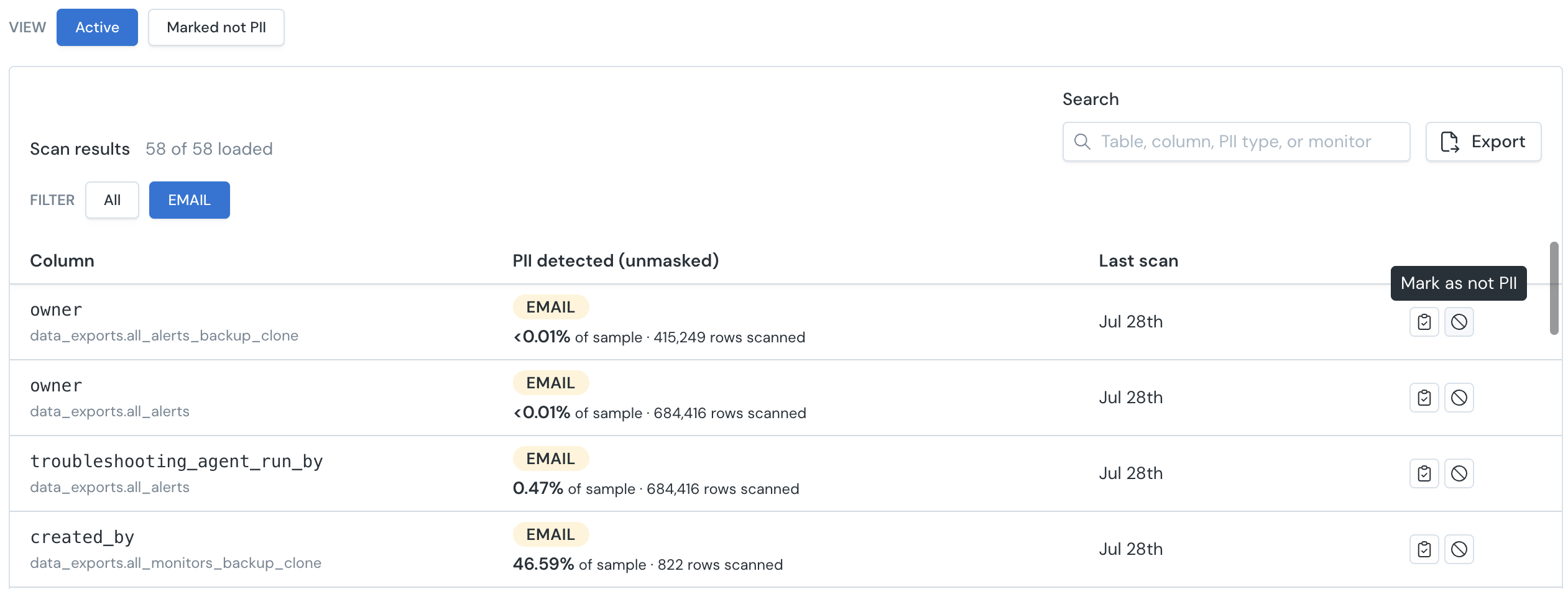
The PII Inventory is the agent's primary output view. Find an aggregated view under Compliance → Results tab, or in the Results tab of a specific Bulk PII monitor.
The inventory answers where does sensitive unmasked data live across our warehouse — and just as importantly, What sensitive data do I already have classified, and where?
The PII Inventory aggregates findings from your Bulk PII monitors alongside your existing warehouse classification tags, giving you one place to see where sensitive data lives, whether its masked and how it's classified. You can drill into a finding and validate it against supporting rows sampled from your warehouse. Row sampling requires data sampling to be enabled for your environment (Settings → WH →Sampling toggle); if your org keeps it disabled for compliance reasons, findings still appear but the underlying rows aren't surfaced.
Filter by warehouse, database, or schema. Export a summary for CIO, audit, or cyber insurance reviews.
Reviewing findings
Not every detection is real PII. e.g. a numeric ID column can match the phone-number pattern. When a finding is wrong, mark it as Not PII from the inventory.
- The decision persists across future scans — the finding drops out of active results and stops triggering notifications.
- The column keeps getting scanned. This suppresses the finding, not the coverage.
- Suppressed findings stay visible in a filtered/audit view, so every review decision is traceable.
- Undo restores the finding to active if it should be treated as PII later.
How detection works
If your team already tags columns as PII in your warehouse, MC uses those tags as supplementary context in the inventory.
- Snowflake — reads
PRIVACY_CATEGORY,SEMANTIC_CATEGORY, andSEMANTIC_SUBCATEGORYtags applied by Snowflake's native classification. Snowflake's semantic categories are often broader than a single MC type — an SSN, for example, is derived from broad values likeNATIONAL_IDENTIFIER/TAX_IDENTIFIERrather than a dedicatedUS_SSNcategory. - Databricks — reads Unity Catalog
class.*tags. - BigQuery — tag integration is not yet supported. SQL-based PII detection works normally on BigQuery;
By default, MC uses these tags to distinguish expected PII from unexpected PII in the inventory. Tags don't replace detection; they enrich it.
Warehouse tag integration
If your team already tags columns as PII in your warehouse, MC uses those tags as supplementary context in the inventory.
- Snowflake — reads
PRIVACY_CATEGORYandSEMANTIC_CATEGORYtags applied by Snowflake's native classification, including the country-specific taxonomy (e.g.,US_SSN,NZ_INLAND_REVENUE_NUMBER,AU_TAX_FILE_NUMBER). - Databricks — reads Unity Catalog
class.*tags. - BigQuery — not yet supported. Detection runs normally on BigQuery, but column-level policy tags are not read into the inventory yet.
By default, MC uses these tags to distinguish expected PII from unexpected PII in the inventory. Tags don't replace detection; they enrich it.
◆ No tagging? No problem. MC's SQL-based detection works independently. Tags are a supplementary signal, not a requirement.
Supported PII types
| PII type | Region | Detection method |
|---|---|---|
| Social Security Number (SSN) | US | Regex |
| Email address | Global | Regex |
| Phone number | US | Regex |
| ZIP code* | US | Regex |
| State code* | US | Regex |
| Credit card number | Global | Regex + Luhn checksum |
| Tax File Number (TFN) | Australia | Regex |
| Medicare number | Australia | Regex |
| Australian Business Number (ABN) | Australia | Regex |
| Phone number | Australia | Regex |
| Postcode | Australia | Regex |
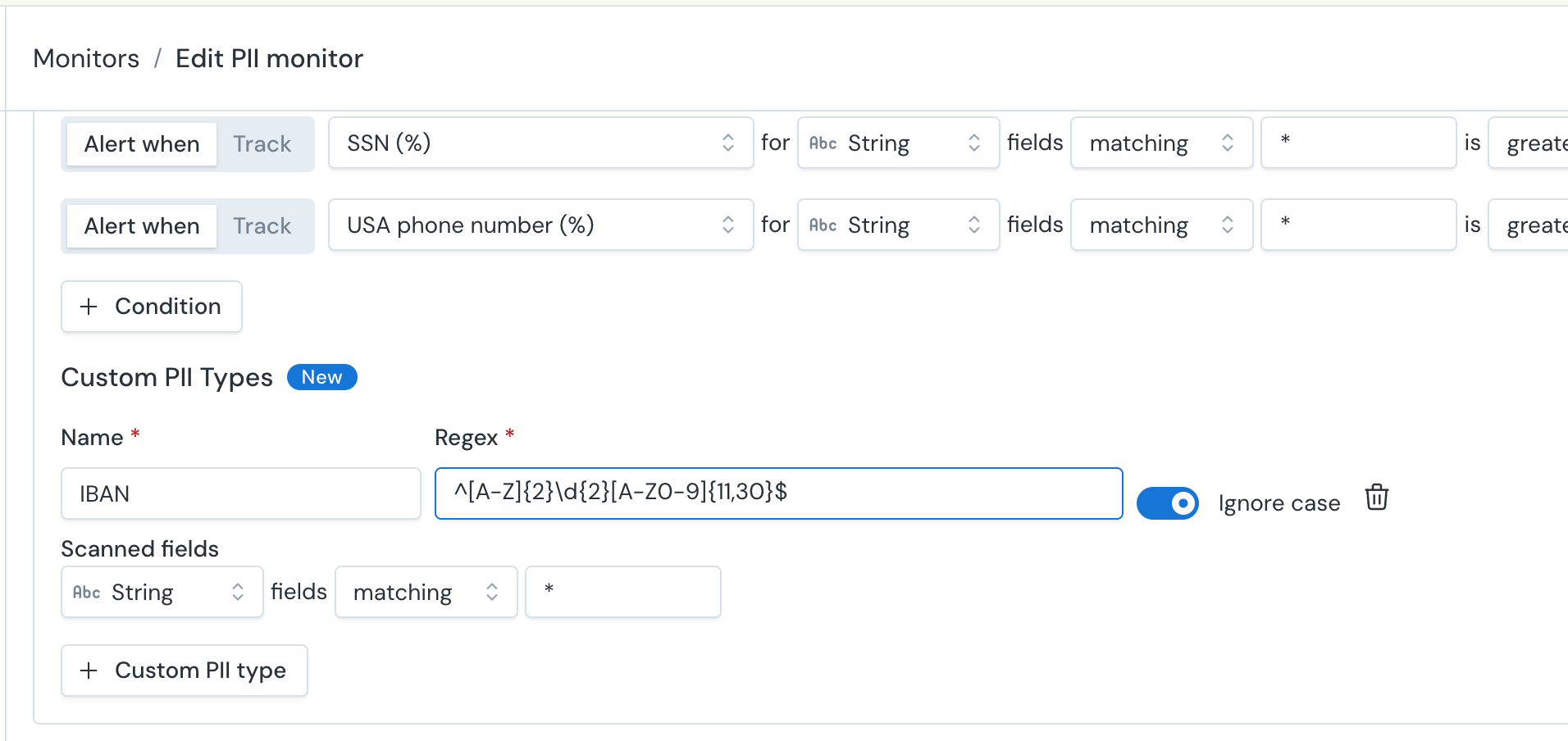
| org-specific identifiers | Global | CUSTOM REGEX |
*US ZIP code and US state code are supported but noisy — they're excluded from the default, product-recommended setup and hidden from the inventory display unless you explicitly opt in.
CUSTOM REGEX
Regex must be compatible with your warehouse's SQL engine.
Patterns are compiled into the underlying SQL query that runs in-warehouse.
Examples:
- Employee ID: EMP-\d6
- Medical Record Number: MRN\d10
- Internal member: ^M\d8$
- Order ID: ORD-[A-Z0-9]10
Accessing the agent
From the Monte Carlo UI
Compliance in the left nav. The Health tab shows governance posture, the Results tab holds the PII Inventory, and the Chat tab is where you create and adjust monitors.
From your IDE (developers)
The pii-monitor skill is available through the Agent Toolkit in AI coding agents like Claude Code and Cursor. The skill provides access to the find_classified_assets, create_pii_monitor, get_pii_types, get_pii_scan_inventory, and get_pii_warehouse_tag_summary MCP tools.
Notes
- Masked / tokenized values. The monitor cannot identify what PII type is hidden behind masked values (
****,XXXX) - Warehouse footprint. Detection runs as SQL queries against your warehouse — the same design that keeps your data in place means scans consume warehouse compute, on the warehouse configured for your MC connection. Sampling bounds the cost per table as much as possible
- However those queries consume your own warehouse compute, which is billed by your warehouse provider and is separate from Monte Carlo credits.
- Sampling. Bulk PII monitors sample rows by default (configurable or up to 1M rows). For very large tables, a bounded sample keeps warehouse compute predictable.
- Result latency. After a scan runs, PII scan results can take up to an hour to appear in the inventory.
- Starting Oct 1st, PII detection moves from free preview to metered usage.
Updated about 1 month ago