
Snowflake Tasks (Public Preview)
Overview
Snowflake tasks are scheduled SQL objects. When you chain them together with dependencies, Snowflake arranges them into a DAG called a task graph (a root task and its dependent tasks). Monte Carlo can ingest those task graphs so you can monitor them the same way you monitor Airflow DAGs, dbt jobs, or any other orchestrator — see which task populated a table, when it last ran, whether it succeeded, and get real-time alerts when a task run fails.
The Snowflake Tasks integration is layered onto your existing Monte Carlo Snowflake warehouse connection, reusing the same credentials and authentication end-to-end. The same connection backs both your monitored tables and your task graphs, so task lineage resolves directly against the tables you already monitor.
Feature Support
| Category | Capability | Support |
|---|---|---|
| Tasks | Task failure alerts | ✅ |
| Tasks | Webhook triggered collection | ✅ |
| Tasks | Task run history | ✅ |
| Lineage | Table-to-Table lineage | ✅ |
| Lineage | Task-to-Task lineage | ✅ |
| Lineage | Column-level lineage | ❌ |
What Monte Carlo Ingests
Monte Carlo collects the following from your Snowflake account:
Task graphs
Each task graph (a root task and the tasks that depend on it) is collected as one asset. For each task in the graph, Monte Carlo captures:
- SQL definition — the SQL the task runs (used to derive lineage)
- Schedule — the cron expression (with timezone) or interval that triggers the root task
- Owner — the Snowflake role that owns the task
Runs
Monte Carlo collects run history for each task graph and for the individual task runs within it: status (succeeded, failed, cancelled, running, and so on), scheduled time, start and completion times, how the run was triggered, and — for failures — the Snowflake error code and message.
Prerequisites
Before enabling Snowflake Tasks, you'll need an existing Monte Carlo Snowflake warehouse connection. You can also set up Snowflake Tasks when you are onboarding a Snowflake warehouse connection for the first time.
Required Snowflake permissions
The role Monte Carlo uses must have MONITOR privileges on the Tasks. This can be granted per task or for all tasks in the account:
Per task:
GRANT MONITOR ON TASK <task_name> TO ROLE <MONTE_CARLO_ROLE>;Account-wide:
GRANT MONITOR EXECUTION ON ACCOUNT TO ROLE <MONTE_CARLO_ROLE>;Setup
You enable Snowflake Tasks on an existing Snowflake warehouse integration. You can choose to enable Tasks collection on the same connection you use for your warehouse integration or on a new connection. Use a new connection when you want Tasks to be collected through a different user, role or warehouse.
Option A — Enable Tasks when setting up a Snowflake integration for the first time
When setting up a brand new Snowflake integration, you can enable Snowflake Tasks during the onboarding flow by selecting this box:
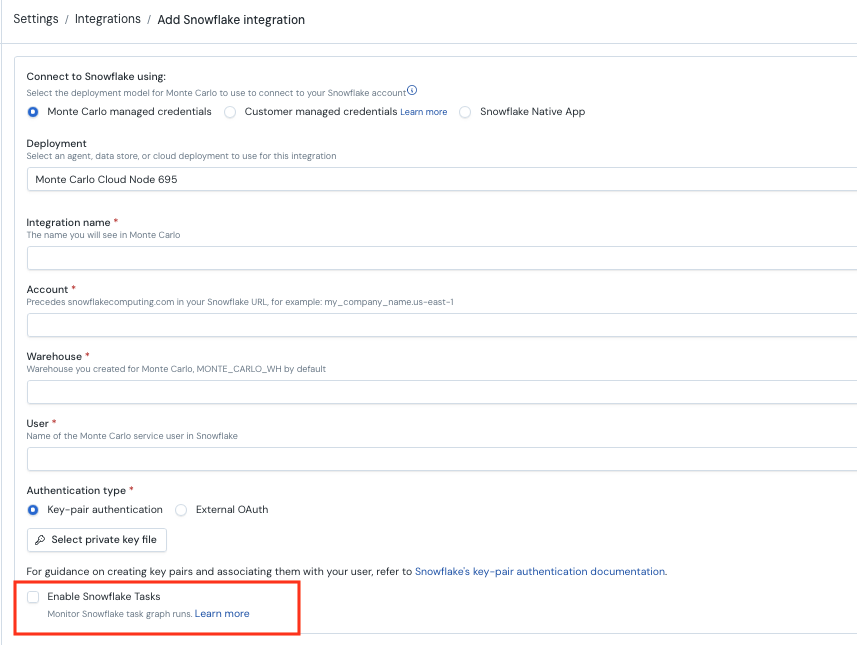
This will enable Task collection through the same connection as all your other Snowflake assets.
Option B — Enable Tasks on an existing Snowflake integration using the same connection (same credentials)
If you already have a Snowflake integration and want to enable Task collection using the same connection, you can enable it by going to Integrations -> Add -> Orchestration -> Snowflake Tasks.
Choose your Snowflake integration and 'Use an existing connection`
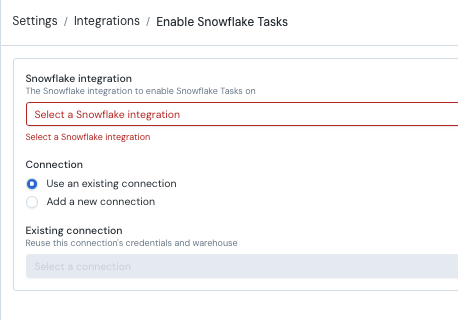
Option C — Enable Tasks on an existing Snowflake integration using a new connection (new credentials)
If you already have a Snowflake integration and want to enable Task collection using a new connection so you can use different credentials, you can enable it by going to Integrations -> Add -> Orchestration -> Snowflake Tasks.
Choose your Snowflake integration and "Add a new connection". Then enter the Task specific credentials:
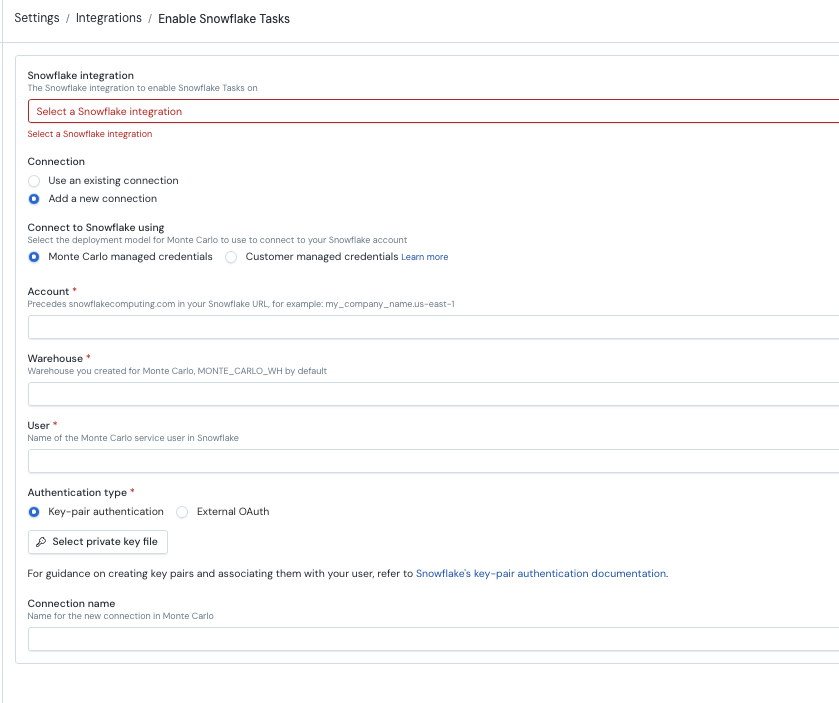
Webhook Triggered Real-Time Run Failure Alerts
After you enable Snowflake Task collection you will be given a webhook URL and option to generate an integration key. These can be used to trigger a run collection so that Monte Carlo can collect run failures as soon as they occur, instead of waiting for the next hourly collection cycle.
This requires some additional configuration in your cloud infrastructure, see full instructions here Real Time Task Failure Notifications.
Lineage
Monte Carlo derives lineage by parsing each task's SQL definition and resolving the referenced source and destination tables against the warehouse behind the connection.
Key points:
- A referenced table must be in a monitored schema for the edge to land on it.
- Table-level only. Column-level lineage is not produced.
- Automatic lineage requires a SQL definition. Because lineage is parsed from the task's
definition, it only covers tasks whose definition is a lineage-bearing SQL statement (see below).
Lineage for non-SQL tasks
Automatic lineage is derived by parsing each task's definition SQL, so it only covers tasks whose definition is a lineage-bearing SQL statement (INSERT, MERGE, COPY, CREATE TABLE AS SELECT, and the like). Tasks are always collected as assets and runs regardless of definition type — a task's runs, schedule, owner, and position in the DAG are monitored even when its definition isn't parseable SQL. Only the parsed lineage edges are absent for tasks such as:
CALL <procedure>(), stored procedures, and Snowflake Scripting blocksEXECUTE IMMEDIATE/ dynamic SQL- dbt-project, Snowpark, notebook, and other non-SQL task types
To produce lineage for these tasks, tag the SQL they run with Monte Carlo's query tags. The tag format (a JSON object in a SQL comment or a native query tag) is documented on Lineage between jobs and tables — for Snowflake Tasks, use these values:
| Tag key | Value | Required |
|---|---|---|
mcd_job_id | The task graph's root task fully-qualified name, exactly as SHOW TASKS reports it: DATABASE.SCHEMA.ROOT_TASK. | Yes |
mcd_task_id | The individual task's fully-qualified name: DATABASE.SCHEMA.TASK. | No — but requires mcd_job_id |
mcd_resource_id | The registered Snowflake Tasks (ETL) connection's resource UUID. | Only to disambiguate when the same fully-qualified name is registered under more than one ETL connection |
Match the fully-qualified name exactly, including caseThe tagged value must match the task's fully-qualified name character-for-character, including case. Snowflake uppercases unquoted identifiers (so
daily_rootbecomesDAILY_ROOT) — tag with the uppercased name. A case-sensitive (quoted) task name must be tagged with that exact case, or resolution won't match.
For a procedure-backed task, set QUERY_TAG inside the procedure so the queries it runs carry the tag:
ALTER SESSION SET QUERY_TAG =
  '{"mcd_job_id": "MY_DB.PUBLIC.DAILY_ROOT", "mcd_task_id": "MY_DB.PUBLIC.TRANSFORM_STEP"}';
INSERT INTO my_db.public.target SELECT * FROM my_db.public.source;
This relies on query-logs collection being enabled on the Snowflake connection and the Snowflake Tasks integration being registered — both already true once you've set up this integration.
FAQs
Q: Task graphs appear, but I don't see lineage.
- The tables the task reads or writes aren't monitored by Monte Carlo. Lineage only attaches to tables catalogued in the connection's warehouse — connect and catalog those tables, then wait for the next collection.
Updated about 1 month ago