
Push Ingest API
This feature requires an Enterprise or higher plan to use.
This feature is in Public Preview. See here for more information on what this means.
What is the ETL Push Ingest API?
The ETL Push Ingest API lets you push pipeline metadata and run events directly to Monte Carlo using the pycarlo SDK or direct HTTP. Use it to integrate any ETL or orchestration tool that Monte Carlo doesn't natively support.
Two endpoints cover everything:
| Endpoint | What it ingests | pycarlo method |
|---|---|---|
POST /ingest/v1/etl/metadata | Job/pipeline structure — names, tasks, schedules, lineage | svc.send_etl_metadata(...) |
POST /ingest/v1/etl/runs | Run execution data — status, timing, errors, task-level breakdown | svc.send_etl_runs(...) |
Every accepted request returns an invocation_id. Save it — it is your primary handle for tracing a push through the downstream systems.
This is the push approach — you control when and how data is sent. If you prefer a turnkey setup where Monte Carlo handles scheduling and pagination, see Custom ETL Connectors instead.
End-to-end workflow
- Set up your integration — Create a Custom ETL integration in the Monte Carlo UI with Push selected for metadata.
- Create an Integration key — Generate a dedicated ingestion key for authenticating push requests.
- Push data — Send pipeline metadata and run events using the pycarlo SDK or direct HTTP.
- View pipelines — Once data is in Monte Carlo, pipelines appear in your workspace with status, run history, and lineage.
1. Set up your integration
Go to Settings → Integrations → Add → Orchestration → Custom ETL integration and create a connection for your ETL tool. Select Push for metadata — the UI will provide the ingestion URLs and resource UUID.
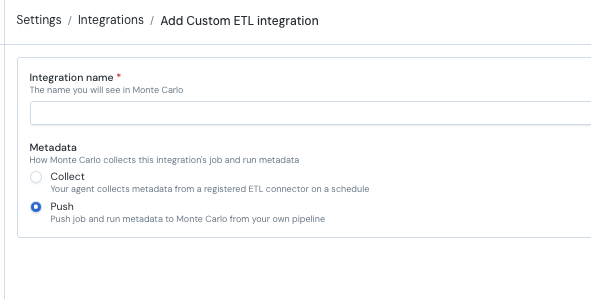
Save the resource UUID — you'll need it for every push request. You can also retrieve it later via GraphQL:
query {
  getUser {
    account {
      etlContainers{
        uuid
        name
        type
      }
    }
  }
}
2. Create an Integration key
Push requests use a dedicated integration key with scope Ingestion. A standard Monte Carlo API key will not work.
Option A — UI (recommended)
After creating your push-based ETL integration you can generate an ingestion key from the UI.
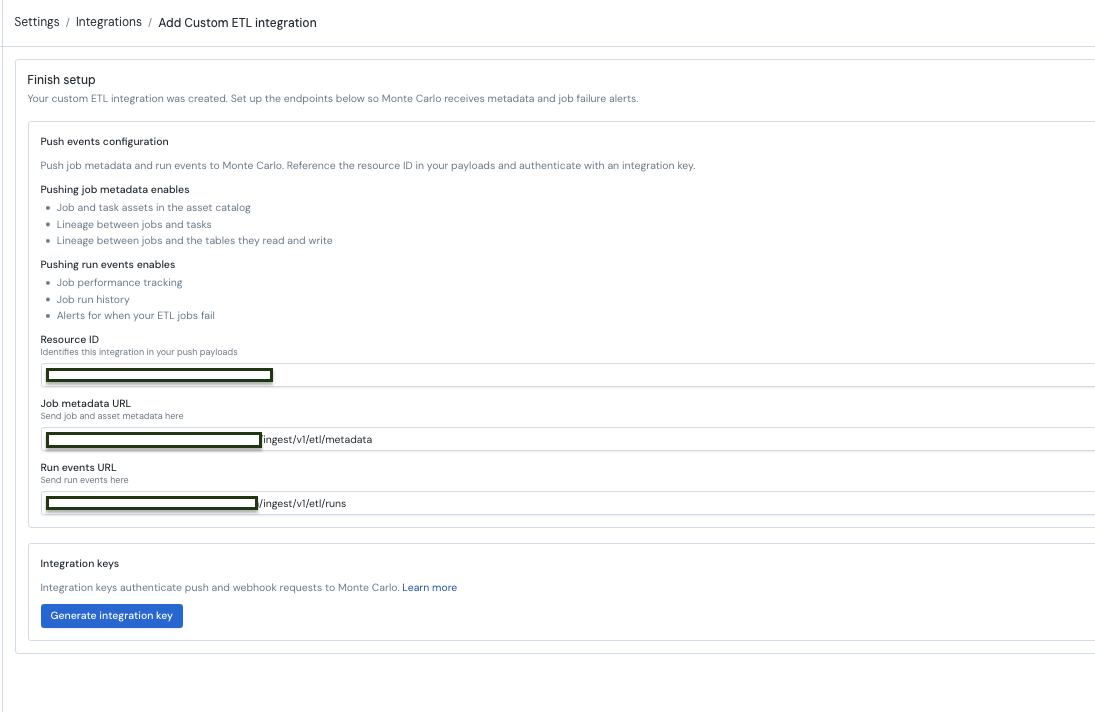
Option B — GraphQL mutation
Use the API Explorer with a GraphQL API key. Using the ETL container UUID from step 1, generate an integration key with:
mutation {
  createIntegrationKey(
    description: "ETL push ingestion key"
    scope: Ingestion
    warehouseIds: ["<etl_container_uuid>"]
  ) {
    key { id secret }
  }
}
Store the key secret immediatelyThe key secret is shown only once at creation time. Save it to a secure secrets manager before closing the terminal.
3. Push data
Set up your environment variables for the examples below:
export MC_INGEST_KEY_ID="<ingestion-key-id>"
export MC_INGEST_KEY_TOKEN="<ingestion-key-secret>"
export MC_RESOURCE_UUID="<resource-uuid>"
Keep credentials out of source controlReplace placeholder values with your actual credentials. Never commit real key secrets to version-controlled files or CI configuration.
Option A — pycarlo SDK (recommended)
Install the SDK:
pip install pycarloInitialize the client
import os
from pycarlo.core import Client, Session
from pycarlo.features.ingestion import IngestionService

service = IngestionService(mc_client=Client(session=Session(
    mcd_id=os.environ["MC_INGEST_KEY_ID"],
    mcd_token=os.environ["MC_INGEST_KEY_TOKEN"],
    scope="Ingestion",
)))
Push pipeline metadata
Illustrative exampleThe job names, task names, and lineage references below are illustrative. Replace them with values from your ETL tool.
from pycarlo.features.ingestion import (
    EtlAsset, EtlGroup, EtlTask, Schedule, Owner, AssetRef, Tag,
)

job = EtlAsset(
    # Required
    job_source_id="pipeline-123",           # stable vendor ID
    name="Build revenue model",             # display name

    # Optional — structure
    group=EtlGroup(
        source_id="analytics-project",      # required within group
        name="Analytics Project",
        group_type="project",
    ),
    tasks=[
        EtlTask(
            task_source_id="extract-charges",
            name="Extract charges",
            task_type="SqlOperator",
            inputs=[AssetRef(asset_type="TABLE", role="INPUT",
                             fully_qualified_name="raw.billing.charges")],
            outputs=[AssetRef(asset_type="TABLE", role="OUTPUT",
                              fully_qualified_name="staging.billing.charges_clean")],
            upstream_task_source_ids=[],
        ),
        EtlTask(
            task_source_id="build-model",
            name="Build model",
            task_type="SqlOperator",
            inputs=[AssetRef(asset_type="TABLE", role="INPUT",
                             fully_qualified_name="staging.billing.charges_clean")],
            outputs=[AssetRef(asset_type="TABLE", role="OUTPUT",
                              fully_qualified_name="prod.analytics.revenue")],
            upstream_task_source_ids=["extract-charges"],
        ),
    ],

    # Optional — scheduling, ownership, metadata
    description="Daily revenue model build",
    folder="/analytics/revenue",
    job_url="https://airflow.example.com/dags/build_revenue",
    is_paused=False,
    schedule=Schedule(kind="cron", cron_expression="0 2 * * *", timezone="UTC"),
    owner=Owner(primary_email="[email protected]", team="Analytics"),
    properties=[Tag(key="env", value="production")],

    # Optional — job-level lineage
    inputs=[
        AssetRef(asset_type="TABLE", role="INPUT",
                 fully_qualified_name="raw.billing.charges"),
    ],
    outputs=[
        AssetRef(asset_type="TABLE", role="OUTPUT",
                 fully_qualified_name="prod.analytics.revenue"),
    ],
)

result = service.send_etl_metadata(
    resource_uuid=os.environ["MC_RESOURCE_UUID"],
    resource_type="airflow",    # lowercase — e.g. airflow, dbt, coalesce, custom
    events=[job],               # 1–100 per batch
)
print("invocation_id:", service.extract_invocation_id(result))
A 202 response with an invocation_id means the push was accepted.
Push run events
from pycarlo.features.ingestion import EtlRunEvent, EtlError

# Successful run
run = EtlRunEvent(
    job_source_id="pipeline-123",
    run_source_id="run-2026-06-11-001",
    status="success",
    event_time="2026-06-11T02:30:00Z",
    start_time="2026-06-11T02:00:00Z",
    end_time="2026-06-11T02:30:00Z",
    trigger="SCHEDULE",
    run_url="https://airflow.example.com/dags/build_revenue/run/001",
    task_runs=[
        EtlRunEvent(
            job_source_id="pipeline-123",
            run_source_id="run-2026-06-11-001",
            task_source_id="extract-charges",
            status="success",
            event_time="2026-06-11T02:15:00Z",
            start_time="2026-06-11T02:00:00Z",
            end_time="2026-06-11T02:15:00Z",
        ),
        EtlRunEvent(
            job_source_id="pipeline-123",
            run_source_id="run-2026-06-11-001",
            task_source_id="build-model",
            status="success",
            event_time="2026-06-11T02:30:00Z",
            start_time="2026-06-11T02:15:00Z",
            end_time="2026-06-11T02:30:00Z",
        ),
    ],
)

result = service.send_etl_runs(
    resource_uuid=os.environ["MC_RESOURCE_UUID"],
    resource_type="airflow",
    events=[run],               # 1–100 per batch
)
print("invocation_id:", service.extract_invocation_id(result))
Reporting failures
For failed runs, set status to "failed" and include an error dict:
failed_run = EtlRunEvent(
    job_source_id="pipeline-123",
    run_source_id="run-2026-06-11-002",
    status="failed",
    event_time="2026-06-11T14:05:00Z",
    start_time="2026-06-11T14:00:00Z",
    end_time="2026-06-11T14:05:00Z",
    trigger="SCHEDULE",
    error=EtlError(
        message="Connection timeout after 30s",
        code="CONN_TIMEOUT",
        failure_type="infrastructure",
        retryable=True,
    ),
)
Option B — Direct HTTP
If you prefer not to use the pycarlo SDK, you can call the endpoints directly.
Base URL (production): https://integrations.getmontecarlo.com
Authentication headers:
| Header | Value |
|---|---|
x-mcd-id | Integration key ID |
x-mcd-token | Integration key secret |
Content-Type | application/json |
Every request body wraps its events in a common envelope:
| Field | Value |
|---|---|
event_type | ETL_METADATA for /etl/metadata, ETLRUN for /etl/runs |
resource | Object with uuid (your resource UUID) and resource_type (e.g. "airflow") |
events | List of 1–100 events. Metadata events wrap each job in an etl_asset object. |
Push metadata
curl -X POST https://integrations.getmontecarlo.com/ingest/v1/etl/metadata \
  -H "x-mcd-id: $MC_INGEST_KEY_ID" \
  -H "x-mcd-token: $MC_INGEST_KEY_TOKEN" \
  -H "Content-Type: application/json" \
  -d '{
    "event_type": "ETL_METADATA",
    "resource": {
      "uuid": "'"$MC_RESOURCE_UUID"'",
      "resource_type": "airflow"
    },
    "events": [
      {
        "etl_asset": {
          "job_source_id": "pipeline-123",
          "name": "Build revenue model",
          "description": "Daily revenue model build",
          "schedule": {
            "kind": "cron",
            "cron_expression": "0 2 * * *",
            "timezone": "UTC"
          },
          "inputs": [
            {"asset_type": "TABLE", "role": "INPUT", "fully_qualified_name": "raw.billing.charges"}
          ],
          "outputs": [
            {"asset_type": "TABLE", "role": "OUTPUT", "fully_qualified_name": "prod.analytics.revenue"}
          ]
        }
      }
    ]
  }'
Note the role field on each input/output asset ref — it is required and must match the list the ref is in (INPUT in inputs, OUTPUT in outputs).
Push run events
curl -X POST https://integrations.getmontecarlo.com/ingest/v1/etl/runs \
  -H "x-mcd-id: $MC_INGEST_KEY_ID" \
  -H "x-mcd-token: $MC_INGEST_KEY_TOKEN" \
  -H "Content-Type: application/json" \
  -d '{
    "event_type": "ETLRUN",
    "resource": {
      "uuid": "'"$MC_RESOURCE_UUID"'",
      "resource_type": "airflow"
    },
    "events": [
      {
        "job_source_id": "pipeline-123",
        "run_source_id": "run-001",
        "status": "success",
        "event_time": "2026-06-11T02:30:00Z",
        "start_time": "2026-06-11T02:00:00Z",
        "end_time": "2026-06-11T02:30:00Z",
        "trigger": "SCHEDULE"
      }
    ]
  }'
Response codes
Both endpoints return 202 Accepted on success:
{ "invocation_id": "<uuid>" }| Status | Meaning |
|---|---|
400 | Schema validation failed. Check details in the response body for field-level errors. |
401 | Authentication failed — wrong key ID or secret. |
403 | The key is not authorized for the resource.uuid in the payload. |
413 | Payload too large — compressed body exceeds 1 MB. Split into smaller batches. |
5xx | Server error — retry with exponential backoff. |
4. View pipelines
Once data is pushed, pipelines appear in your Monte Carlo workspace. You can:
- View job/pipeline status and run history
- See task-level breakdown for each run
- Trace cross-domain lineage connecting ETL pipelines to monitored warehouse tables (when inputs/outputs are populated)
- Set up failure alerting on pipeline runs
- Track run duration for SLA monitoring
Data schemas
Both the Push API and Custom ETL Connectors use the same schemas. The pycarlo SDK provides typed dataclasses, but you can also pass plain dicts with the same keys when using direct HTTP.
EtlAsset — pipeline/job metadata
Input to send_etl_metadata(). Describes the structural metadata of a job or pipeline.
| Field | Type | Required | Description |
|---|---|---|---|
job_source_id | str | yes | Stable vendor identifier for the job |
name | str | yes | Human-readable job name |
group | EtlGroup | no | Parent container (workspace, project, folder) |
tasks | list[EtlTask] | no | Task breakdown within the job |
description | str | no | Job description |
folder | str | no | Folder path in vendor UI |
is_paused | bool | no | Whether the job is disabled |
job_url | str | no | Link to the job in vendor UI |
schedule | Schedule | no | How the job is triggered |
owner | Owner | no | Job ownership |
properties | list[Tag] | no | Key-value tags |
attributes | dict | no | Arbitrary vendor-specific metadata (passed through) |
inputs | list[AssetRef] | no | Data assets the job reads (enables lineage) |
outputs | list[AssetRef] | no | Data assets the job writes (enables lineage) |
triggered_job_source_ids | list[str] | no | Downstream jobs triggered by this one |
EtlRunEvent — run execution data
Input to send_etl_runs(). Describes a specific execution of a job.
| Field | Type | Required | Description |
|---|---|---|---|
job_source_id | str | yes | Which job this run belongs to |
run_source_id | str | yes | Vendor's unique run identifier |
status | str | yes | Run status — see allowed values |
event_time | str | yes | ISO 8601 timestamp with timezone — when this event was produced |
start_time | str | no | ISO 8601 — when the run started |
end_time | str | conditional | ISO 8601 — when the run ended. Required for terminal statuses. |
trigger | str | no | What started the run — see trigger types |
run_url | str | no | Link to the run in vendor UI |
task_source_id | str | no | Task identifier (present only for task-level runs inside task_runs) |
task_runs | list[EtlRunEvent] | no | Task-level breakdown — each entry is itself an EtlRunEvent |
error | EtlError | conditional | Error details. Required when status is failed or error. |
inputs | list[AssetRef] | no | Runtime lineage — assets actually read in this run |
outputs | list[AssetRef] | no | Runtime lineage — assets actually written in this run |
attributes | dict | no | Arbitrary vendor-specific metadata |
Sub-schemas
EtlGroup
| Field | Type | Required | Description |
|---|---|---|---|
source_id | str | yes | Vendor's unique group identifier |
name | str | no | Human-readable group name |
group_type | str | no | Type label (e.g. "workspace", "project") |
schedule | Schedule | no | Group-level schedule |
attributes | dict | no | Arbitrary metadata |
EtlTask
| Field | Type | Required | Description |
|---|---|---|---|
task_source_id | str | yes | Vendor's unique task identifier |
name | str | yes | Human-readable task name |
task_type | str | no | Operator/step type (e.g. "SqlOperator", "PythonOperator") |
description | str | no | Task description |
inputs | list[AssetRef] | no | Assets this task reads |
outputs | list[AssetRef] | no | Assets this task writes |
upstream_task_source_ids | list[str] | no | Task dependencies within the job |
triggered_job_source_ids | list[str] | no | Jobs triggered by this task |
attributes | dict | no | Arbitrary metadata |
EtlError
| Field | Type | Required | Description |
|---|---|---|---|
message | str | yes | Error message |
code | str | no | Error code |
failure_type | str | no | Category of failure |
retryable | bool | no | Whether the error is retryable |
upstream_failed_task_source_ids | list[str] | no | Tasks whose failure caused this one |
structured_fields | dict | no | Arbitrary structured error metadata |
Schedule
| Field | Type | Required | Description |
|---|---|---|---|
kind | str | yes | cron, interval, event, upstream, or manual |
cron_expression | str | no | Cron expression (when kind is cron) |
interval_seconds | int | no | Interval in seconds (when kind is interval) |
timezone | str | no | Schedule timezone |
next_run_at | str | no | ISO 8601 next scheduled run |
paused | bool | no | Whether the schedule is paused |
event_trigger | dict | no | Event trigger details (when kind is event) |
upstream_job_source_ids | list[str] | no | Upstream dependencies (when kind is upstream) |
Owner
| Field | Type | Required | Description |
|---|---|---|---|
primary_email | str | no | Owner's email |
primary_name | str | no | Owner's display name |
primary_external_id | str | no | External user ID |
run_as_email | str | no | Service account / execution identity |
notification_emails | list[str] | no | Additional notification recipients |
team | str | no | Owning team name |
AssetRef
| Field | Type | Required | Description |
|---|---|---|---|
asset_type | str | yes | TABLE, VIEW, FILE, TOPIC, DATASET, or DASHBOARD |
role | str | yes | INPUT or OUTPUT (must match the list it's in) |
fully_qualified_name | str | one of these | Vendor-native asset name (e.g. db.schema.table) |
mcon | str | one of these | Monte Carlo Object Name (internal identifier) |
At least one of fully_qualified_name or mcon must be provided.
Tag
| Field | Type | Required | Description |
|---|---|---|---|
key | str | yes | Tag key |
value | str | yes | Tag value |
Allowed enum values
Run statuses
success, failed, skipped, cancelled, in_progress, error, timed_out, queued, blocked, inactive, restarting, up_for_retry, up_for_reschedule, upstream_failed, removed, scheduled, deferred, pass, fail, warn, partial_success, unknown
Terminal statuses (require end_time): success, failed, skipped, cancelled, error, timed_out, pass, fail, partial_success
Failed statuses (require error): failed, error
Trigger types
SCHEDULE, MANUAL, API, UPSTREAM, EVENT, CYCLIC, BACKFILL, RETRY
Asset types
TABLE, FILE, VIEW, TOPIC, DATASET, DASHBOARD
Lineage
The inputs and outputs fields on EtlAsset, EtlTask, and EtlRunEvent enable cross-domain lineage in Monte Carlo:
- Static lineage (on EtlAsset or EtlTask) — what a job/task always reads and writes. Declared once in metadata.
- Runtime lineage (on EtlRunEvent) — what was actually read and written in a specific run. Use when lineage varies between runs (conditional logic, dynamic table selection).
When lineage is populated, Monte Carlo can:
- Show which warehouse tables are produced by which ETL pipelines
- Trace downstream impact when a pipeline fails
- Connect ETL health to data quality monitors on the output tables
Lineage is entirely optional. If the vendor API doesn't expose input/output assets, omit the fields.
Validation rules
The pycarlo SDK enforces these rules at push time. If you use direct HTTP, the server validates on receipt.
Run events:
job_source_id,run_source_id,status, andevent_timeare required and non-empty- All datetime fields must be valid ISO 8601 with timezone
- Terminal statuses require
end_time failed/errorstatuses require anerrordicttask_runsare validated recursively (same rules)
Metadata events:
job_source_idandnameare required and non-emptygroup.source_idis required whengroupis providedtasks[].task_source_idandtasks[].nameare required when tasks are providedinputs/outputsasset refs are validated at both asset and task level
General:
- Batch size: 1–100 events per request
- Omit
Nonevalues and empty lists — the API expects sparse payloads
FAQs
What happens to my integration keys if I delete the integration?
Deleting an integration in Monte Carlo also deletes any integration keys (including Ingestion-scoped keys) associated with it. Any scripts or pipelines using those keys will start failing with 401 errors. Before deleting an integration, make sure no active push pipelines depend on its keys — or create new keys on a replacement integration first.
Updated about 2 months ago