
Real-Time Task Failure Notifications
Overview
By default, Monte Carlo collects Snowflake Tasks runs on a polling schedule that reads a rolling recent window from Snowflake. If you want near-real-time run collection the moment a task fails, you can route Snowflake's built-in task-error notifications through a cloud messaging service to a small forwarder that calls Monte Carlo's ETL collection webhook — triggering an on-demand collection of the failed run instead of waiting for the next scheduled cycle.
The end-to-end flow:
task fails
   │
   ▼
Snowflake NOTIFICATION INTEGRATION (ERROR_INTEGRATION on the root task)
   │  publishes a USER_TASK_FAILED message
   ▼
Cloud messaging service  (AWS SNS · GCP Pub/Sub · Azure Event Grid)
   │
   ▼
Your forwarder  (Lambda · Cloud Function · Azure Function)
   │  POST with ?job_source_id=<rootTaskName>
   ▼
Monte Carlo ETL collection webhook
   │
   ▼
On-demand collection of that task graph's latest run
   |
   ▼
Monte Carlo Alert created
The Snowflake notification mechanism is generic — the same messages can be routed anywhere (Slack, PagerDuty, a data pipeline, etc.). This page documents it with Monte Carlo collection as the primary use case, but the Snowflake-side and cloud-side configuration is identical regardless of what consumes the message.
When to use this vs. pollingMonte Carlo will collect the Task graph runs every hour and create alerts for the failed runs. This set up is if you want failures to surface in Monte Carlo within seconds to minutes rather than on the next collection cycle.
Snowflake does not support cross-cloud push notifications, so you must use the messaging service of the cloud that hosts your Snowflake account. The rest of this page is organized as three self-contained walkthroughs — AWS, GCP, and Azure — after some shared setup that applies to all three. Follow the shared setup, then jump to the section for your cloud.
Prerequisites & privileges
- Snowflake Tasks enabled in Monte Carlo. Complete the Snowflake Tasks integration.
- A cloud messaging topic in the cloud that hosts your Snowflake account (SNS topic / Pub/Sub topic / Event Grid topic).
- Privilege to create a notification integration.
CREATE INTEGRATIONis granted toACCOUNTADMINby default and can be granted to other roles. USAGEon the integration to attach it to a task: "Creating or modifying a task that references a notification integration requires a role that has the USAGE privilege on the notification integration."- Cloud-side permissions to configure the trust handshake (IAM role / Pub/Sub IAM binding / Event Grid role assignment), to create a secret and grant your forwarder read access to it, and to deploy and subscribe your forwarder.
How it works: the task-failure message
A task failure produces a USER_TASK_FAILED message with this shape:
{
  "version": "1.0",
  "messageId": "3ff1eff0-7ad7-493c-9552-c0307087e0c6",
  "messageType": "USER_TASK_FAILED",
  "timestamp": "2026-07-08T19:00:02.39Z",
  "accountName": "GL00716",
  "taskName": "db.schema.task_name",
  "taskId": "01c587a6-08c8-ed70-0000-000000000041",
  "rootTaskName": "db.schema.task_name",
  "rootTaskId": "01c587a6-08c8-ed70-0000-000000000041",
  "messages": [
    {
      "runId": "2026-07-08T19:00:00Z",
      "scheduledTime": "2026-07-08T19:00:00Z",
      "queryStartTime": "2026-07-08T19:00:01Z",
      "completedTime": "null",
      "queryId": "01c593b4-0206-8bb8-000f-31820005500a",
      "errorCode": "002003",
      "errorMessage": "SQL compilation error: ... does not exist or not authorized."
    }
  ]
}
The field the forwarder cares about is the top-level rootTaskName — the fully-qualified name of the root task, which identifies the task graph. The forwarder passes it to Monte Carlo's webhook as a job_source_id query parameter, and Monte Carlo collects that task graph's latest run.
Delivery is at-least-once
runIdis the run's scheduled timestamp, not a unique identifier, and delivery is at-least-once — a consumer may receive duplicate messages. Triggering a redundant collection is harmless (Monte Carlo de-duplicates the run), so the forwarders below don't attempt to de-duplicate.
Generate your Monte Carlo integration token
This is the same for all clouds. In Monte Carlo, go to Settings -> Integrations -> your Snowflake integration. On the overview page you'll find your unique webhook URL and the option to create an integration key:
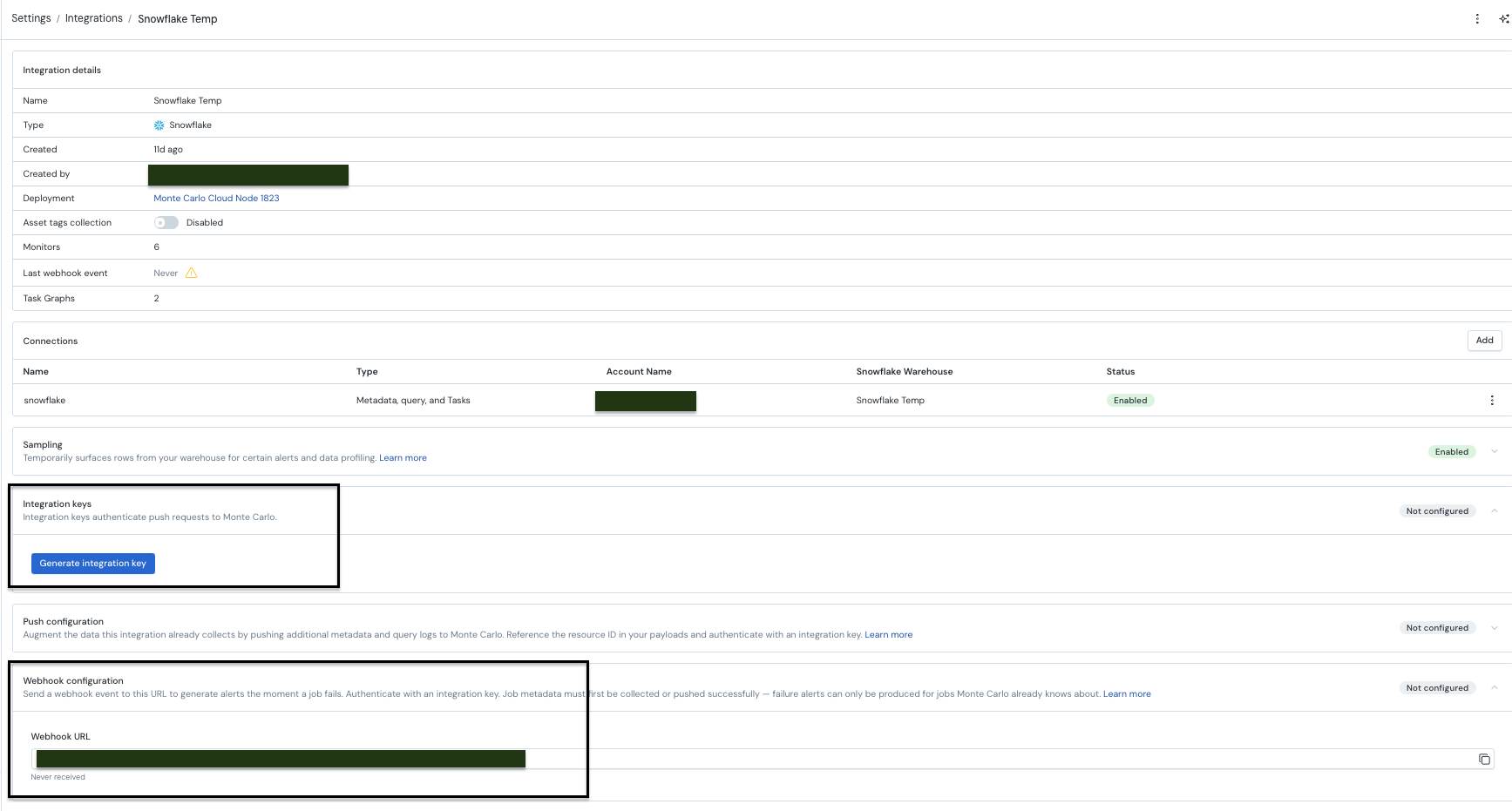
Generate an integration key and save the key ID, key secret, and webhook URL. The forwarder sends the key ID and secret as the x-mcd-id and x-mcd-token headers; you'll store them as a secret and reference the webhook URL when you deploy. In every cloud the secret value is the same JSON object:
{
  "mcd_id": "<key-id>",
  "mcd_token": "<key-secret>"
}
AWS (SNS → Lambda)
1. Create the SNS notification integration
Follow the Snowflake AWS SNS instructions to create a notification integration that publishes to an SNS topic in the account that hosts your Snowflake instance.
2. Store your Monte Carlo credentials
aws secretsmanager create-secret \
  --name montecarlo/task-webhook \
  --secret-string '{"mcd_id":"<key-id>","mcd_token":"<key-secret>"}'
Note the returned secret ARN — it becomes the forwarder's MCD_SECRET_ID.
3. Deploy the forwarder
"""
SNS -> Webhook forwarder for Snowflake task failure notifications.

Subscribes to the SNS topic Snowflake's notification integration publishes to.
For each record it forwards the Snowflake rootTaskName to the MC webhook as a
`job_source_id` query param (empty POST body; x-mcd-id / x-mcd-token headers).
Raises on any delivery failure so Lambda's async retry / DLQ can handle it.

Env vars:
  WEBHOOK_URL              (required) Full HTTPS webhook URL.
  MCD_SECRET_ID            (required) Secrets Manager secret with mcd_id / mcd_token.
  WEBHOOK_TIMEOUT_SECONDS  (optional) Request timeout. Default: 5.
"""

import json
import os
import urllib.request
from functools import cache
from urllib.parse import parse_qsl, urlencode, urlsplit, urlunsplit

import boto3

WEBHOOK_URL = os.environ["WEBHOOK_URL"]
MCD_SECRET_ID = os.environ["MCD_SECRET_ID"]
WEBHOOK_TIMEOUT_SECONDS = float(os.environ.get("WEBHOOK_TIMEOUT_SECONDS", "5"))


@cache
def _credentials() -> dict:
    """Fetch and cache the {x-mcd-id, x-mcd-token} headers for the life of the execution env."""
    secret = json.loads(
        boto3.client("secretsmanager").get_secret_value(SecretId=MCD_SECRET_ID)["SecretString"]
    )
    return {"x-mcd-id": secret["mcd_id"], "x-mcd-token": secret["mcd_token"]}


def _post_to_webhook(source_id: str) -> None:
    parts = urlsplit(WEBHOOK_URL)
    query = dict(parse_qsl(parts.query)) | {"job_source_id": source_id}
    url = urlunsplit(parts._replace(query=urlencode(query)))

    request = urllib.request.Request(url, data=b"", headers=_credentials(), method="POST")
    with urllib.request.urlopen(request, timeout=WEBHOOK_TIMEOUT_SECONDS) as resp:
        if resp.status >= 300:
            raise RuntimeError(f"Webhook returned non-2xx status: {resp.status}")


def lambda_handler(event, context):
    failures = []
    for record in event.get("Records", []):
        message_id = record["Sns"].get("MessageId")
        try:
            payload = json.loads(record["Sns"]["Message"])
            _post_to_webhook(payload["rootTaskName"])
        except Exception:
            failures.append(message_id)

    if failures:
        raise RuntimeError(f"Failed to deliver messages: {failures}")
Set the function's environment variables (WEBHOOK_URL is the webhook from the shared setup; MCD_SECRET_ID is the secret ARN from step 2):
aws lambda update-function-configuration \
  --function-name <lambda-name> \
  --environment "Variables={WEBHOOK_URL=<webhook-url>,MCD_SECRET_ID=<secret-arn>}"
Attach AWSLambdaBasicExecutionRole (CloudWatch logs) to the function's execution role and grant it read access to the secret:
aws iam put-role-policy \
  --role-name <lambda-execution-role> \
  --policy-name mc-read-secret \
  --policy-document '{
    "Version": "2012-10-17",
    "Statement": [{
      "Effect": "Allow",
      "Action": "secretsmanager:GetSecretValue",
      "Resource": "<secret-arn>"
    }]
  }'
4. Subscribe the Lambda to the topic
Subscribe the Lambda to the SNS topic, then allow SNS to invoke it:
aws sns subscribe \
  --topic-arn <sns-topic-arn> \
  --protocol lambda \
  --notification-endpoint <lambda-function-arn>

aws lambda add-permission \
  --function-name <lambda-name> \
  --statement-id sns-invoke \
  --action lambda:InvokeFunction \
  --principal sns.amazonaws.com \
  --source-arn <sns-topic-arn>
SNS invokes the Lambda asynchronously. Because the handler raises on any delivery failure, configure the function's asynchronous invocation settings (retry attempts and a dead-letter queue) so failed deliveries are retried and captured rather than dropped.
5. Attach the integration to your tasks
Set ERROR_INTEGRATION on the root task of each task graph you want alerts for (or on a standalone task):
ALTER TASK <db>.<schema>.<root_task> SET ERROR_INTEGRATION = my_task_error_int;
Root task covers the whole graphPer Snowflake: "You only specify the error notification integrations on a root task of a task graph. Any failed child task sends error notifications to the root task's specified integration." So set it once on the root — not on every child task. (Tasks with
TASK_AUTO_RETRY_ATTEMPTS> 0 emit a notification for each failed attempt.)
GCP (Pub/Sub → Cloud Function)
1. Create the Pub/Sub notification integration
Follow the Snowflake GCP Pub/Sub instructions to create a notification integration that publishes to a Pub/Sub topic in the project that hosts your Snowflake instance.
2. Store your Monte Carlo credentials
printf '{"mcd_id":"<key-id>","mcd_token":"<key-secret>"}' | \
  gcloud secrets create montecarlo-task-webhook --data-file=-
The forwarder's MCD_SECRET_ID is the version resource name: projects/<proj>/secrets/montecarlo-task-webhook/versions/latest.
3. Deploy the forwarder
"""
Pub/Sub -> Webhook forwarder for Snowflake task failure notifications (GCP).

Deploy as a CloudEvent-triggered Cloud Function subscribed to the Pub/Sub topic
Snowflake's notification integration publishes to. Forwards the Snowflake
rootTaskName to the MC webhook as a `job_source_id` query param (empty POST body;
x-mcd-id / x-mcd-token headers). Raises on failure so Pub/Sub redelivers
(requires "Retry on failure" enabled on the subscription).

Env vars:
  WEBHOOK_URL              (required) Full HTTPS webhook URL.
  MCD_SECRET_ID            (required) Secret Manager resource name, e.g.
                           projects/<proj>/secrets/<name>/versions/latest.
                           Secret JSON must contain mcd_id / mcd_token.
  WEBHOOK_TIMEOUT_SECONDS  (optional) Request timeout. Default: 5.
"""

import base64
import json
import os
import urllib.request
from functools import cache
from urllib.parse import parse_qsl, urlencode, urlsplit, urlunsplit

import functions_framework
from google.cloud import secretmanager

WEBHOOK_URL = os.environ["WEBHOOK_URL"]
MCD_SECRET_ID = os.environ["MCD_SECRET_ID"]
WEBHOOK_TIMEOUT_SECONDS = float(os.environ.get("WEBHOOK_TIMEOUT_SECONDS", "5"))


@cache
def _credentials() -> dict:
    """Fetch and cache the {x-mcd-id, x-mcd-token} headers for the life of the execution env."""
    client = secretmanager.SecretManagerServiceClient()
    payload = client.access_secret_version(name=MCD_SECRET_ID).payload.data.decode()
    secret = json.loads(payload)
    return {"x-mcd-id": secret["mcd_id"], "x-mcd-token": secret["mcd_token"]}


def _post_to_webhook(source_id: str) -> None:
    parts = urlsplit(WEBHOOK_URL)
    query = dict(parse_qsl(parts.query)) | {"job_source_id": source_id}
    url = urlunsplit(parts._replace(query=urlencode(query)))

    request = urllib.request.Request(url, data=b"", headers=_credentials(), method="POST")
    with urllib.request.urlopen(request, timeout=WEBHOOK_TIMEOUT_SECONDS) as resp:
        if resp.status >= 300:
            raise RuntimeError(f"Webhook returned non-2xx status: {resp.status}")


@functions_framework.cloud_event
def forward(cloud_event):
    # Pub/Sub delivers one message per invocation, base64-encoded in message.data.
    data = base64.b64decode(cloud_event.data["message"]["data"])
    payload = json.loads(data)
    _post_to_webhook(payload["rootTaskName"])
Grant the function's runtime service account read access to the secret:
gcloud secrets add-iam-policy-binding montecarlo-task-webhook \
  --member "serviceAccount:<function-runtime-sa>" \
  --role roles/secretmanager.secretAccessor
The function's environment variables (WEBHOOK_URL, MCD_SECRET_ID) are set at deploy time with --set-env-vars in the next step.
4. Subscribe the function to the topic
Deploy the function with a Pub/Sub topic trigger — this creates the push subscription for you. Set the env vars from the shared setup at deploy time:
gcloud functions deploy forward \
  --gen2 \
  --runtime python312 \
  --region <region> \
  --source . \
  --entry-point forward \
  --trigger-topic <pubsub-topic> \
  --retry \
  --set-env-vars WEBHOOK_URL=<webhook-url>,MCD_SECRET_ID=projects/<proj>/secrets/montecarlo-task-webhook/versions/latest
--trigger-topic creates the subscription, and --retry enables "Retry on failure" so Pub/Sub redelivers when the function raises.
5. Attach the integration to your tasks
Set ERROR_INTEGRATION on the root task of each task graph you want alerts for (or on a standalone task):
ALTER TASK <db>.<schema>.<root_task> SET ERROR_INTEGRATION = my_task_error_int;
Root task covers the whole graphPer Snowflake: "You only specify the error notification integrations on a root task of a task graph. Any failed child task sends error notifications to the root task's specified integration." So set it once on the root — not on every child task. (Tasks with
TASK_AUTO_RETRY_ATTEMPTS> 0 emit a notification for each failed attempt.)
Azure (Event Grid → Function)
1. Create the Event Grid notification integration
Follow the Snowflake Azure Event Grid instructions to create a notification integration that publishes to an Event Grid topic in the subscription that hosts your Snowflake instance.
2. Store your Monte Carlo credentials
az keyvault secret set \
  --vault-name <vault> \
  --name montecarlo-task-webhook \
  --value '{"mcd_id":"<key-id>","mcd_token":"<key-secret>"}'
The forwarder's KEY_VAULT_URL is https://<vault>.vault.azure.net/ and its MCD_SECRET_NAME is montecarlo-task-webhook.
3. Deploy the forwarder
"""
Event Grid -> Webhook forwarder for Snowflake task failure notifications (Azure).

Event Grid-triggered Azure Function subscribed to the topic Snowflake's
notification integration publishes to. Forwards the Snowflake rootTaskName to the
MC webhook as a `job_source_id` query param (empty POST body; x-mcd-id /
x-mcd-token headers). Raises on failure so Event Grid retries per its policy.

Env vars:
  WEBHOOK_URL              (required) Full HTTPS webhook URL.
  KEY_VAULT_URL            (required) Key Vault URL, e.g. https://<vault>.vault.azure.net/.
  MCD_SECRET_NAME          (required) Key Vault secret whose value is JSON with
                           mcd_id / mcd_token.
  WEBHOOK_TIMEOUT_SECONDS  (optional) Request timeout. Default: 5.
"""

import json
import os
import urllib.request
from functools import cache
from urllib.parse import parse_qsl, urlencode, urlsplit, urlunsplit

import azure.functions as func
from azure.identity import DefaultAzureCredential
from azure.keyvault.secrets import SecretClient

WEBHOOK_URL = os.environ["WEBHOOK_URL"]
KEY_VAULT_URL = os.environ["KEY_VAULT_URL"]
MCD_SECRET_NAME = os.environ["MCD_SECRET_NAME"]
WEBHOOK_TIMEOUT_SECONDS = float(os.environ.get("WEBHOOK_TIMEOUT_SECONDS", "5"))

app = func.FunctionApp()


@cache
def _credentials() -> dict:
    """Fetch and cache the {x-mcd-id, x-mcd-token} headers for the life of the execution env."""
    client = SecretClient(vault_url=KEY_VAULT_URL, credential=DefaultAzureCredential())
    secret = json.loads(client.get_secret(MCD_SECRET_NAME).value)
    return {"x-mcd-id": secret["mcd_id"], "x-mcd-token": secret["mcd_token"]}


def _post_to_webhook(source_id: str) -> None:
    parts = urlsplit(WEBHOOK_URL)
    query = dict(parse_qsl(parts.query)) | {"job_source_id": source_id}
    url = urlunsplit(parts._replace(query=urlencode(query)))

    request = urllib.request.Request(url, data=b"", headers=_credentials(), method="POST")
    with urllib.request.urlopen(request, timeout=WEBHOOK_TIMEOUT_SECONDS) as resp:
        if resp.status >= 300:
            raise RuntimeError(f"Webhook returned non-2xx status: {resp.status}")


@app.event_grid_trigger(arg_name="event")
def forward(event: func.EventGridEvent):
    # Event Grid delivers one event per invocation in the event's data field.
    payload = event.get_json()
    _post_to_webhook(payload["rootTaskName"])
Set the function app's environment variables (application settings) from the shared setup and step 2:
az functionapp config appsettings set \
  --name <function-app> \
  --resource-group <rg> \
  --settings \
    WEBHOOK_URL=<webhook-url> \
    KEY_VAULT_URL=https://<vault>.vault.azure.net/ \
    MCD_SECRET_NAME=montecarlo-task-webhook
Enable a system-assigned managed identity on the Function App and grant it read access to the vault's secrets:
# Enable the managed identity (prints the identity's principalId)
az functionapp identity assign \
  --name <function-app> \
  --resource-group <rg>

# Grant that identity the Key Vault Secrets User role on the vault
az role assignment create \
  --assignee <principal-id> \
  --role "Key Vault Secrets User" \
  --scope <key-vault-resource-id>
4. Subscribe the function to the topic
Create an Event Grid subscription that delivers to the function:
az eventgrid event-subscription create \
  --name mc-task-failures \
  --source-resource-id <event-grid-topic-resource-id> \
  --endpoint-type azurefunction \
  --endpoint <function-app-resource-id>/functions/forward
Event Grid retries per its default retry policy when the function raises. Configure dead-lettering on the subscription (--deadletter-endpoint <storage-blob-container>) to capture events that exhaust retries.
5. Attach the integration to your tasks
Set ERROR_INTEGRATION on the root task of each task graph you want alerts for (or on a standalone task):
ALTER TASK <db>.<schema>.<root_task> SET ERROR_INTEGRATION = my_task_error_int;
Root task covers the whole graphPer Snowflake: "You only specify the error notification integrations on a root task of a task graph. Any failed child task sends error notifications to the root task's specified integration." So set it once on the root — not on every child task. (Tasks with
TASK_AUTO_RETRY_ATTEMPTS> 0 emit a notification for each failed attempt.)
Updated 3 months ago