
Reducing noise from monitors
When a monitor breaches, it creates an Alert that triggers a notification based on the Audiences configured in the monitor. If a monitor breaches repeatedly, this can result in repetitive notifications. Monte Carlo offers per-monitor controls to manage notification noise.
The available options vary by monitor type, but fall into two approaches: grouping subsequent breaches into an already-open alert so your team isn't re-notified while an issue is already being investigated, or controlling how often you're notified when a monitor stays in breach (Available for Custom SQL/Validation monitors).
For grouping, an alert is considered open when its status is No Status, Acknowledged, or Work in Progress — once resolved (Fixed, Expected, or No Action Needed), the next breach creates a new alert. This option comes with a time window and an optional re-notify setting:
- Group for up to [ X ] hours — new breaches from the same monitor are grouped into the currently open alert for up to X hours from when it first opened. After that, the next breach creates a new alert. Defaults to 5 hours.
- Re-notify every [ X ] hours while the alert remains open (optional) — sends a reminder notification to the monitor's configured audience every X hours until the alert is resolved. On by default, at 24 hours.
Table Monitors
Select one option in the Send notifications section of monitor creation:
- Group breaches from the same schema for 5 hours (default) — breaches are grouped into the same alert for up to 5 hours, regardless of alert status
- Group new breaches from the same schema into the currently open alert, for up to [ X ] hours
- ☑ Re-notify every [ X ] hours while the alert remains open (optional)
In either case, breaches are grouped by alert type within the same schema — freshness, volume, and time since last row count change alerts are grouped together, and schema change alerts are grouped separately from those.
Metric, Multi-table Metric & Comparison Monitors
Select one option in the Send notifications section of monitor creation:
- Create a new alert every time the monitor breaches (default — no grouping)
- Group new breaches into the currently open alert, for up to [ X ] hours
- ☑ Re-notify every [ X ] hours while the alert remains open (optional)
Custom SQL & Validation Monitors
SQL and Validation monitors may remain in a breached state for an extended period while the threshold stays violated. In addition to grouping by status, these monitors offer the following notification frequency controls, which are available in the Send notifications section of monitor creation:
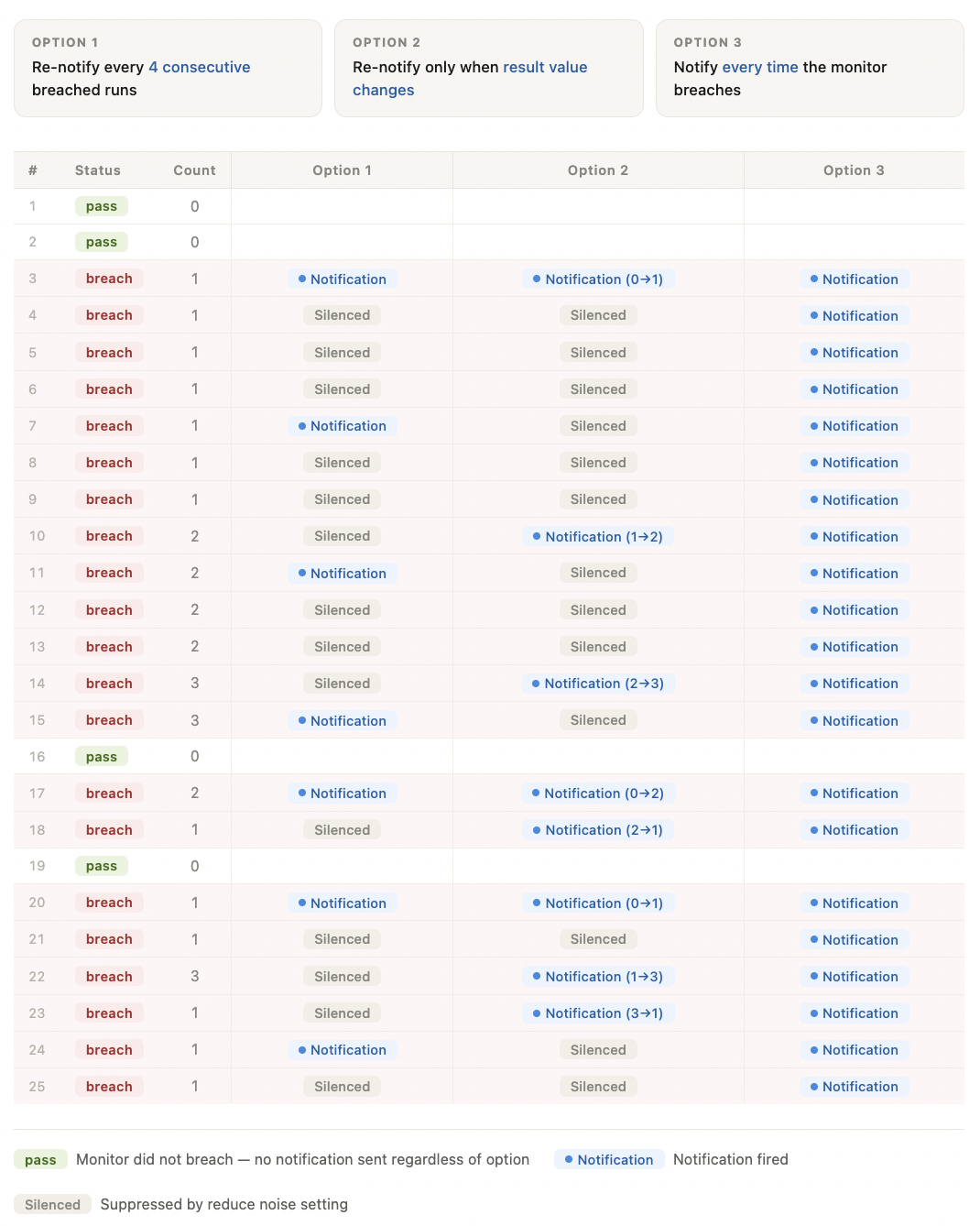
- Send another notification every [ X ] runs of the monitor
- Send another notification only if the value or count of breached rows changes
- Notify every time (no grouping or noise reduction)
- Group new breaches into the currently open alert, for up to [ X ] hours
- ☑ Re-notify every [ X ] hours while the alert remains open (optional)
The following illustrates how the first three options behave across 25 runs of a Custom SQL monitor configured to breach when row count exceeds 0, with Option 1 set to re-notify every 4 consecutive breached runs. Option 4 groups by alert status.
In Monitors as Code
All noise reduction settings are optional. When none are configured, each monitor type applies its default behavior as outlined above. To configure noise reduction via Monitors as Code, use the following fields:
event_rollup_count(Int: minimum value of2)— re-notifies after everyNconsecutive breached runs. Applies to Custom SQL & Validation monitors.event_rollup_until_changed(boolean)— re-notifies only when the value or count of breached rows changes when set totrue. Applies to Custom SQL & Validation monitors.alert_grouping— groups subsequent breaches into the currently open alert rather than creating a new one. Applies to Table, Metric, Multi-table Metric, Comparison, Custom SQL & Validation monitors.mode— set togroup_into_open_alertto enable groupingmax_hours(Int) — caps the grouping window. Defaults to 5 if omitted. Grouping stops when the alert is no longer open, this limit or the 100-event cap is reached, whichever comes firstrenotify_after_hours(Int) — sends a reminder notification every X hours while the alert remains open. Defaults to 24 if omitted. Set to-1to disable.
alert_grouping:
  mode: group_into_open_alert
  max_hours: 5               # optional — defaults to 5 if omitted
  renotify_every_hours: 24   # optional — defaults to 24 if omitted; set to -1 to disable
Visit the Monitors as Code documentation for full details, and per-monitor-type references.
Additional notes
- Monte Carlo will not group more than 100 successive breaches of a monitor. Once 100 successive breaches are grouped, the next breach will generate a new alert.
- These settings determine whether events are grouped into a single alert, not whether notifications are sent to each audience. When you add a new audience to an existing monitor, that audience will receive a notification on the next event regardless of where the monitor is in its rollup cycle for existing audiences.
Updated 4 months ago