
MC Prevent: PR & CI Agent
MC Prevent is Monte Carlo's suite of agents that surfaces data observability context at every stage of the development lifecycle:
- PR Agent reviews pull requests and posts a risk assessment comment.
- CI Agent is an optional CI step that can block merges based on the PR Agent's risk assessment.
Requires the GitHub integration. For the PR Agent to identify affected tables, also set up dbt integrations.
PR Agent
The PR Agent reviews pull requests in your enabled GitHub repos and posts an explainable risk assessment comment. It identifies data assets affected by the PR, scores the overall risk as Low, Medium, or High, and surfaces concrete checks to complete before merging.
The PR Agent is also the source of truth for the CI Agent. If you add the CI Agent to GitHub Actions or CircleCI, the CI Agent reads the PR Agent assessment and applies your configured gate policy.
Turning on the PR Agent
The PR Agent won't comment on any pull request until you add repos to its allowlist. New installations start with an empty allowlist.
- Go to Settings → Integrations → GitHub.
- Click into the organization you want to configure.
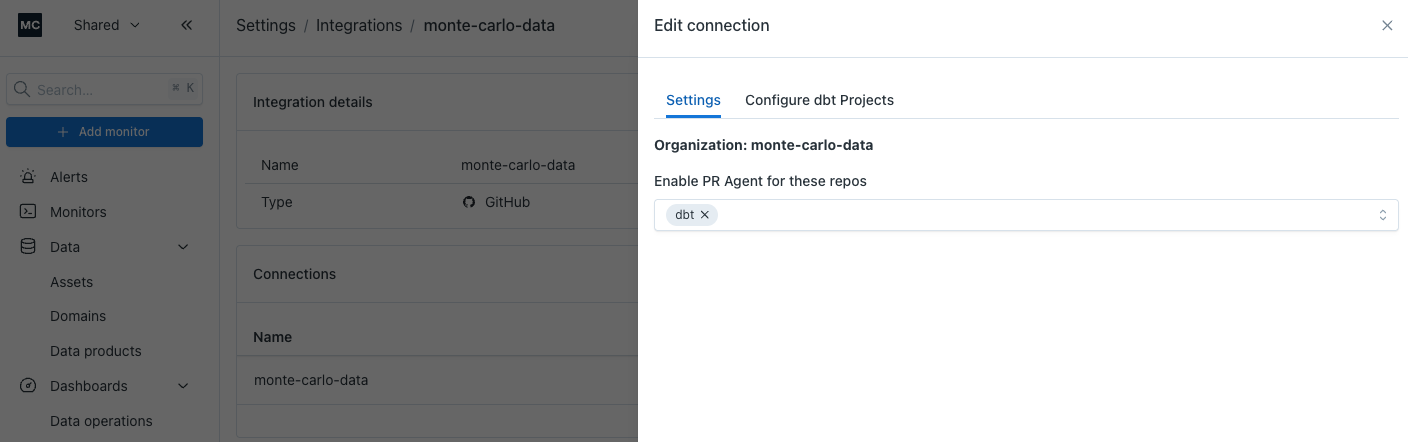
- In the Edit connection drawer, open the Settings tab.
- Add repos under Enable PR Agent for these repos.
The PR Agent must also be on for your account. Go to Settings → AI Agents and toggle PR Agent.
What the PR Agent evaluates
- Which Monte Carlo-monitored tables are affected by the PR's file changes
- Code review findings from the PR diff
- Schema and contract changes, such as removed columns, renamed fields, and type changes
- Downstream lineage and blast radius, including Key Assets
- Asset criticality
- Active open alerts on impacted or upstream assets
- Monitor coverage gaps
- Validation opportunities for dbt model SQL changes
Triggers
- Automatically when a PR is opened in an allowlisted repo
- On demand by creating a PR comment that says
mc review(case-insensitive)
The PR Agent does not automatically re-run on every new commit. After pushing a fix or meaningful update, comment mc review to request a fresh assessment for the new head commit.
Repo allowlist
The allowlist controls which repos the PR Agent comments on, per installation. Existing installations had their allowlist seeded with the repos that already have dbt projects connected to Monte Carlo. New installations start empty.
If the allowlist is empty, the PR Agent will not post on any PR in that installation. Commenting mc review on a non-allowlisted repo has no effect.
Programmatic access is available via the experimental getPrAgentConfig query and updatePrAgentConfig mutation on the GraphQL API.
Enabling and disabling the PR Agent
To enable or disable the PR Agent for your account, go to Settings → AI Agents and toggle PR Agent.
When the PR Agent is disabled, Monte Carlo falls back to the legacy impact assessment comment if that feature is enabled on your account.
Adjusting PR Agent usage
You control how much of the PR Agent your account uses from Settings → AI Agents:
- Do not restrict (default): every pull request receives a full review.
- Limit to free usage only: every pull request still receives a free review (risk score and summary), and the account is never charged for full reviews.
You can switch between these at any time, and the change takes effect on subsequent pull requests. Limit to free usage only caps usage immediately without disabling the integration. PRs keep getting reviewed at the free level.
Free review vs. full review
A free review runs on every pull request and is never charged. It gives you a fast read on whether a change is risky and why. A full review goes further: it tells you which parts of the change are risky and what to do about them before the PR merges.
| Capability | Free review | Full review |
|---|---|---|
| Runs on every pull request | ✅ | ✅ |
| Overall risk score (Low / Medium / High) | ✅ | ✅ |
| Control over how the risk score is calculated | ✅ | ✅ |
| Plain-language summary of the PR and its risk | ✅ | ✅ |
| Details of the risky parts of the change, each with a specific recommendation | — | ✅ |
| Auto-generated SQL validation queries for the change | — | ✅ |
| Warnings about open alerts on upstream assets | — | ✅ |
| Suggestions for monitor coverage gaps the change exposes | — | ✅ |
What the PR comment looks like
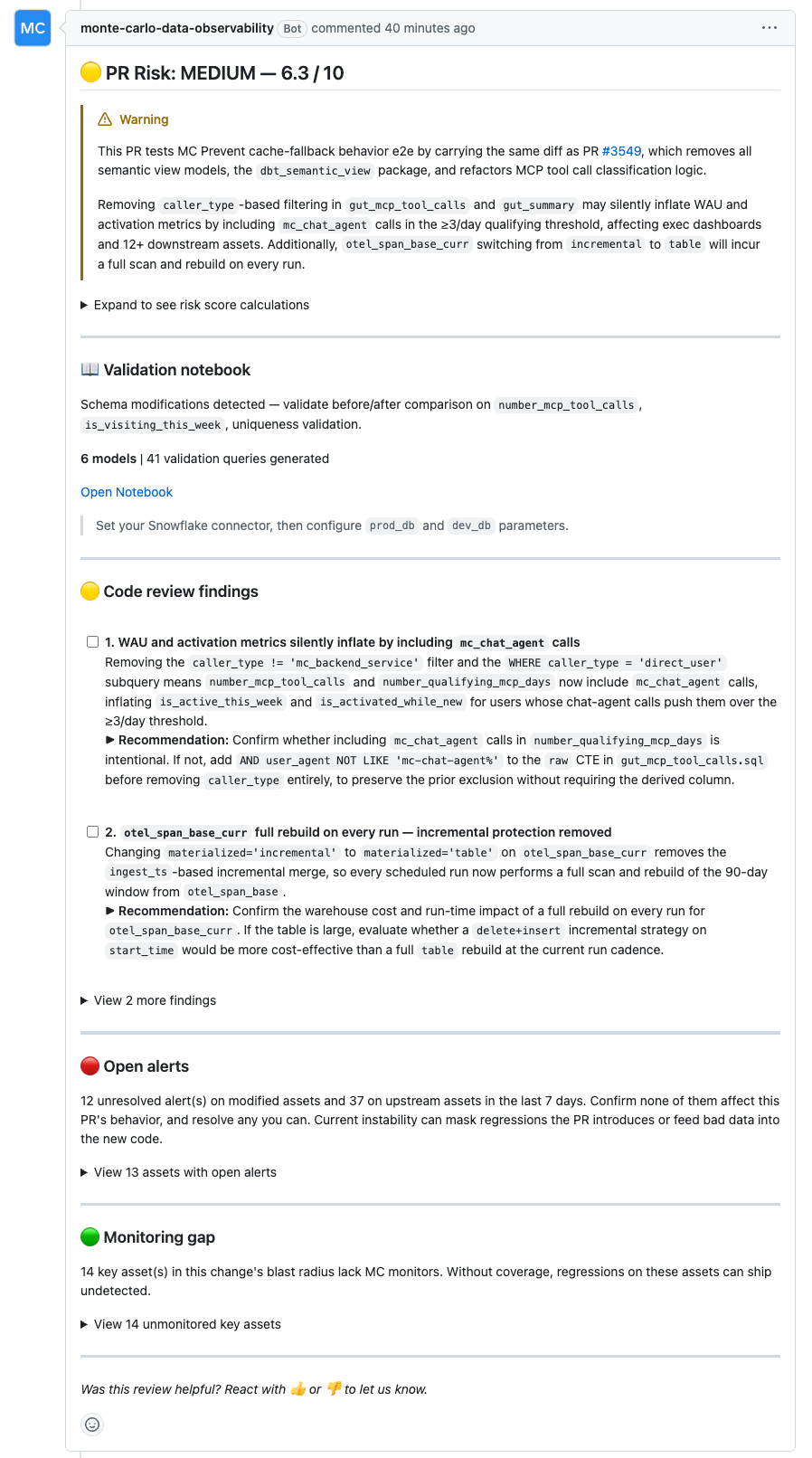
The PR Agent posts a rubric-based comment with the following sections:
- Risk title.
PR Risk: Low | Medium | High, including the overall score out of 10. - Risk summary. A short callout explaining the main reason for the rating and the highest-risk issue to review.
- Risk score calculations. An expandable table showing each rubric category, score, configured weight, weighted contribution, and rationale.
- Validation Notebook. When dbt SQL changes are detected, the PR Agent can generate a SQL Notebook with validation queries. The comment includes the detected validation focus, model count, query count, notebook link, and required parameters.
- Code review findings. Actionable findings from the PR diff, shown as checklist items with recommended fixes. Additional findings may be collapsed to keep the comment readable.
- Open alerts. When relevant, active Monte Carlo alerts on modified or upstream assets.
- Monitoring gap. Key assets in the change's blast radius that don't have Monte Carlo monitor coverage, including asset links and scope.
- Feedback prompt. React with 👍 or 👎 on the bot comment to send feedback to Monte Carlo. Reactions are collected when the PR closes.
For very large PRs, the diff may be truncated before analysis. The PR Agent notes this in the comment when it happens.
Risk factor weights
You can tune how the PR Agent weights each risk factor when calculating the overall PR risk score.
- Go to Settings → Integrations → GitHub.
- Click into the organization you want to configure.
- In the Edit connection drawer, open the Settings tab.
- Under Risk factor weights, adjust the category percentages.
| Risk factor | Description | Default |
|---|---|---|
| Code review findings | Risks intrinsic to the code changes | 40% |
| Lineage blast radius | Downstream assets that may be affected | 15% |
| Open alerts | Unresolved Monte Carlo alerts on modified tables and upstream feeders | 15% |
| Monitoring gap | Monitor coverage on modified, upstream, and downstream assets | 15% |
| Schema & contract changes | Column removes, renames, type changes, primary key changes, and contract breaks | 10% |
| Asset criticality | How much the directly changed asset matters to the business | 5% |
Weights must be whole-number percentages and must sum to 100%. Monte Carlo shows the live total while you edit, and the Normalize button rescales the current values to 100% while preserving their relative proportions.
Changes apply to new PR Agent reviews for that GitHub installation. Existing PR comments and check runs are not recalculated automatically. Comment mc review on a PR to request a fresh assessment using the latest configuration.
Missing permissions
If the GitHub App is missing the required contents:read permission on a repo, the PR Agent posts a "missing permissions" comment with a link back to these docs. Re-authorize the app in GitHub → Settings → Applications → Monte Carlo to grant the permission.
Verifying the PR Agent
Open a new pull request in an allowlisted repo. The Monte Carlo bot should post a PR Risk comment, and an MC Prevent: PR Risk Rubric check run should appear.
CI Agent
The CI Agent is an optional step you add to GitHub Actions or CircleCI. It reads the PR Agent's MC Prevent risk assessment, applies your gate policy, and posts an MC Prevent: CI Gate Result GitHub check run.
When combined with GitHub branch protection rules, the CI Agent can block PRs whose risk tier meets your configured threshold.
PR Agent vs. CI Agent: the PR Agent reviews pull requests and produces the MC Prevent risk assessment. The CI Agent is the enforcement step. Add it to your CI pipeline when you want a required check that can block merges based on the PR Agent's risk tier.
Turning on the CI Agent
The CI Agent requires the PR Agent to be on for the repo.
Choose your CI platform:
- GitHub Actions: monte-carlo-data/mc-prevent-action
- CircleCI: monte-carlo-data/mc-prevent-orb
Each repository includes setup instructions, examples, and parameter documentation.
To block merges, make MC Prevent: CI Gate Result a required status check in your GitHub branch protection rules.
How it works
- The CI Agent runs on pull request events. Draft PRs are skipped.
- It calls Monte Carlo's
/ci/assessAPI with the repo, PR number, commit SHA, and optional CI policy. - Monte Carlo fetches the PR Agent's rubric assessment from GitHub.
- The PR risk score is mapped to a risk tier:
< 3.5= low< 6.5= medium>= 6.5= high
- Monte Carlo compares the tier against your
block-onpolicy and returns pass or fail. - The result appears in the CI job output, step summary, and the MC Prevent: CI Gate Result check run.
If no assessment is available for the current commit, the CI Agent can reuse the cached CI Gate verdict from a previous workflow run on the same branch.
Gate policy
Use block-on to choose which risk tiers fail CI.
| Setting | Behavior |
|---|---|
low+ | Block low, medium, and high risk PRs |
medium+ | Block medium and high risk PRs |
high+ | Block only high risk PRs |
none | Never block. Show results only. |
When block-on is not set in CI, Monte Carlo uses the policy configured in the UI.
Configuration precedence
Monte Carlo resolves the effective policy in this order:
block-onin the CI workflow or CircleCI job- Per-repo override in the Monte Carlo UI
- Installation-wide default in the Monte Carlo UI
- System default:
medium+
Use CI-level block-on only when a specific pipeline needs to override the central UI policy.
Configure in the Monte Carlo UI
- Go to Settings → Integrations → GitHub.
- Click into the organization you want to configure.
- In the Edit connection drawer, open the Settings tab.
- Under MC Prevent CI Configuration, set:
- Default gate behavior: applies to all repos in the GitHub installation.
- Per-repo overrides: exception rules for specific repos.
Per-repo overrides are useful when one repo should gate differently than the org default. For example, use high+ for an experimental repo while keeping medium+ as the default for production repos.
Remediating a failed gate
If MC Prevent blocks a PR, push the fix first, then comment mc review on the PR to request a fresh PR Agent assessment for the new head commit.
The CI Agent uses the latest PR Agent assessment available for the commit being checked. If the PR Agent review finishes while CI is still polling, the gate can pick up the updated assessment automatically. If no assessment exists before CI times out, the previous verdict is preserved so the gate never silently downgrades. To get an updated assessment, comment mc review and rerun CI.
Override
Add the mc-override label to a PR to bypass the CI Agent. The gate returns pass, and Monte Carlo posts a green MC Prevent: CI Gate Result check run for the current commit, so no new commit or CI re-run is required. Override activity is recorded in service logs.
Anyone who can apply labels to pull requests can override the gate. To control who can bypass it, restrict who can apply labels.
Progressive adoption
| Stage | Result |
|---|---|
| CI step added, credentials missing | Pass. Skips without an API call. |
| Credentials configured, PR Agent disabled or repo not allowlisted | Pass after polling with no assessment |
| Credentials configured, PR Agent enabled and repo allowlisted | Full risk-tier gate result |
See the GitHub Action and CircleCI setup guides for how to set up credentials.
Verifying the CI Agent
The MC Prevent: CI Gate Result check run appears on pull requests after the PR Agent posts its assessment.
Limitations
- The PR Agent runs when a PR is opened in an allowlisted repo. It does not automatically re-review every new commit. After pushing a fix, comment
mc reviewto request a fresh assessment for the new head commit. - Very large files may be skipped for full-content inspection. The PR Agent can still review the PR diff, but individual file reads are limited.
- MC Prevent currently runs on GitHub only. GitLab and Azure DevOps PRs are supported for incident-chart PR overlays, but not for PR Agent reviews or the CI Agent gate.
FAQ
Q: The PR Agent isn't commenting on one of my repos. Why?
Check the repo allowlist: Settings → Integrations → GitHub → (org) → Edit connection → Settings → Enable PR Agent for these repos. If the repo isn't in the list, add it. The allowlist applies to both auto-triggered reviews and manual mc review comments.
Q: Can I trigger the PR Agent manually?
Yes. Comment mc review on any PR in an allowlisted repo to trigger a new assessment. This is useful after pushing changes to address a prior risk finding. Create the comment after the new commit is pushed so the PR Agent reviews the latest head commit.
Q: How do I turn the PR Agent off?
- For a specific repo: remove it from the allowlist at Settings → Integrations → GitHub → (org) → Edit connection → Settings.
- For the whole account: go to Settings → AI Agents and toggle PR Agent off. You will fall back to the legacy impact assessment comment if that feature is enabled on your account.
Q: I set up the GitHub integration but didn't add the CI Agent. Will I still get risk assessments?
Yes, on repos in the PR Agent allowlist. The CI Agent is only needed if you want a pipeline gate that can block merges based on that assessment.
Q: The CI Agent action is waiting but never getting an assessment. What's happening?
The CI Agent looks for a PR Agent assessment on the commit being checked. Common causes:
- The repo is not in the PR Agent allowlist. Add the repo, then comment
mc reviewon the PR to trigger an assessment. - The PR Agent has not reviewed the latest commit yet. After pushing a fix, comment
mc reviewto request a fresh assessment for the new head commit. - The PR Agent is still running. The CI Agent polls every 30 seconds for up to 5 minutes by default. If no assessment is found for the current commit, it may reuse a cached verdict from a previous commit. If no cached verdict exists, it defaults to pass.
If your PR Agent reviews consistently take longer than the polling window, increase the max-wait input.
Updated 1 day ago