
Custom source tables
Collect metadata, query logs, lineage, or jobs from your own tables or views instead of warehouse system tables.
Overview
Monte Carlo reads system tables and views in your warehouse to collect metadata, query logs, lineage, and jobs. If you can't give Monte Carlo access to some of them, you can point Monte Carlo at your own tables or views instead. We call these custom source tables.
Each table or view you enter replaces one system table. It must:
- Have the same column names and types as the system table it replaces.
- Stay current: use a view, or refresh it in near real time. For query logs, lineage, and jobs, Monte Carlo reads a recent time window on each run, so rows that arrive late are never collected.
- Be readable by the Monte Carlo service account.
Most integrations don't need custom source tables. Use them only if Monte Carlo can't read the system tables directly.
Custom source tables are available for these integrations:
| Integration | Tables you can replace |
|---|---|
| Databricks | Query logs, lineage, and jobs. See Databricks: custom source tables. |
| Snowflake | Metadata and query logs. See Snowflake. |
| Redshift | Metadata and query logs. See Redshift. |
| Teradata | Query logs. See Teradata. |
Set custom source tables
Who can see and change them
- To see custom source tables, you need the
settings/integrations/accesspermission. - To change them, you need the
settings/integrations/editpermission. Without it, the fields are read-only and the section says you don't have permission to edit.
See IAM resources and permissions. You can only see connections on warehouses you have access to.
Set, change, or clear a table
- Create your tables or views, and grant the Monte Carlo service account
SELECTon them. - In Monte Carlo, go to Settings → Integrations and open the integration.
- Expand Custom source tables, the last section of the page. It is marked Advanced.
- If the integration has more than one eligible connection, choose one in Connection. Custom source tables are set per connection. The section says which collection jobs the connection runs.
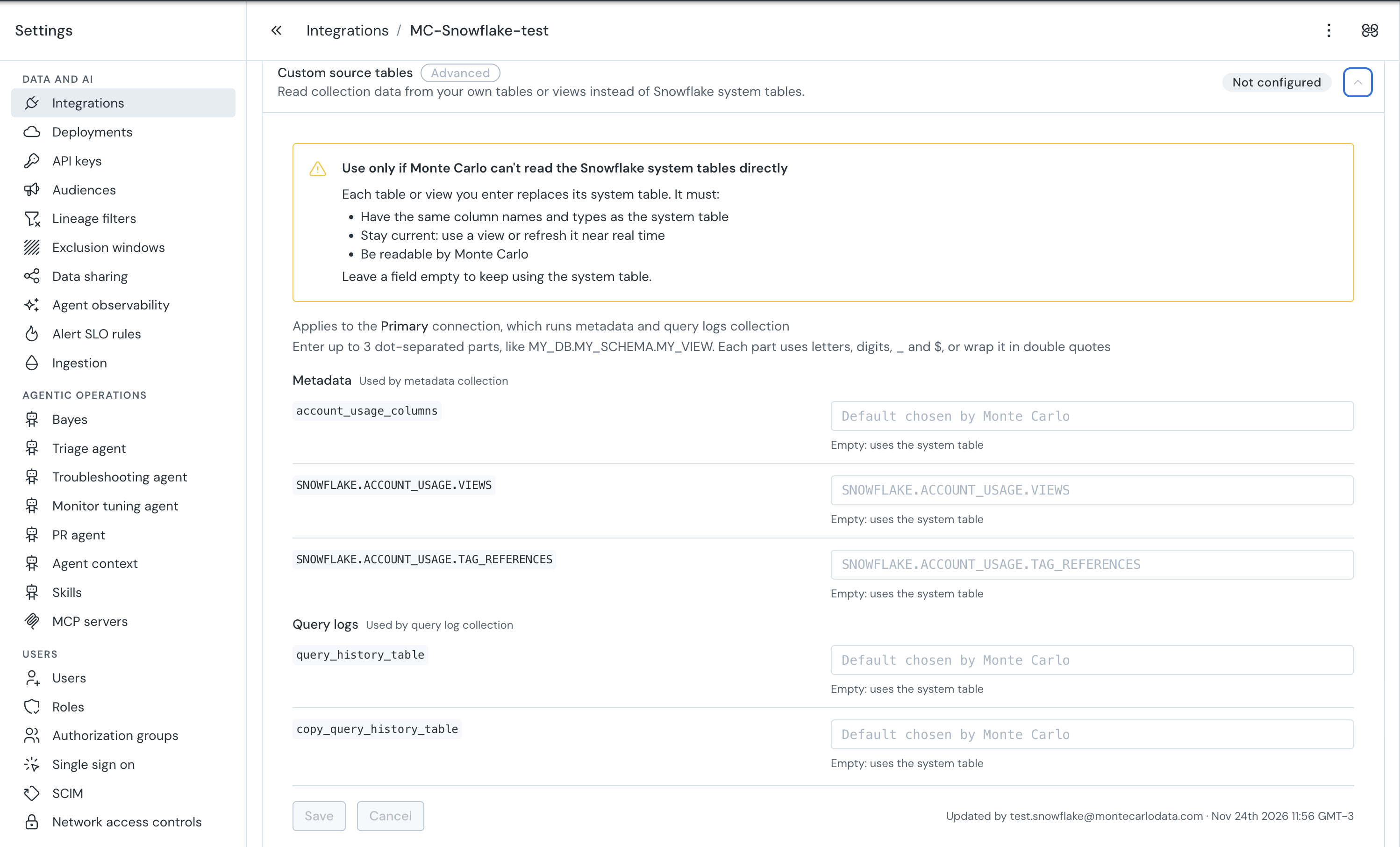
- Fields are grouped by collection job, such as Metadata or Query logs. Each field shows the system table it replaces. Enter the name of your table or view next to each system table you replace.
- Click Save. Cancel discards your edits.
To change a table, edit its field and click Save. To go back to the system table, clear the field (or click its clear button) and click Save.
Only the fields you edited are saved, so a table someone else saved in the meantime is kept.
Table name rules
Enter one table or view name, without a query or alias. Each name has dot-separated parts. A part can be quoted, but a quoted part can't contain the quote character or control characters. A name can be at most 512 characters long.
| Integration | Parts | Unquoted part | Quote with | Example |
|---|---|---|---|---|
| Databricks | Up to 3: catalog.schema.table | Letters, digits, and underscores | Backticks ` (no double quotes inside) | `my-catalog`.my_schema.my_view |
| Snowflake | Up to 3: database.schema.table | Starts with a letter or _; letters, digits, _, and $ | Double quotes " | "My Db".MY_SCHEMA.MY_VIEW |
| Redshift | Up to 3: database.schema.table | Starts with a letter or _; letters, digits, _, and $ | Double quotes " | my_db."My Schema".my_view |
| Teradata | Up to 2: database.table | Starts with a letter or _; letters, digits, _, and $ | Double quotes " | MY_DATABASE."My View" |
Quote any part that is a SQL keyword. In Snowflake, a quoted part is case-sensitive and unquoted names are stored in upper case, so "my_view" doesn't match a view created as my_view. We recommend the full name, with every part: a shorter name is resolved against the connection's default database or schema.
The section checks names as you type and again when you save. A name that breaks these rules can't be saved.
When a change takes effect
Monte Carlo reads your tables from the next collection run of each job. Saving doesn't check that Monte Carlo can read them. The next run does: if it can't read a table, the run fails and the section shows the error. Fix the table or its grants, or clear the field, and the run after that checks again.
On older data collector versions, a run that can't read a table may fail without this error, and the section may not show it. Databricks query logs on older versions skip a table they can't read, with no error. To check your version, contact Monte Carlo support.
Statuses and messages
Next to the section title
| Status | Meaning |
|---|---|
| Not configured | No custom source tables are set on this connection. Every job reads the system tables. |
| 1 override, 2 overrides, … | How many fields on this connection have a table set. |
| 1 failing, … | How many collection jobs failed on their last run because Monte Carlo couldn't read a custom source table. |
Under a field
| Message | Meaning |
|---|---|
| Empty: uses the system table | Nothing is set. The job reads the system table. |
| Replaces system table | The job reads the table in the field instead of this system table. |
| Monte Carlo set this job to read table | Monte Carlo set this table for your account, your warehouse, or this job's scheduled runs, and the job reads it. The field is empty because the table isn't set on this connection. A table you enter replaces one set for the account or warehouse. If Monte Carlo set it for the scheduled runs, the field shows May not be read instead. |
| May not be read: Monte Carlo set the tables for some or all of this job's runs elsewhere. Contact support to use this setting | Monte Carlo set tables for some or all of this job's scheduled runs, and those runs read them instead of what you enter here. Contact Monte Carlo support to have your table used. |
| Needs a newer data collector. Upgrade the deployment to set this table | Your data collector can't read a custom table in place of this system table yet. The field is disabled until the data collector is upgraded. |
| A name rule, such as Enter up to 3 dot-separated parts… | The name breaks the table name rules. Fix it to save. |
Elsewhere in the section
| Message | Meaning |
|---|---|
| Job collection failed: Monte Carlo can't read a custom source table | The job's last run failed on a custom source table. The message below it, from the collector, names the table. It also shows when the run happened. The alert stays until a later run finishes without this error. |
| The tables changed after this run; the next run checks them again | The failed run happened before the last save. The next run checks the tables again. |
| Updated by email or Monte Carlo · date | Who last saved custom source tables on this connection, and when. Monte Carlo means Monte Carlo set them for you. |
| · checked on the next collection run / · read from the next collection run | A job hasn't run since the last save. "Checked" means the next run reports a table it can't read. "Read" appears for Databricks query logs. With a current data collector, a query log run that can't read a table still fails and shows its error in this section. |
| Custom source tables saved. Monte Carlo checks them on the next collection run / …reads them from the next collection run | The save worked. The two endings mean the same as above. |
| You don't have permission to edit custom source tables | You need the settings/integrations/edit permission. |
Snowflake
You can set custom source tables on the Snowflake connection.
| Job | Field | System table it replaces |
|---|---|---|
| Metadata | account_usage_columns | The column metadata Monte Carlo reads. Your table must match SNOWFLAKE.ACCOUNT_USAGE.COLUMNS. |
| Metadata | SNOWFLAKE.ACCOUNT_USAGE.VIEWS | SNOWFLAKE.ACCOUNT_USAGE.VIEWS |
| Metadata | SNOWFLAKE.ACCOUNT_USAGE.TAG_REFERENCES | SNOWFLAKE.ACCOUNT_USAGE.TAG_REFERENCES |
| Query logs | query_history_table | SNOWFLAKE.ACCOUNT_USAGE.QUERY_HISTORY, unless Monte Carlo set another table for your account |
| Query logs | copy_query_history_table | SNOWFLAKE.ACCOUNT_USAGE.COPY_HISTORY, unless Monte Carlo set another table for your account |
Fields whose system table depends on your account's settings show the setting's name instead of a table name.
By default, Monte Carlo reads column metadata from each database's INFORMATION_SCHEMA, or from SNOWFLAKE.ACCOUNT_USAGE.COLUMNS if Monte Carlo set that up for your account. When you set account_usage_columns, it reads column metadata from your table instead, for all databases.
Redshift
You can set custom source tables on the Redshift connection.
| Job | System tables you can replace |
|---|---|
| Metadata | svv_tables, pg_catalog.pg_views, svv_external_tables, svv_columns, svv_all_tables, svv_all_columns, svv_all_schemas, svv_table_info |
| Query logs | sys_query_history, sys_query_text, pg_user, stl_query, stl_ddltext, stl_querytext, stl_scan, stl_delete, stl_insert, stl_operations, svv_table_info |
svv_table_info appears under both jobs. Each job reads only the table set under it, so set it under both to replace it for both.
Monte Carlo reads only some of these system tables, depending on whether you use Redshift Serverless or a provisioned cluster and how it is set up. Replacing a system table Monte Carlo doesn't read has no effect.
Teradata
You can set custom source tables on the Teradata connection.
| Job | System tables you can replace |
|---|---|
| Query logs | DBC.QryLogV, DBC.QryLogSQLV |
Troubleshooting & FAQ
I don't see the Custom source tables section. Why?
The section is only on Databricks, Snowflake, Redshift, and Teradata integrations. For Databricks, it is on integrations with a metadata collection connection. It is collapsed by default, at the end of the integration's page. If it says you don't have permission to view custom source tables, you need the settings/integrations/access permission.
Collection failed after I saved a custom source table. What should I check?
Read the message in the failure alert: it names the table Monte Carlo couldn't read. Check that the table exists, that the name is right, and that the Monte Carlo service account can read it. Then wait for the next run, or clear the field to go back to the system table.
Collection succeeds but some data is missing. Why?
Check that your table has every column of the system table, with the same types, and that it is up to date. For Databricks, see Databricks: custom source tables.
A field says "May not be read". What should I do?
Contact Monte Carlo support. Monte Carlo set tables for this job's scheduled runs, and support can change that so your table is used.
Details and edge cases
Settings Monte Carlo set for you. Monte Carlo can set custom source tables for your account, a warehouse, a connection, or a job's scheduled runs. The section shows tables set on the connection in the fields, and tables set elsewhere in the Monte Carlo set this job to read message. Tables set for a job's scheduled runs take priority over tables set on the connection.
Saving with no changes. Save is only enabled when a field differs from what is saved. Clearing a field you never set changes nothing.
Unsaved edits. If you switch to another connection with unsaved edits, Monte Carlo asks whether to discard them.
Updated 16 minutes ago