
Airflow
Overview
Monte Carlo integrates with Apache Airflow to provide run history, DAG failure alerts, and lineage for your DAGs and tasks. Monte Carlo receives DAG and task runs from Airflow callbacks, and links each task to the tables it reads from and writes to through your warehouse's query logs. You can see which DAG produced a table, how its recent runs went, and whether a failed run explains an anomaly downstream.
When a DAG fails, Monte Carlo can raise it as an alert, so you get centralized incident triage, notification routing, and reporting across all your data and system issues. You can also use Monte Carlo circuit breakers to stop a DAG when data doesn't meet your quality rules.
Unlike most integrations, Airflow doesn't need credentials. Airflow sends runs to Monte Carlo through callbacks from the airflow-mcd package, so Monte Carlo never connects to your Airflow environment.
Feature Support
| Category | Capability | Support |
|---|---|---|
| DAGs | DAG failure alerts | ✅ |
| DAGs | Real-time run collection | ✅ |
| DAGs | DAG and task run history | ✅ |
| DAGs | DAG tags | ✅ |
| DAGs | SLA miss alerts | ❌ |
| Lineage | Task-to-Table lineage | ✅ |
| Lineage | Task-to-Task lineage | ✅ |
| Lineage | DAG-to-DAG and Dataset lineage | ✅ |
| Lineage | Column-level lineage | ❌ |
What Monte Carlo Ingests
DAGs and tasks
Each Airflow DAG is collected as a job asset, and its tasks are collected as the DAG's tasks. DAG tags are imported with every DAG callback, so you can use them in job monitors and domains.
DAG Runs and Task Runs
Callbacks send each DAG run and task run to Monte Carlo as it starts, succeeds, fails, or retries. For each run, Monte Carlo captures its status, start and end times, and duration, with links to the DAG and its logs in Airflow.
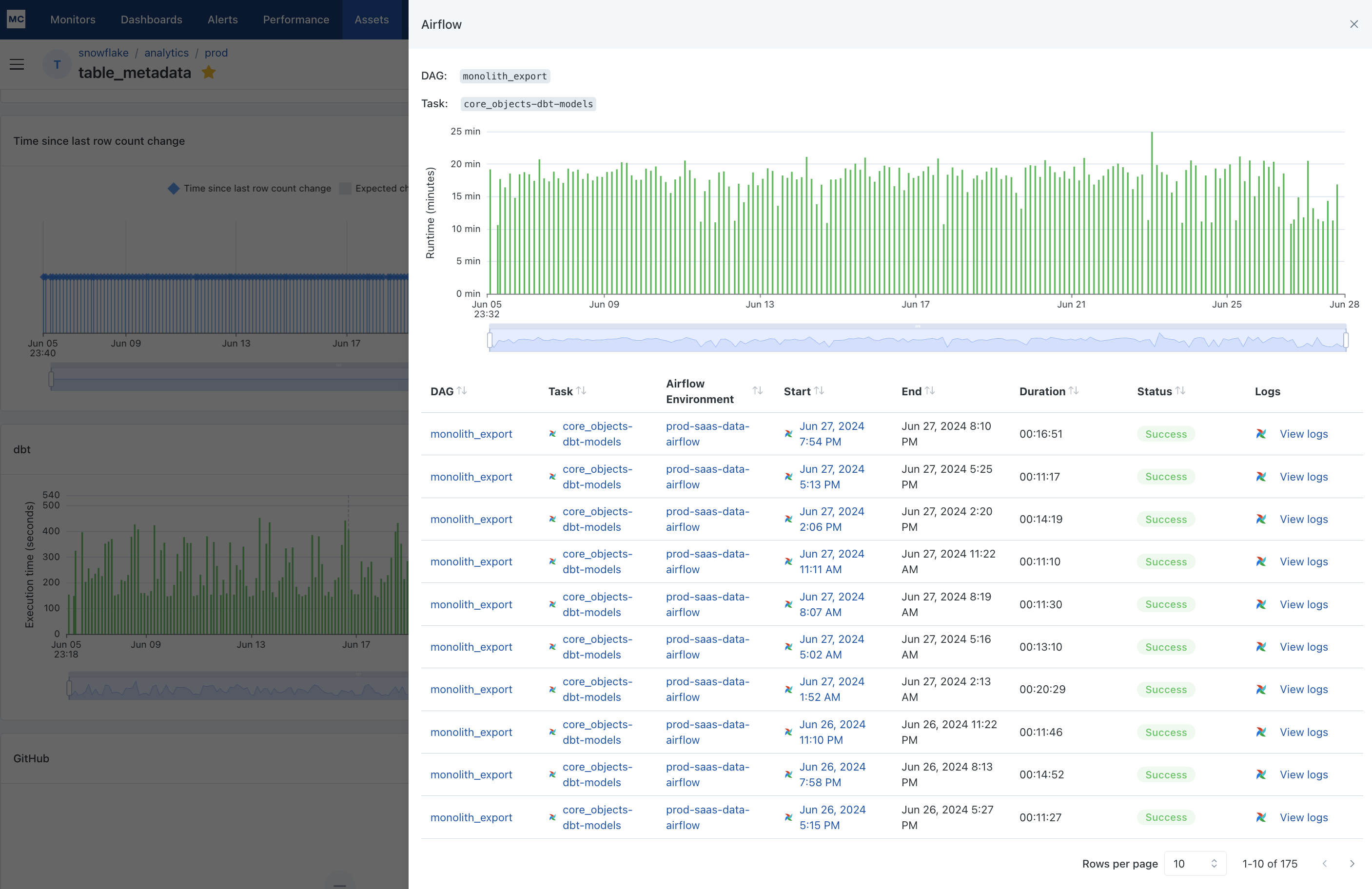
DAG structure
With airflow-mcd 0.3.12 or later, DAG callbacks also send each DAG's structure: the dependencies between its tasks, the DAGs it triggers, and the Airflow Datasets it produces and consumes. See Airflow DAG and Task Lineage.
Prerequisites
Before adding the integration, you'll need:
- Airflow 2.x or 3.x, self-managed or hosted (for example Amazon MWAA, Google Cloud Composer, or Astronomer). Airflow 2.4.3 through 2.6.0 aren't supported; see the FAQs.
- The ability to install Python packages in your Airflow environment and restart it.
- For lineage: a warehouse integration in Monte Carlo with query logs enabled.
Use
airflow-mcd0.3.12 or later. It's required for Airflow 3 task callbacks and for DAG and task lineage.
Setup
The full steps are on Airflow Alerts and Task Observability. In summary:
- Add the Airflow integration in Monte Carlo. Go to Settings → Integrations, click Create, and select Airflow from the Orchestration section. Provide a name and the host name of your Airflow web server. Monte Carlo uses the host name only to link to your DAGs and logs.
- Generate an integration key for the Airflow integration, and save the key ID and secret.
- Install
airflow-mcdin your Airflow environment. - Create a
Monte Carlo Data Gatewayconnection in Airflow using the key ID and secret. - Add Monte Carlo callbacks to your DAGs and tasks.
If you configure task callbacks, you must also configure DAG callbacks. Without DAG callbacks, Monte Carlo can't update DAG run status, so DAGs may appear stuck in "Running" and DAG failures won't alert.
- Tag your queries for lineage (recommended). See Airflow in Lineage.
- Create a job monitor to alert on DAG failures. See DAG Failure Alerts.
Confirm data is flowing
- Trigger a DAG that has Monte Carlo callbacks.
- In Monte Carlo, navigate to Assets, search for the DAG's
dag_id, and open it. - On the Runs tab, verify you can see the run and its status.
A new DAG appears after its first run with callbacks, and can take a few hours to show up on the Assets page. If it doesn't appear, go to Settings → Integrations, open the Airflow integration's menu, and click Test to run a validation test. If any check fails, the test shows steps to resolve it.
Lineage may take up to 24 hours to appear due to batch processing.
DAG Failure Alerts
When a DAG run fails, Monte Carlo raises a Job run failed event. A job monitor decides which DAG failures alert and who is notified. This lets you:
- Route and receive notifications like other Monte Carlo alerts
- Analyze the downstream impact of a failure
- Report on DAG failures alongside all your other data issues
Create a job monitor on your Airflow integration. A job monitor can cover all DAGs, DAGs with a given tag, or DAGs you pick, and sends alerts to the audiences you choose. See Job monitors for setup steps.
Because callbacks send runs as they happen, failures reach Monte Carlo immediately. No webhook or polling setup is needed.
Airflow DAG tags
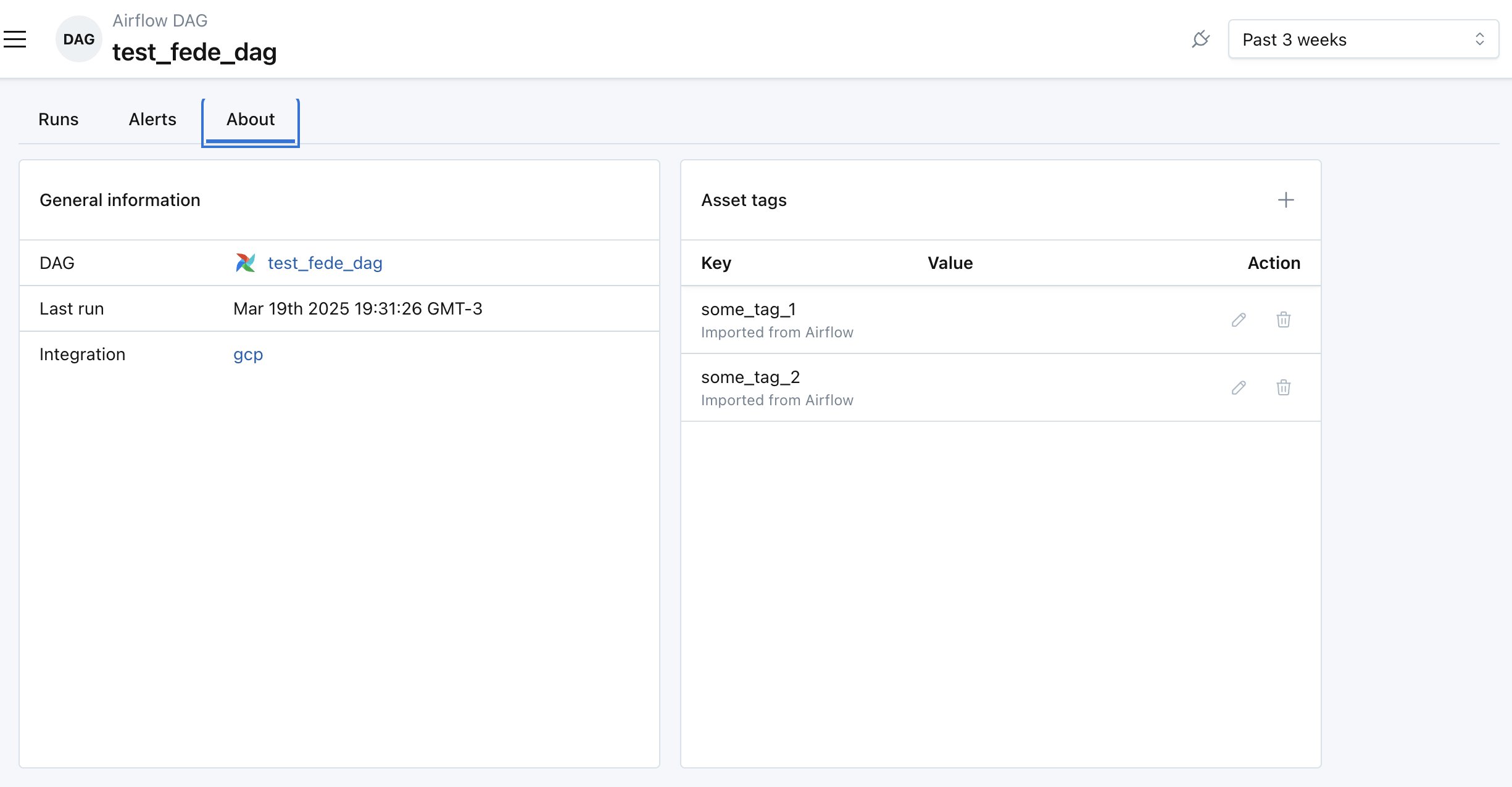
DAG tags let teams see only the jobs and alerts relevant to them. Use DAG tags in a job monitor's tag rule to alert only on the tagged DAGs, or to include only the tagged DAGs in a domain. New DAGs with the tag are covered automatically.
Lineage
Monte Carlo builds Airflow lineage from two sources:
- Task-to-Table lineage comes from your warehouse's query logs. Tag the queries your tasks run with the DAG and task ID, and Monte Carlo attributes the resulting lineage edges to that task. See Airflow in Lineage.
- Task-to-Task, DAG-to-DAG, and Dataset lineage comes from DAG callbacks. It appears as the task graph on a DAG's Tasks tab and on its Job dependencies tab. See Airflow DAG and Task Lineage.
Click the Airflow icon on a lineage edge to see recent DAG and task runs for that edge.
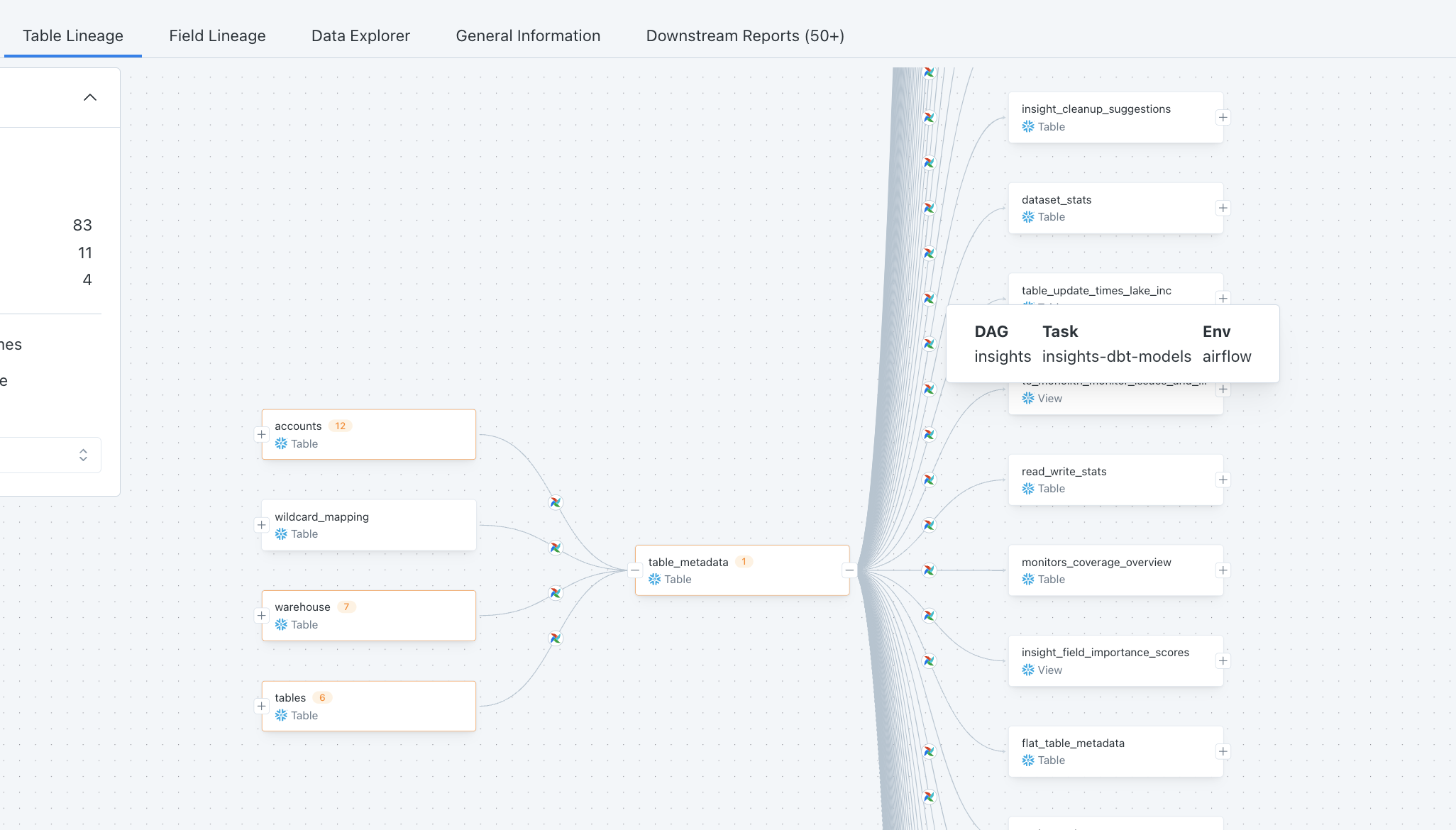
Key points:
- A referenced table must be monitored by Monte Carlo for the edge to land on it.
- Table-level only. Column-level lineage is not produced.
- Lineage can take up to 24 hours to appear due to batching.
Circuit Breakers
Run Monte Carlo rules or "circuit break" pipelines when data doesn't meet your quality thresholds, for example between transformation steps, or after ETL/ELT jobs run but before BI dashboards update.
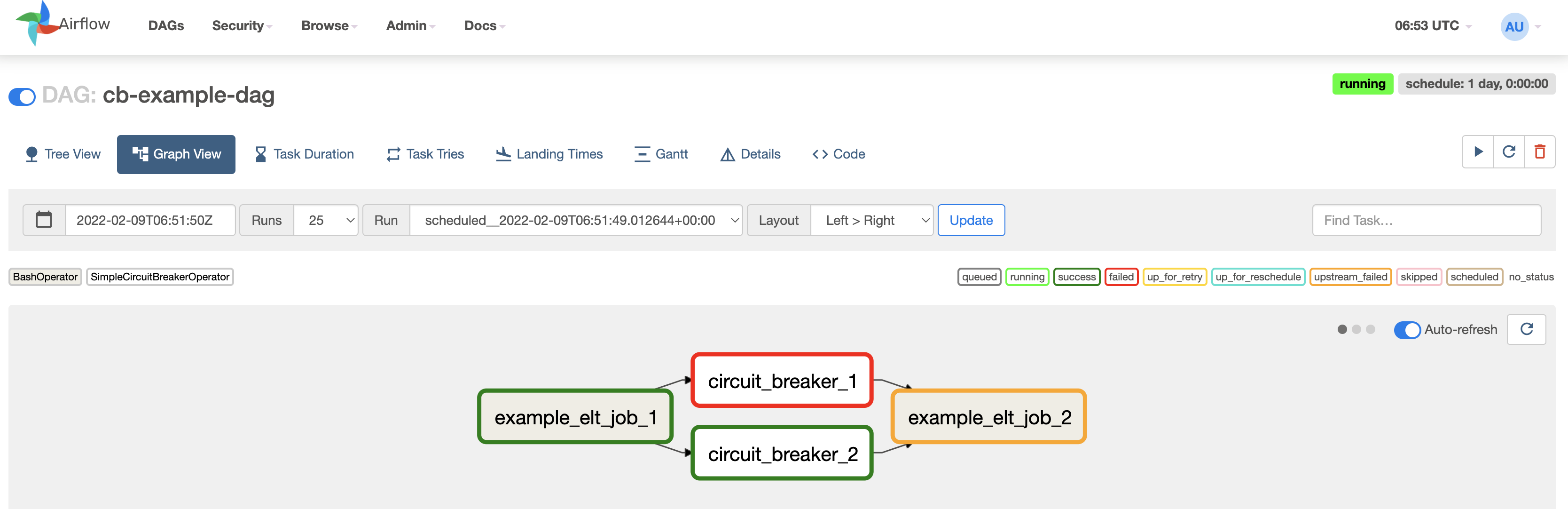
See Circuit breakers for setup steps.
Network Access Control
You can restrict access to the Airflow callbacks endpoint by IP address using Network Access Control Lists. See Network Access Control.
FAQs
Q: Why don't I have to give Monte Carlo my Airflow credentials?
Monte Carlo doesn't connect to Airflow. Airflow sends runs to Monte Carlo through callbacks, and lineage comes from your warehouse's query logs.
Q: Which Airflow providers are supported?
All of them, including Amazon MWAA, Google Cloud Composer, Astronomer, and self-managed installations. No Monte Carlo agent is required.
Q: Are multiple Airflow environments supported?
Yes. Create an Airflow integration for each environment. If environments share DAG and task IDs, add the environment tag to your queries. See Multiple Airflow Environments.
Q: Why does my DAG show as "Running" even though it has completed?
DAG callbacks aren't configured. When only task callbacks are configured, Monte Carlo never receives the signal that the DAG finished. As a result:
- DAG runs remain "Running" indefinitely.
- DAG failures don't alert.
- The Job performance view shows a steadily declining chart.
Configure both DAG and task callbacks. See How Airflow Callbacks Work.
Q: Does Monte Carlo support alerting on SLA misses?
No. SLA miss callbacks were removed in airflow-mcd 0.3.8. If you're interested in this functionality, let your Monte Carlo representative know, or ask Bayes.
Q: Do DAGs disappear from the Assets page if they haven't run recently?
No. A DAG stays on the Assets page after it stops running, along with its past runs.
Q: Is airflow-mcd compatible with all Airflow versions? What if I see a setuptools/package name mismatch error?
airflow-mcd isn't compatible with Airflow 2.4.3 through 2.6.0. Those versions removed package name normalization, which causes this error when installing airflow-mcd:
Exception: The package 'airflow_mcd' from setuptools and airflow-mcd do not match. Please make sure they are alignedThe recommended fix is to upgrade Airflow to 2.6.1 or later. If upgrading isn't possible, install the package under a different name:
- Install
airflow-mcdwith a changed package name:
mkdir airflow_mcd # not the official package name
cd airflow_mcd
pip download airflow-mcd  # the official package name, downloads the code from pip but does not install
cd ..
pip install airflow_mcd # not the official package name- Verify the installation:
pip freeze | grep mcd # Should show airflow_mcd==<version>Q: Can I use Monte Carlo with third-party orchestration tools (for example, Astronomer, Docker, or other dbt runners)?
Yes, but you're responsible for passing Monte Carlo's request headers (key ID and secret) through unchanged, and for keeping the request format the same. Usually this means configuring your tool to inject these environment variables at runtime:
MCD_DEFAULT_API_ID=<your_api_id>
MCD_DEFAULT_API_TOKEN=<your_api_token>
Most orchestration and container tools support secret or environment variable management for this. Because configuration varies by tool, see your platform's documentation or support for setup questions.
Q: Can I use AWS PrivateLink for Airflow?
No. PrivateLink isn't supported for Airflow.
Q: Something is missing. How do I request more functionality?
Request more functionality for the Airflow integration here, or ask Bayes.
Updated 4 days ago