
Alert operations
How many alerts you got, how fast you responded and fixed them, and how many became incidents.
Private previewComposable dashboards and the metrics API are in private preview: available to invited accounts, and features may change. See Integration and feature lifecycles for what this means, and reach out to your account representative to request access.
Overview
An overview of your alerts: how many there are, how fast your team responds and fixes them, and how many became incidents. The tiles are modelled on the product's Data operations dashboard but are not the same: the product has no status update rate, no time to fixed for all alerts and no alerts by alert type.
For: data team leads. Metrics: Data quality.
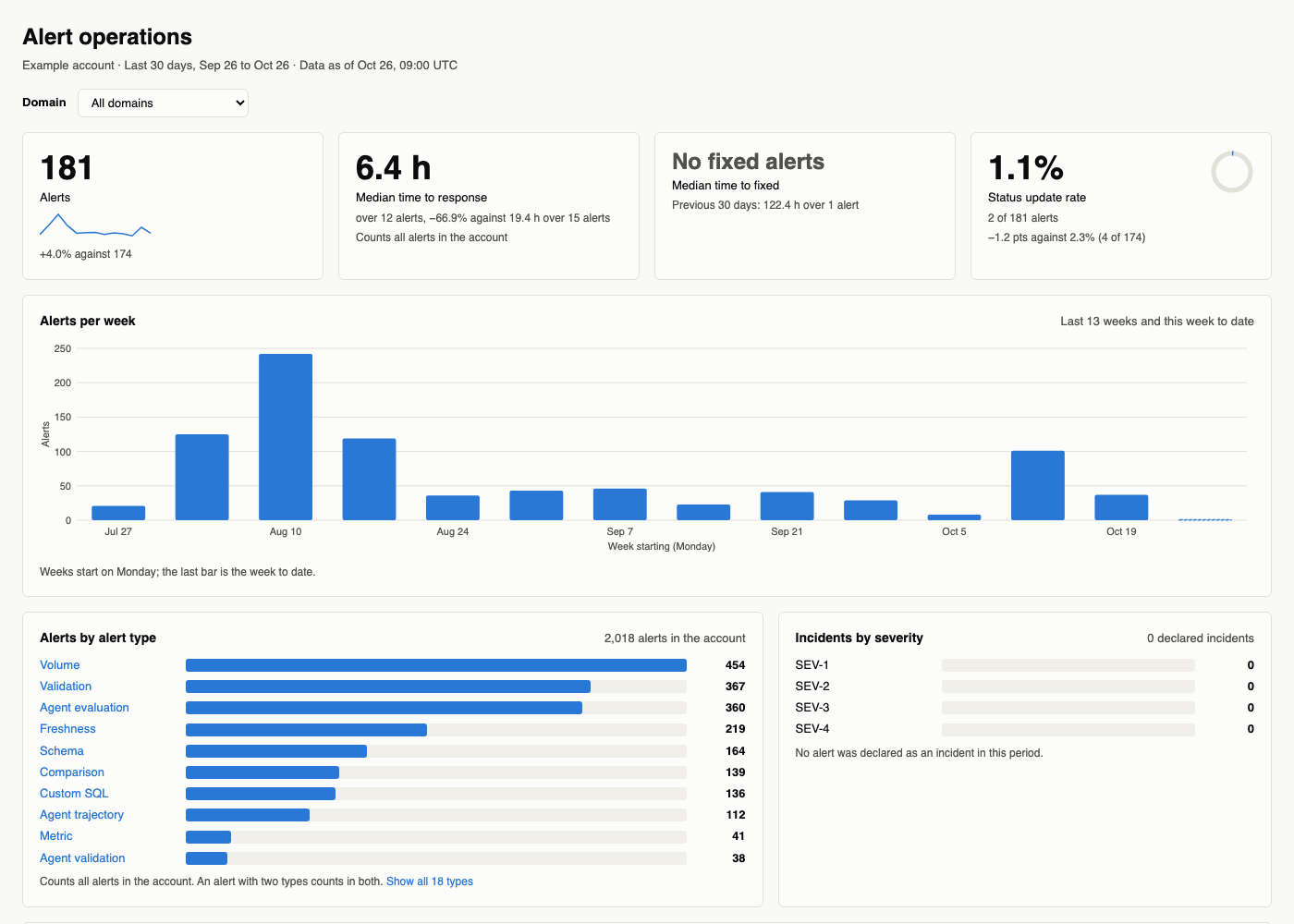
An example built from the prompt below, with sample names and values.
Prompt
Copy this prompt into an AI tool connected to the Monte Carlo MCP server. With the dashboard skills from the Monte Carlo agent toolkit installed (in coding agents such as Claude Code, Cursor, Codex and GitHub Copilot), your agent reads this page, builds the layout and runs the queries below; without them, it works from the metrics alone.
Build an alert operations dashboard by domain for the last 30 days, with alerts per week, median time to response and to fixed, status update rate, incidents by severity and alerts by alert type.What it covers
- How many alerts you got, week by week, against the previous period.
- Median time to response and time to fixed, and the status update rate.
- Alerts by alert type, and declared incidents by severity.
- One row per domain with its alerts, time to fixed and status update rate.
- Time to response and time to fixed are calculated differently from the Data operations dashboard in Monte Carlo, so the numbers differ.
Filters and groupings
- By the monitors' domain (as the Alerts page filters), monitor tag (often the team) or audience, with their
monitor_domain_,monitor_tag_andaudience_alert metrics. - By the tables' domain, data product or asset tag, with their
domain_,data_product_andasset_tag_alert metrics. - By alert type, severity, status or owner.
- Any window up to 13 full months, by day, week or month.
How it's built
The layout, queries and definitions your agent follows; use them to check its numbers or to build the dashboard by hand.
Layout
- Filters: the window (7, 30 or 90 days, 30 by default) and one domain or data product. For alerts, a domain is the monitor domain, or the domains of the tables for alerts without a monitor, as on the product's Alerts page. Time to response and alert type have no per-member metric: they say they count all alerts.
- The answer and trend: alerts, median time to response, median time to fixed and status update rate, each with its change against the previous 30 days, and alerts per week next to them.
- Breakdown: alerts by alert type, and declared incidents by severity, SEV-1 to SEV-4, zero when there are none.
- Declared incidents: by alert type and severity together, and their median time to fixed.
- Domains: one row per monitor domain with alerts in the window, most alerts first: its alerts with a bar and a link to them, median time to fixed, status update rate with "x of y", and declared incidents. With one domain in the filter, only its row.
Queries
| Block | Window |
|---|---|
| Alerts per week | the 13 weeks before this one, and this week to date |
| Time to response, time to fixed, status update rate | last 30 days |
| Incidents by severity | last 30 days |
| Alerts by alert type | last 30 days |
| Change against the previous period | the 30 days before the window |
| Declared incidents | last 30 days |
| Domains | last 30 days |
The domain filter lists the monitor domains with alerts in the window: monitor_domain_incident_count grouped by monitor_domain and monitor_domain__domain_name, so each domain links to its alerts. The parts of the status update rate are incident_count grouped by incident__is_incident_status_set.
Alerts per week
- Metrics:
incident_count - Grouped by:
metric_time__week - Filter:
metric_time__dayon or after the start of the week 13 weeks ago - Sorted by:
metric_time__week, lowest first
Request (JSON)
{
  "metrics": ["incident_count"],
  "group_by": ["metric_time__week"],
  "filters": [
    {
      "field": "metric_time__day",
      "op": "gte",
      "values": ["<start of the week 13 weeks ago>"]
    }
  ],
  "order_by": [{"field": "metric_time__week"}]
}
Weeks start on Monday; the last week is to date. Alerts per week keep 13 weeks whatever the window filter says. For one domain, ask monitor_domain_incident_count filtered on monitor_domain__domain_name; for one data product, data_product_incident_count filtered on data_product__data_product_name.
Time to response, time to fixed, status update rate
- Metrics:
incident_count,incident_median_first_feedback_hours,incident_median_ttr_hours,incident_status_update_rate - Filter:
metric_time__dayon or after 30 days ago
Request (JSON)
{
  "metrics": [
    "incident_count",
    "incident_median_first_feedback_hours",
    "incident_median_ttr_hours",
    "incident_status_update_rate"
  ],
  "filters": [
    {
      "field": "metric_time__day",
      "op": "gte",
      "values": ["<30 days ago>"]
    }
  ]
}
Alerts behind the medians. Only alerts that reached a status have a time to response, and only fixed alerts a time to fixed: the count under each median ("42.8 h over 2 alerts") is what the two queries below return, not the alerts without a status.
Behind time to fixed:
- Metrics:
incident_count - Filter:
metric_time__dayon or after 30 days ago;incident__incident_ttr_hoursat least0
Request (JSON)
{
  "metrics": ["incident_count"],
  "filters": [
    {
      "field": "metric_time__day",
      "op": "gte",
      "values": ["<30 days ago>"]
    },
    {
      "field": "incident__incident_ttr_hours",
      "op": "gte",
      "values": ["0"]
    }
  ]
}
Behind time to response:
- Metrics:
incident_count - Filter:
metric_time__dayon or after 30 days ago;incident__incident_first_feedback_hoursat least0
Request (JSON)
{
  "metrics": ["incident_count"],
  "filters": [
    {
      "field": "metric_time__day",
      "op": "gte",
      "values": ["<30 days ago>"]
    },
    {
      "field": "incident__incident_first_feedback_hours",
      "op": "gte",
      "values": ["0"]
    }
  ]
}
For the domain rows, ask monitor_domain_incident_count grouped by monitor_domain and monitor_domain__domain_name with the same filters; for the previous period, the same with its window.
Incidents by severity
- Metrics:
incident_declared_count - Grouped by:
incident__incident_user_severity - Filter:
metric_time__dayon or after 30 days ago
Request (JSON)
{
  "metrics": ["incident_declared_count"],
  "group_by": ["incident__incident_user_severity"],
  "filters": [
    {
      "field": "metric_time__day",
      "op": "gte",
      "values": ["<30 days ago>"]
    }
  ]
}
Alerts by alert type
- Metrics:
incident_alert_type_incident_count - Grouped by:
incident_sub_type__incident_alert_type - Filter:
metric_time__dayon or after 30 days ago - Sorted by:
incident_alert_type_incident_count, highest first
Request (JSON)
{
  "metrics": ["incident_alert_type_incident_count"],
  "group_by": ["incident_sub_type__incident_alert_type"],
  "filters": [
    {
      "field": "metric_time__day",
      "op": "gte",
      "values": ["<30 days ago>"]
    }
  ],
  "order_by": [
    {
      "field": "incident_alert_type_incident_count",
      "descending": true
    }
  ]
}
Each alert type links to its alerts, as Links to a list of alerts in Dashboard style says. The link needs the sub types of each alert type, from a second request that only lists them; the counts stay those of the first request, since an alert with several sub types would count once per sub type:
- Metrics:
incident_alert_type_incident_count - Grouped by:
incident_sub_type__incident_alert_type,incident_sub_type - Filter:
metric_time__dayon or after 30 days ago
Request (JSON)
{
  "metrics": ["incident_alert_type_incident_count"],
  "group_by": [
    "incident_sub_type__incident_alert_type",
    "incident_sub_type"
  ],
  "filters": [
    {
      "field": "metric_time__day",
      "op": "gte",
      "values": ["<30 days ago>"]
    }
  ]
}
Change against the previous period
- Metrics: the four of Time to response, time to fixed, status update rate, and
incident_count - Filter:
metric_time__dayfrom 60 days ago to 31 days ago
Request (JSON)
{
  "metrics": ["incident_count"],
  "filters": [
    {
      "field": "metric_time__day",
      "op": "gte",
      "values": ["<60 days ago>"]
    },
    {
      "field": "metric_time__day",
      "op": "lte",
      "values": ["<31 days ago>"]
    }
  ]
}
Declared incidents by alert type and severity
- Metrics:
incident_alert_type_incident_count - Grouped by:
incident_sub_type__incident_alert_type,incident__incident_user_severity - Filter:
metric_time__dayon or after 30 days ago;incident__is_incident_declaredistrue
Request (JSON)
{
  "metrics": ["incident_alert_type_incident_count"],
  "group_by": [
    "incident_sub_type__incident_alert_type",
    "incident__incident_user_severity"
  ],
  "filters": [
    {
      "field": "metric_time__day",
      "op": "gte",
      "values": ["<30 days ago>"]
    },
    {
      "field": "incident__is_incident_declared",
      "op": "in",
      "values": [true]
    }
  ]
}
Declared incidents: time to fixed. Their number is the sum of Incidents by severity.
- Metrics:
incident_median_ttr_hours - Filter:
metric_time__dayon or after 30 days ago;incident__is_incident_declaredistrue
Request (JSON)
{
  "metrics": ["incident_median_ttr_hours"],
  "filters": [
    {
      "field": "metric_time__day",
      "op": "gte",
      "values": ["<30 days ago>"]
    },
    {
      "field": "incident__is_incident_declared",
      "op": "in",
      "values": [true]
    }
  ]
}
For one domain or data product, monitor_domain_incident_median_ttr_hours and monitor_domain_incident_status_update_rate (or the data_product_ ones) replace time to fixed and status update rate; time to response keeps counting all alerts. Declared incidents by severity for a member: its ..._incident_count filtered on incident__is_incident_declared and on the member, grouped by incident__incident_user_severity.
Domains
- Metrics:
monitor_domain_incident_count,monitor_domain_incident_median_ttr_hours,monitor_domain_incident_status_update_rate - Grouped by:
monitor_domain,monitor_domain__domain_name - Filter:
metric_time__dayon or after 30 days ago - Sorted by:
monitor_domain_incident_count, highest first
Request (JSON)
{
  "metrics": [
    "monitor_domain_incident_count",
    "monitor_domain_incident_median_ttr_hours",
    "monitor_domain_incident_status_update_rate"
  ],
  "group_by": [
    "monitor_domain",
    "monitor_domain__domain_name"
  ],
  "filters": [
    {
      "field": "metric_time__day",
      "op": "gte",
      "values": ["<30 days ago>"]
    }
  ],
  "order_by": [
    {
      "field": "monitor_domain_incident_count",
      "descending": true
    }
  ]
}
The parts of the status update rate: monitor_domain_incident_count grouped by the same and incident__is_incident_status_set. Declared incidents: monitor_domain_incident_count grouped by the same, filtered incident__is_incident_declared is true. A domain with no fixed alert shows "No fixed alerts". Alerts in two domains count in both, so the rows do not add up to the answer.
Definitions
- Alerts and incidents. An alert groups one or more events; an incident is an alert someone declared (SEV-1 to SEV-4). See the Glossary.
- Time to response and time to fixed are medians with one value per alert: from the alert to its first status, and to Fixed. The product's Time to response (alerts) counts only Acknowledged, Expected and No action needed as a response, else the latest status, and its Time to resolved covers declared incidents only, taken over their events, so the values differ.
Updated 1 day ago