
Validation monitor results
Every run of your validation monitors with its value, threshold and outcome, and a summary per monitor.
Private previewComposable dashboards and the metrics API are in private preview: available to invited accounts, and features may change. See Integration and feature lifecycles for what this means, and reach out to your account representative to request access.
Overview
Every run of your validation monitors: the value each run measured, the threshold of that run and whether it breached, as each monitor's chart shows it. Use it to review checks and to export the runs.
For: data engineers, data stewards. Metrics: Monitor runs.
Monitor runs are in private previewContact your Monte Carlo account team to inquire.
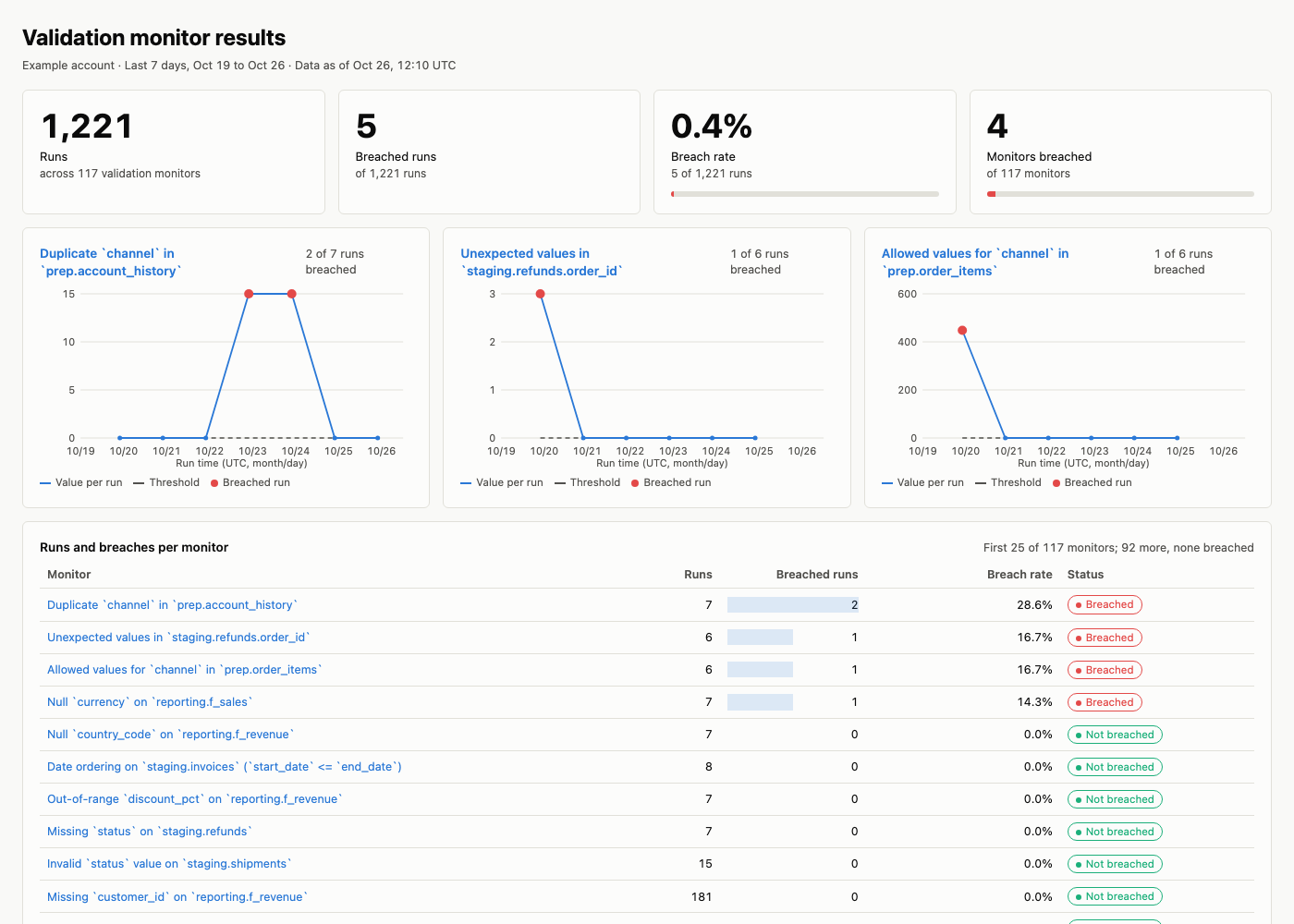
An example built from the prompt below, with sample names and values.
Prompt
Copy this prompt into an AI tool connected to the Monte Carlo MCP server. With the dashboard skills from the Monte Carlo agent toolkit installed (in coding agents such as Claude Code, Cursor, Codex and GitHub Copilot), your agent reads this page, builds the layout and runs the queries below; without them, it works from the metrics alone.
Show my validation monitor runs from the last 7 days with value, threshold and whether they breached, a summary per monitor, and charts for the 3 monitors that breached most.What it covers
- How many validation runs there were, how many breached, and the breach rate.
- Each run's value and threshold, for the monitors that breached most.
- A summary per monitor, and the run history to export.
Filters and groupings
- By monitor, and by breached or not.
- By run date, within the history kept for the monitor, which depends on how often it runs (see Monitor runs).
- By team, domain or data product in two steps: list its monitors with the Coverage metrics, then filter these queries on them (By team or domain, below).
- Users whose access is limited to some domains cannot query monitor runs.
How it's built
The layout, queries and definitions your agent follows; use them to check its numbers or to build the dashboard by hand.
Layout
- The answer: runs, breached runs, breach rate and the number of monitors that breached, summed from the summary per monitor. A monitor with a validation alert in the window and no breached run is counted as breached and marked "run value pending".
- Runs of the worst monitors: for the 3 monitors that breached most, the value per run, its threshold (the upper bound, else the lower bound, else the configured value with its operator) and which runs breached.
- Detail: the summary per monitor, most breaches first, then the runs table with a CSV download.
Queries
| Block | Window |
|---|---|
| Runs and breaches per monitor | last 7 days |
| Runs with value and threshold (runs of the worst monitors, detail, CSV) | last 7 days |
Runs and breaches per monitor
- Metrics:
monitor_run_item_count,monitor_run_item_breach_count,monitor_run_item_breach_rate - Grouped by:
monitor,monitor__monitor_name - Filter:
monitor__monitor_typeisvalidation - Filter:
monitor__is_monitor_deletedisfalse - Filter:
monitor_run_item__is_gapfilledisfalse - Filter:
metric_time__dayon or after 7 days ago - Sorted by:
monitor_run_item_breach_count, highest first, thenmonitor_run_item_breach_rate, highest first, thenmonitor__monitor_name, lowest first
Request (JSON)
{
  "metrics": [
    "monitor_run_item_count",
    "monitor_run_item_breach_count",
    "monitor_run_item_breach_rate"
  ],
  "group_by": ["monitor", "monitor__monitor_name"],
  "filters": [
    {
      "field": "monitor__monitor_type",
      "op": "in",
      "values": ["validation"]
    },
    {
      "field": "monitor__is_monitor_deleted",
      "op": "in",
      "values": [false]
    },
    {
      "field": "monitor_run_item__is_gapfilled",
      "op": "in",
      "values": [false]
    },
    {
      "field": "metric_time__day",
      "op": "gte",
      "values": ["<7 days ago>"]
    }
  ],
  "order_by": [
    {
      "field": "monitor_run_item_breach_count",
      "descending": true
    },
    {
      "field": "monitor_run_item_breach_rate",
      "descending": true
    },
    {"field": "monitor__monitor_name"}
  ]
}
Validation alerts per monitor. The newest run of a monitor can be exported before its value: it comes back gap-filled and is left out, though its alert exists. The alerts catch it.
- Metrics:
monitor_incident_count - Grouped by:
monitor,monitor__monitor_name - Filter:
monitor__monitor_typeisvalidation;monitor__is_monitor_deletedisfalse;metric_time__dayon or after 7 days ago
Request (JSON)
{
  "metrics": ["monitor_incident_count"],
  "group_by": ["monitor", "monitor__monitor_name"],
  "filters": [
    {
      "field": "monitor__monitor_type",
      "op": "in",
      "values": ["validation"]
    },
    {
      "field": "monitor__is_monitor_deleted",
      "op": "in",
      "values": [false]
    },
    {
      "field": "metric_time__day",
      "op": "gte",
      "values": ["<7 days ago>"]
    }
  ]
}
Runs with value and threshold. Grouping by monitor_run_item returns one row per run; a week of runs can pass the default of 1,000 rows, so the query asks for up to 10,000.
- Metrics:
monitor_run_item_count - Grouped by:
monitor_run_item,monitor,monitor__monitor_name,monitor_run_item__monitor_run_item_measured_at__second,monitor_run_item__monitor_run_item_value,monitor_run_item__monitor_run_item_lower_threshold,monitor_run_item__monitor_run_item_upper_threshold,parent_time_series__parent_time_series_operator,parent_time_series__parent_time_series_threshold,monitor_run_item__is_monitor_run_item_breach - Filter:
monitor__monitor_typeisvalidation - Filter:
monitor__is_monitor_deletedisfalse - Filter:
monitor_run_item__is_gapfilledisfalse - Filter:
metric_time__dayon or after 7 days ago - At most 10,000 rows
Request (JSON)
{
  "metrics": ["monitor_run_item_count"],
  "group_by": [
    "monitor_run_item",
    "monitor",
    "monitor__monitor_name",
    "monitor_run_item__monitor_run_item_measured_at__second",
    "monitor_run_item__monitor_run_item_value",
    "monitor_run_item__monitor_run_item_lower_threshold",
    "monitor_run_item__monitor_run_item_upper_threshold",
    "parent_time_series__parent_time_series_operator",
    "parent_time_series__parent_time_series_threshold",
    "monitor_run_item__is_monitor_run_item_breach"
  ],
  "filters": [
    {
      "field": "monitor__monitor_type",
      "op": "in",
      "values": ["validation"]
    },
    {
      "field": "monitor__is_monitor_deleted",
      "op": "in",
      "values": [false]
    },
    {
      "field": "monitor_run_item__is_gapfilled",
      "op": "in",
      "values": [false]
    },
    {
      "field": "metric_time__day",
      "op": "gte",
      "values": ["<7 days ago>"]
    }
  ],
  "limit": 10000
}
Definitions
- Threshold is the bound of that run: the lower and upper threshold the monitor used for the point. EQ and NEQ monitors have no bound; show their configured value (the threshold of the series) with the operator.
- Breach rate counts runs with a static threshold; gap-filled points on the chart are not runs and are left out.
- Pending runs: a run whose value has not arrived yet is not counted; it arrives with the next refresh. A monitor that alerted without a breached run is shown as breached, "run value pending".
- History: depends on how often the monitor runs; Monitor runs lists how far back each kind goes.
- Ties: the summary is ordered by breaches, then breach rate, then monitor name; the top 3 are its first three rows. With fewer than 3 breaching monitors, show the ones there are.
- By team or domain: list the monitors of the team or domain in the Coverage metrics first, then filter these queries on them, as the Monitor runs metrics describes.
Updated 3 days ago