
Credit consumption
How many credits you used each month, what used them, and which monitors cost the most.
Private previewComposable dashboards and the metrics API are in private preview: available to invited accounts, and features may change. See Integration and feature lifecycles for what this means, and reach out to your account representative to request access.
Overview
Where your credits go: the credits per month over the last 13 months, what consumed them (charge type, monitor type, warehouse) and the monitors that cost the most in the last 30 days. Credits only, as the Consumption metrics say: no dollar amounts or invoices.
In the product: the Billing page shows credits per day by charge type, and the statements per billing period.
For: data platform owners, budget owners. Metrics: Consumption.
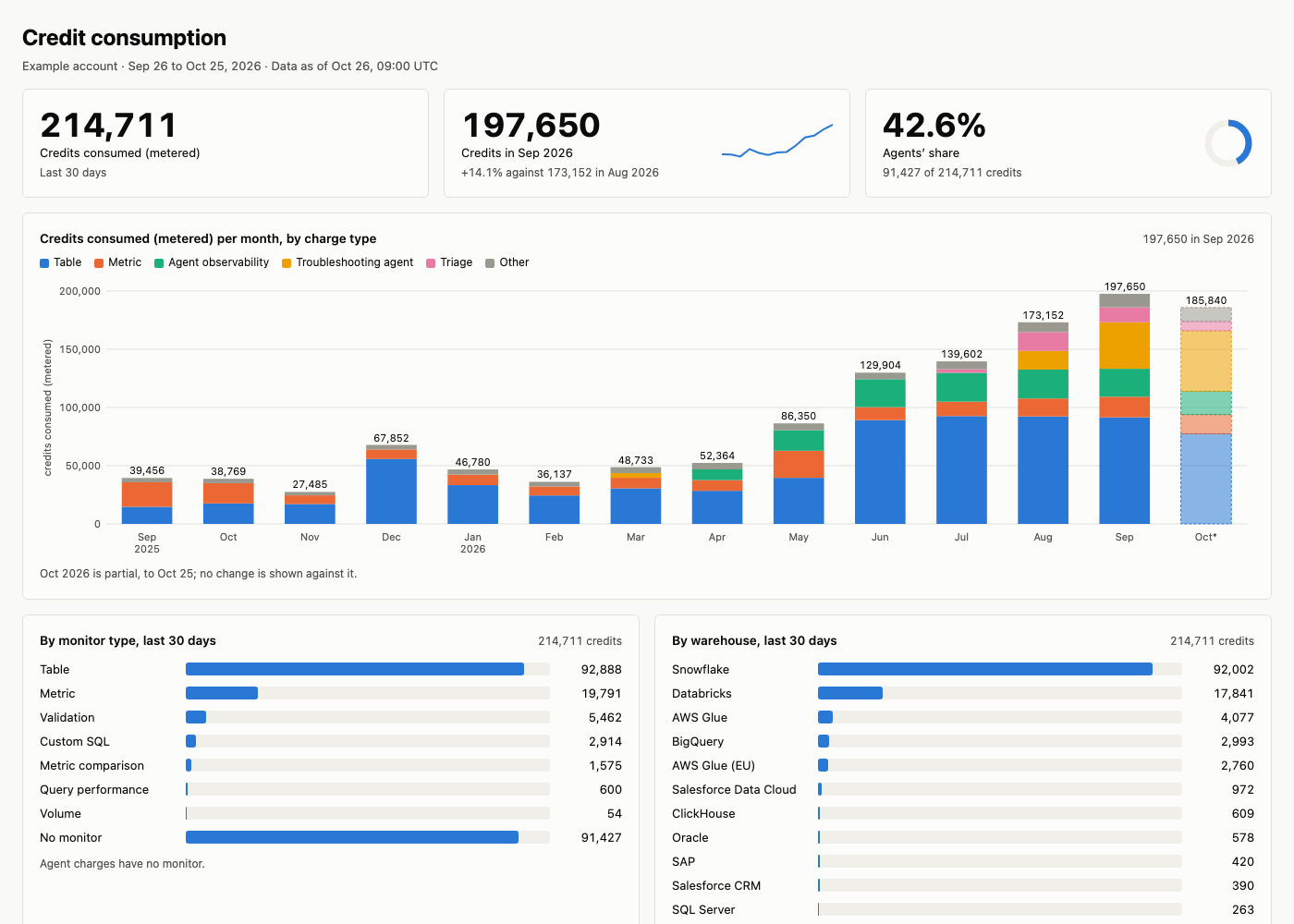
An example built from the prompt below, with sample names and values.
Prompt
Copy this prompt into an AI tool connected to the Monte Carlo MCP server. With the dashboard skills from the Monte Carlo agent toolkit installed (in coding agents such as Claude Code, Cursor, Codex and GitHub Copilot), your agent reads this page, builds the layout and runs the queries below; without them, it works from the metrics alone.
Build a credit consumption dashboard with credits per month for the last 13 months by charge type, the change against the month before, credits by monitor type and by warehouse for the last 30 days, and the 20 monitors that used the most credits.What it covers
- Credits per month over the last 13 months, by charge type, and the change against the month before.
- What consumed them in the last 30 days: monitor type and warehouse.
- The 20 monitors that used the most credits.
- Credits only: no dollar amounts or invoices.
Filters and groupings
- By charge type, monitor type, warehouse or monitor.
- By domain, data product, asset tag, monitor domain, monitor tag or audience, with their
consumed_creditsmetrics; a monitor counts in every member it covers, so members overlap and do not add up to the account. - By day, week or month, up to 13 full months.
How it's built
The layout, queries and definitions your agent follows; use them to check its numbers or to build the dashboard by hand.
Layout
- Filter: none; the dashboard is for the whole account.
- The answer: credits consumed (metered) in the last 30 days, the last full month with its change against the month before, and the agents' share of the last 30 days.
- Credits per month: one bar per month for the last 13 full months and this month to date, stacked by charge type, the month to date marked as partial.
- Breakdown: credits by monitor type and by warehouse in the last 30 days, highest first; charges with no monitor or no warehouse are their own row, last.
- Top monitors: the 20 monitors with the most credits in the last 30 days, with their type, status and credits, flagging monitors whose tables are all deleted.
Queries
Every query filters on credit pricing; when it returns nothing, say the account is not on credit pricing.
The answer
- Metrics:
consumed_credits,agent_consumed_credits,agent_credit_share - Filter:
metric_time__dayon or after 30 days ago;account__is_account_on_credit_pricingistrue
Request (JSON)
{
  "metrics": [
    "consumed_credits",
    "agent_consumed_credits",
    "agent_credit_share"
  ],
  "filters": [
    {
      "field": "metric_time__day",
      "op": "gte",
      "values": ["<30 days ago>"]
    },
    {
      "field": "account__is_account_on_credit_pricing",
      "op": "in",
      "values": [true]
    }
  ]
}
Credits per month
- Metrics:
consumed_credits - Grouped by:
metric_time__month - Filter:
metric_time__dayon or after the start of the month 13 months ago;account__is_account_on_credit_pricingistrue - Sorted by:
metric_time__month, lowest first
Request (JSON)
{
  "metrics": ["consumed_credits"],
  "group_by": ["metric_time__month"],
  "filters": [
    {
      "field": "metric_time__day",
      "op": "gte",
      "values": ["<start of the month 13 months ago>"]
    },
    {
      "field": "account__is_account_on_credit_pricing",
      "op": "in",
      "values": [true]
    }
  ],
  "order_by": [{"field": "metric_time__month"}]
}
The last full month and its change against the month before are computed from these rows.
Credits per month by charge type
- Metrics:
consumed_credits - Grouped by:
metric_time__month,consumption__consumption_charge_type - Filter:
metric_time__dayon or after the start of the month 13 months ago;account__is_account_on_credit_pricingistrue
Request (JSON)
{
  "metrics": ["consumed_credits"],
  "group_by": [
    "metric_time__month",
    "consumption__consumption_charge_type"
  ],
  "filters": [
    {
      "field": "metric_time__day",
      "op": "gte",
      "values": ["<start of the month 13 months ago>"]
    },
    {
      "field": "account__is_account_on_credit_pricing",
      "op": "in",
      "values": [true]
    }
  ]
}
Charge types add up to the month's credits, so the bars stack.
By monitor type
- Metrics:
consumed_credits - Grouped by:
monitor__monitor_type - Filter:
metric_time__dayon or after 30 days ago;account__is_account_on_credit_pricingistrue - Sorted by:
consumed_credits, highest first
Request (JSON)
{
  "metrics": ["consumed_credits"],
  "group_by": ["monitor__monitor_type"],
  "filters": [
    {
      "field": "metric_time__day",
      "op": "gte",
      "values": ["<30 days ago>"]
    },
    {
      "field": "account__is_account_on_credit_pricing",
      "op": "in",
      "values": [true]
    }
  ],
  "order_by": [
    {"field": "consumed_credits", "descending": true}
  ]
}
By warehouse
- Metrics:
consumed_credits - Grouped by:
warehouse,warehouse__warehouse_name - Filter:
metric_time__dayon or after 30 days ago;account__is_account_on_credit_pricingistrue - Sorted by:
consumed_credits, highest first
Request (JSON)
{
  "metrics": ["consumed_credits"],
  "group_by": ["warehouse", "warehouse__warehouse_name"],
  "filters": [
    {
      "field": "metric_time__day",
      "op": "gte",
      "values": ["<30 days ago>"]
    },
    {
      "field": "account__is_account_on_credit_pricing",
      "op": "in",
      "values": [true]
    }
  ],
  "order_by": [
    {"field": "consumed_credits", "descending": true}
  ]
}
Top monitors
- Metrics:
monitor_consumed_credits - Grouped by:
monitor,monitor__monitor_name,monitor__monitor_type,monitor__monitor_status,monitor__is_monitor_on_deleted_assets_only - Filter:
metric_time__dayon or after 30 days ago;account__is_account_on_credit_pricingistrue - Sorted by:
monitor_consumed_credits, highest first - At most 20 rows
Request (JSON)
{
  "metrics": ["monitor_consumed_credits"],
  "group_by": [
    "monitor",
    "monitor__monitor_name",
    "monitor__monitor_type",
    "monitor__monitor_status",
    "monitor__is_monitor_on_deleted_assets_only"
  ],
  "filters": [
    {
      "field": "metric_time__day",
      "op": "gte",
      "values": ["<30 days ago>"]
    },
    {
      "field": "account__is_account_on_credit_pricing",
      "op": "in",
      "values": [true]
    }
  ],
  "order_by": [
    {
      "field": "monitor_consumed_credits",
      "descending": true
    }
  ],
  "limit": 20
}
Each monitor links to its page in Monte Carlo.
Definitions
- Metered, not billed: credits consumed count every charge as it was metered, including an agent's usage before that agent was on the invoice, so a month can be higher than its statement and a change against the month before can differ from the bill. Label the numbers "credits consumed (metered)". In the product: the Billing page's statements are the billed credits.
- The window ends yesterday: credits arrive by day, so "the last 30 days" and "this month to date" end on the last day with credits; say that date.
- Agent charges have no monitor: by monitor type they are one row, "No monitor", and Top monitors leaves them out.
- Monitors on deleted tables only still consume credits until they are deleted.
Updated 1 day ago