
Monitoring coverage
How much of what matters is monitored and which key tables have no monitor, for all tables or the tables behind a domain or data product.
Private previewComposable dashboards and the metrics API are in private preview: available to invited accounts, and features may change. See Integration and feature lifecycles for what this means, and reach out to your account representative to request access.
Overview
Shows which tables have an active monitor and which key tables have none. Coverage reflects the current state.
For: data platform owners. Metrics: Coverage.
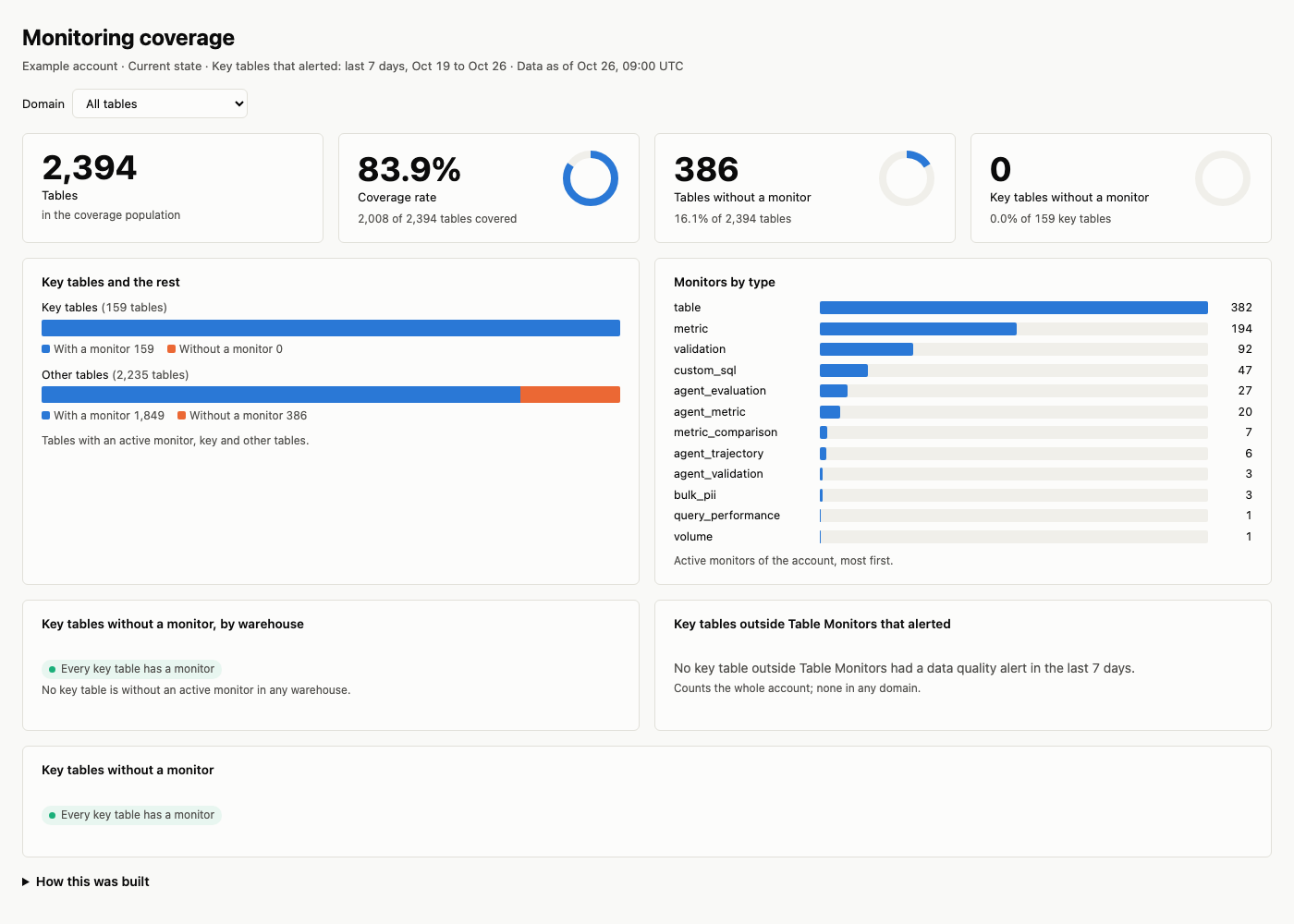
An example built from the prompt below, with sample names and values.
Prompt
Copy this prompt into an AI tool connected to the Monte Carlo MCP server. With the dashboard skills from the Monte Carlo agent toolkit installed (in coding agents such as Claude Code, Cursor, Codex and GitHub Copilot), your agent reads this page, builds the layout and runs the queries below; without them, it works from the metrics alone.
Build a monitoring coverage dashboard by domain with our coverage rate, key tables and the rest with and without a monitor, monitors by type, key tables without a monitor per warehouse and the list of them, and the key tables outside Table Monitors that alerted this week.What it covers
- How many of your tables have an active monitor, and your coverage rate.
- How many key tables have no monitor, and in which warehouse.
- Active monitors by type.
- Which key tables to cover first, most important first.
- Coverage shows the current state only; there is no history yet.
Filters and groupings
- By domain, data product or asset tag, with their
domain_,data_product_andasset_tag_coverage metrics, or by warehouse. - Key tables or all tables, and by monitor type.
- No date filter or trend: coverage is today's state.
How it's built
The layout, queries and definitions your agent follows; use them to check its numbers or to build the dashboard by hand.
Layout
- Filter: the domain or data product, all tables by default.
- The answer: tables, tables covered with the coverage rate, tables without a monitor, and key tables without a monitor with their share of key tables.
- Key tables and the rest: for key tables and for the other tables, how many have a monitor and how many do not.
- By warehouse: key tables without a monitor per warehouse.
- Monitors by type: active monitors per monitor type, most first.
- Key tables outside Table Monitors that alerted: key tables in no Table Monitor's scope that had data quality alerts in the last 7 days, most alerts first.
- Key tables without a monitor: each table with its warehouse and importance score, most important first; with none, say every key table has a monitor.
Queries
All blocks are current state, so there is no window filter, except Key tables outside Table Monitors that alerted (last 7 days). The queries are for all tables; for one domain, ask the domain_ metric of the same name and filter on its name, as below (data products: data_product_). Tables without a monitor are population_assets minus covered_assets: tables without an active monitor, while the product counts tables with only paused monitors as monitored; the share of key tables is uncovered_key_assets / key_assets.
The answer
All tables:
Request (JSON)
{
  "metrics": [
    "population_assets",
    "covered_assets",
    "coverage_rate",
    "key_assets",
    "uncovered_key_assets"
  ]
}
One domain:
- Metrics:
domain_population_assets,domain_covered_assets,domain_coverage_rate,domain_key_assets,domain_uncovered_key_assets - Filter:
domain__domain_nameis the selected domain
Request (JSON)
{
  "metrics": [
    "domain_population_assets",
    "domain_covered_assets",
    "domain_coverage_rate",
    "domain_key_assets",
    "domain_uncovered_key_assets"
  ],
  "filters": [
    {
      "field": "domain__domain_name",
      "op": "in",
      "values": ["<selected domain>"]
    }
  ]
}
Key tables and the rest
- Metrics:
population_assets,covered_assets - Grouped by:
asset__is_asset_important
Request (JSON)
{
  "metrics": ["population_assets", "covered_assets"],
  "group_by": ["asset__is_asset_important"]
}
Monitors by type
- Metrics:
live_monitor_count - Grouped by:
monitor__monitor_type - Sorted by:
live_monitor_count, highest first
Request (JSON)
{
  "metrics": ["live_monitor_count"],
  "group_by": ["monitor__monitor_type"],
  "order_by": [
    {"field": "live_monitor_count", "descending": true}
  ]
}
Key tables outside Table Monitors that alerted
- Metrics:
asset_incident_count - Grouped by:
asset,asset__asset_full_table_id,asset__asset_importance_score - Filter:
metric_time__dayon or after 7 days ago;asset__is_asset_importantistrue;asset__is_asset_monitoredisfalse;incident__incident_typeis not one of "etl_errors", "dbt_errors" - Sorted by:
asset_incident_count, highest first, thenasset__asset_full_table_id
Request (JSON)
{
  "metrics": ["asset_incident_count"],
  "group_by": [
    "asset",
    "asset__asset_full_table_id",
    "asset__asset_importance_score"
  ],
  "filters": [
    {
      "field": "metric_time__day",
      "op": "gte",
      "values": ["<7 days ago>"]
    },
    {
      "field": "asset__is_asset_important",
      "op": "in",
      "values": [true]
    },
    {
      "field": "asset__is_asset_monitored",
      "op": "in",
      "values": [false]
    },
    {
      "field": "incident__incident_type",
      "op": "not_in",
      "values": ["etl_errors", "dbt_errors"]
    }
  ],
  "order_by": [
    {"field": "asset_incident_count", "descending": true},
    {"field": "asset__asset_full_table_id"}
  ]
}
For one domain, take its tables first (domain_population_assets grouped by asset) and keep these rows for them, as Combining groupings on the Dimensions page says. asset__is_asset_monitored is the Table Monitor scope (see Covered in the Coverage metrics), so these tables can have other monitors, which raised the alerts.
By warehouse
- Metrics:
uncovered_key_assets - Grouped by:
asset__warehouse,warehouse__warehouse_name - Sorted by:
uncovered_key_assets, highest first
Request (JSON)
{
  "metrics": ["uncovered_key_assets"],
  "group_by": [
    "asset__warehouse",
    "warehouse__warehouse_name"
  ],
  "order_by": [
    {"field": "uncovered_key_assets", "descending": true}
  ]
}
Key tables without a monitor
- Metrics:
uncovered_key_assets - Grouped by:
asset,asset__asset_full_table_id,warehouse__warehouse_name,asset__asset_importance_score - Sorted by:
asset__asset_importance_score, highest first - At most 10,000 rows
Request (JSON)
{
  "metrics": ["uncovered_key_assets"],
  "group_by": [
    "asset",
    "asset__asset_full_table_id",
    "warehouse__warehouse_name",
    "asset__asset_importance_score"
  ],
  "order_by": [
    {
      "field": "asset__asset_importance_score",
      "descending": true
    }
  ],
  "limit": 10000
}
Definitions
- Covered means at least one active monitor of any kind: not paused, deleted or draft. Label it covered, never monitored or with a monitor: a table whose only monitor is paused has a monitor but is not covered.
- The coverage population is the tables that are not deleted, not excluded and not part of a wildcard, in warehouses that are not deleted.
- Key tables are the tables Monte Carlo marks as important.
- In the product: the Coverage dashboard counts tables whose only monitors are paused as monitored, and all monitors including paused and draft ones, so its tables with monitors and total monitors are higher. Its "Important tables without coverage" lists only key tables outside Table Monitors that had missed anomalies in the last 7 days, not every key table without a monitor.
- Current state only. There is no coverage history yet, so no change versus last month.
- Domains and data products overlap: a table in two domains counts in both, so do not add them up.
Updated 1 day ago