
Table health
Which tables alerted this week, which of them are key tables, and whether their alerts are still open.
Private previewComposable dashboards and the metrics API are in private preview: available to invited accounts, and features may change. See Integration and feature lifecycles for what this means, and reach out to your account representative to request access.
Overview
The tables to look at first: the ones with data quality alerts in the last 7 days, key tables first, with their open alerts and when they were last written to. It answers the question of the product's Table health dashboard from the tables' side: which tables, not which alerts.
For: data engineers on call. Metrics: Data quality.
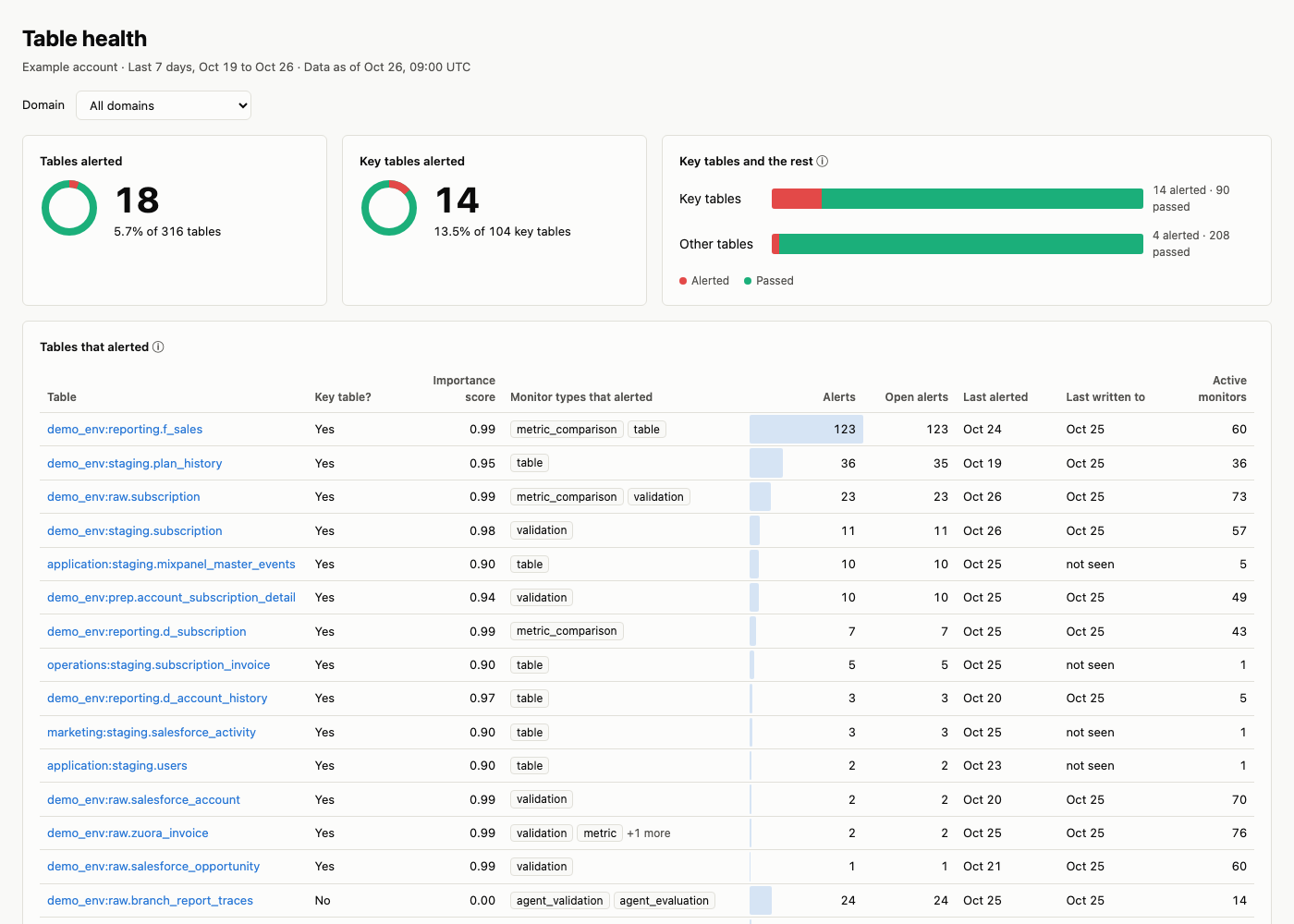
An example built from the prompt below, with sample names and values.
Prompt
Copy this prompt into an AI tool connected to the Monte Carlo MCP server. With the dashboard skills from the Monte Carlo agent toolkit installed (in coding agents such as Claude Code, Cursor, Codex and GitHub Copilot), your agent reads this page, builds the layout and runs the queries below; without them, it works from the metrics alone.
Build a table health dashboard by domain for the last 7 days with the tables that alerted, key tables first, the monitor types that alerted on each, their alerts and open alerts, and when each was last written to.What it covers
- How many tables alerted in the last 7 days, out of the tables with a result, key tables first.
- For each table that alerted: the monitor types that alerted, its alerts and open alerts, and when it was last written to.
- It answers the question of the Table health dashboard in Monte Carlo from the tables' side: which tables, not which alerts.
Filters and groupings
- By domain, data product or asset tag in two steps (list its tables, then filter on them), or by warehouse.
- Key tables or all tables.
- Windows: the last 1, 7, 30 or 90 days up to the last data refresh.
How it's built
The layout, queries and definitions your agent follows; use them to check its numbers or to build the dashboard by hand.
Layout
- Filter: the domain or data product, all tables by default. The window is the last 7 days.
- The answer: tables that alerted out of the tables with a result, and key tables that alerted out of key tables with a result.
- Key tables and the rest: for key tables and for the other tables, how many alerted and how many passed.
- Tables that alerted: one row per table, key tables first, then by alerts: the table, its importance score, the monitor types that alerted on it, its alerts and open alerts in the window, when it last alerted and when it was last written to, and its active monitors. Show the first 25 and say how many more.
Queries
The answer and Key tables and the rest are each table's state over the 7 days up to the last data refresh; Tables that alerted lists the same tables as the answer, with the alerts created in the last 7 days. A table whose only alert was created earlier and alerted again this week has no row, so the list can be a few tables shorter than the answer: say so under the table.
The answer, and key tables and the rest
- Metrics:
asset_count - Grouped by:
asset__is_asset_important,asset__is_asset_alerting_7d - Filter:
asset__asset_categoryistable;asset__is_asset_with_result_7distrue
Request (JSON)
{
  "metrics": ["asset_count"],
  "group_by": [
    "asset__is_asset_important",
    "asset__is_asset_alerting_7d"
  ],
  "filters": [
    {
      "field": "asset__asset_category",
      "op": "in",
      "values": ["table"]
    },
    {
      "field": "asset__is_asset_with_result_7d",
      "op": "in",
      "values": [true]
    }
  ]
}
Each table is in one row, so the answer is the sum of the rows.
Tables that alerted
- Metrics:
asset_incident_count,asset_incident_open_count - Grouped by:
asset,asset__asset_full_table_id,asset__is_asset_important,asset__asset_importance_score,asset__asset_last_alerted_at,asset__asset_last_write_at - Filter:
metric_time__dayon or after 7 days ago;asset__asset_categoryistable;asset__is_asset_alerting_7distrue;incident__incident_typeis not one of "etl_errors", "dbt_errors" - Sorted by:
asset__is_asset_important, thenasset_incident_count, both highest first, thenasset__asset_full_table_id - At most 25 rows
Request (JSON)
{
  "metrics": [
    "asset_incident_count",
    "asset_incident_open_count"
  ],
  "group_by": [
    "asset",
    "asset__asset_full_table_id",
    "asset__is_asset_important",
    "asset__asset_importance_score",
    "asset__asset_last_alerted_at",
    "asset__asset_last_write_at"
  ],
  "filters": [
    {
      "field": "metric_time__day",
      "op": "gte",
      "values": ["<7 days ago>"]
    },
    {
      "field": "asset__asset_category",
      "op": "in",
      "values": ["table"]
    },
    {
      "field": "asset__is_asset_alerting_7d",
      "op": "in",
      "values": [true]
    },
    {
      "field": "incident__incident_type",
      "op": "not_in",
      "values": ["etl_errors", "dbt_errors"]
    }
  ],
  "order_by": [
    {
      "field": "asset__is_asset_important",
      "descending": true
    },
    {"field": "asset_incident_count", "descending": true},
    {"field": "asset__asset_full_table_id"}
  ],
  "limit": 25
}
Active monitors per table
- Metrics:
asset_live_monitor_count - Grouped by:
asset - Filter:
asset__asset_categoryistable;asset__is_asset_alerting_7distrue
Request (JSON)
{
  "metrics": ["asset_live_monitor_count"],
  "group_by": ["asset"],
  "filters": [
    {
      "field": "asset__asset_category",
      "op": "in",
      "values": ["table"]
    },
    {
      "field": "asset__is_asset_alerting_7d",
      "op": "in",
      "values": [true]
    }
  ]
}
Monitor types that alerted per table
- Metrics:
monitor_assets - Grouped by:
asset,monitor__monitor_type - Filter:
monitor_asset_quality__is_monitor_asset_alerting_7distrue;asset__asset_categoryistable
Request (JSON)
{
  "metrics": ["monitor_assets"],
  "group_by": ["asset", "monitor__monitor_type"],
  "filters": [
    {
      "field": "monitor_asset_quality__is_monitor_asset_alerting_7d",
      "op": "in",
      "values": [true]
    },
    {
      "field": "asset__asset_category",
      "op": "in",
      "values": ["table"]
    }
  ]
}
In the product: the Table health dashboard shows one column per monitor type.
For one domain or data product, combine groupings as Combining groupings on the Dimensions page says.
Definitions
- Alerted means at least one data quality alert in the 7 days up to the last data refresh; a table with a result and no such alert passed.
- Open alerts are counted for the alerts created in the window; alerts left open from before do not count.
- Last written to comes from the daily importance scoring, so it can be up to a day behind; it can be empty when no write was seen: show "not seen", not "never". A table with no importance score shows "no score".
- Job failures (Airflow, dbt, Databricks, Data Factory) are not data quality alerts: they do not make a table alert here and are left out of its alerts. In the product: the Table health dashboard shows dbt errors as a column, and lists only the tables it tracks, not every table with a result. See the Asset dimensions.
Updated 3 days ago